
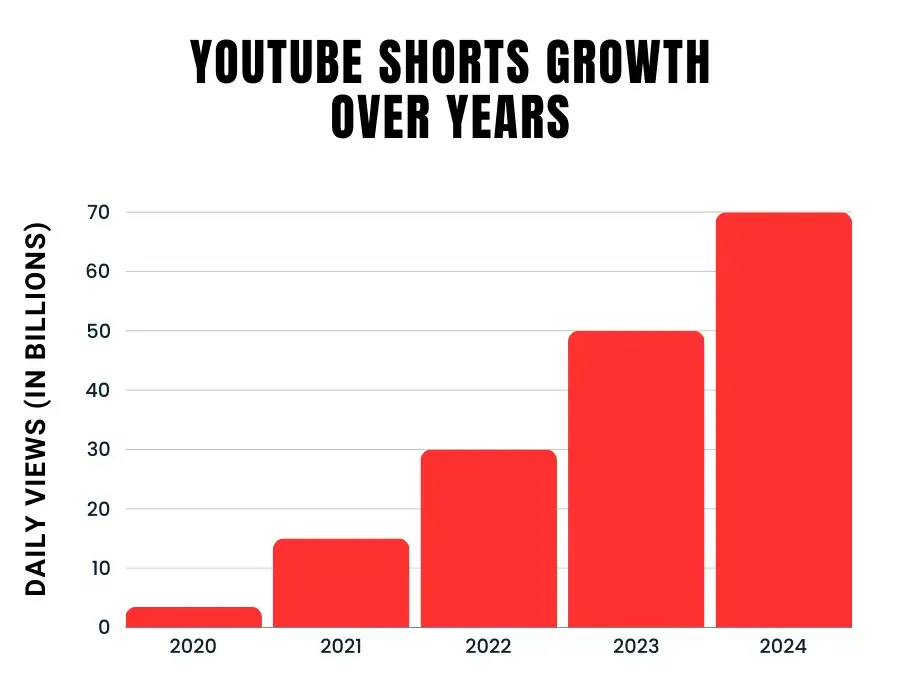
Short-form video has quietly become one of the biggest opportunities for creators who prefer staying off-camera or have limited time for complex editing. In 2025, this format generates more than 70 billion views every day and attracts over 2 billion monthly users, with India contributing a huge portion of total watch time. This means there’s still plenty of room for newcomers who can publish consistent, valuable content across any niche or language. In this guide, you’ll learn how to produce engaging, faceless short videos using modern automation tools—from choosing a niche and writing scripts to generating voices, visuals, simple edits, effective optimization, and tracking performance. Everything is based on the latest trends, research, and workflows you can implement immediately.
Why Faceless AI‑Powered Shorts Are a Massive 2025 Opportunity
YouTube Shorts is no longer an experiment; it is a core part of YouTube’s ecosystem and a serious growth engine for channels of all sizes.
Key 2025 stats that matter for you
You do not need to remember every number, but you should understand the direction:
- YouTube Shorts videos are watched over 70+ billion times per day, making it one of the fastest‑growing formats in history.
- More than 2–2.3 billion monthly active users consume Shorts, which is close to one in four people on the planet.
- Over 52 million channels have uploaded Shorts, and creator adoption has grown by around 50% year‑on‑year.
- Engagement rate on Shorts averages around 5.9%, slightly higher than TikTok and Instagram Reels, which means likes, comments, and shares are strong if your content hooks quickly.
- Shorts can still drive subscribers efficiently: some analyses show around 16–17 new subscribers per 10,000 Shorts views, with even higher conversion for larger channels.
These numbers tell you one thing: short, vertical, mobile‑first content is now a default viewing habit, not a trend, and AI helps you compete in this noisy environment without needing a studio, a DSLR, or on‑camera confidence.
What Is a Faceless YouTube Shorts Channel?
A faceless YouTube channel publishes videos where the creator’s face never appears; instead, the content relies on visuals like stock footage, B‑roll, screen recordings, text overlays, and voiceovers (human or AI).
Common styles of faceless Shorts
- Documentary or explainer style
- AI avatar or character‑led shorts
- Screen‑based shorts
- B‑roll + text + voiceover
The advantage of faceless formats is scalability: you can repurpose scripts across multiple channels, languages, and platforms, and even outsource parts of the workflow once your system is stable.
How the YouTube Shorts Algorithm Works (So You Can Work With It)
If you want to grow using Shorts, you must understand what the algorithm rewards in 2025.
Core signals the Shorts algorithm uses
According to platform explanations and independent breakdowns, YouTube Shorts recommendations focus on:
- View duration / retention
- Engagement actions
- User‑level personalization
- Content type and topic bias
The implication is simple: if your faceless AI‑generated Shorts grab attention in the first 1–2 seconds, keep viewers hooked, and feel entertaining—even while being educational—you are giving the algorithm exactly what it wants.
What Research Says About Short‑Form Video and AI Content
You are not just chasing views; you are competing for attention in a cognitively overloaded environment, and research helps you design better Shorts.
Short‑form video and attention
Multiple studies between 2023 and 2025 have analyzed how short‑form video affects attention and behavior:
- A 2025 study on Indian teenagers found a significant negative correlation between short‑form video engagement and sustained attention, with heavy users (>3 hours/day) showing reduced focus compared to light users.
- Research on short‑form video addiction among undergraduates linked overuse to weaker attentional control and higher academic procrastination, highlighting how hyper‑stimulating clips rewire expectations for constant novelty.
- Another study on short‑format social videos (ages 20–30) points out that fast‑paced, visually dense clips sharply load working memory, which can fragment attention if consumed excessively.
For creators, these findings mean your Shorts should respect attention: deliver value quickly, avoid manipulative clickbait, and encourage healthy, intentional consumption rather than endless doom‑scrolling.
AI‑generated video content and engagement
Recent experiments around AI‑generated content provide encouraging signals:
- Field experiments on AI‑generated video summaries showed that adding AI summaries increased engagement metrics such as comments and user interactions, primarily by reducing cognitive load and helping users quickly understand content.
- Research on AI disclosure (telling viewers content is AI‑generated) suggests it can boost engagement intentions, but may slightly reduce perceived content quality unless viewers trust AI capabilities—meaning high‑quality, accurate outputs are critical if you reveal AI usage.
- A 2025 MIT‑linked study on generative AI in advertising found that AI‑generated personalized videos increased customer engagement by 6–9 percentage points and reduced production costs significantly compared to traditional workflows.
This evidence supports using AI for scripting, voiceovers, and assembly—as long as you maintain factual accuracy and human‑level editorial judgment.
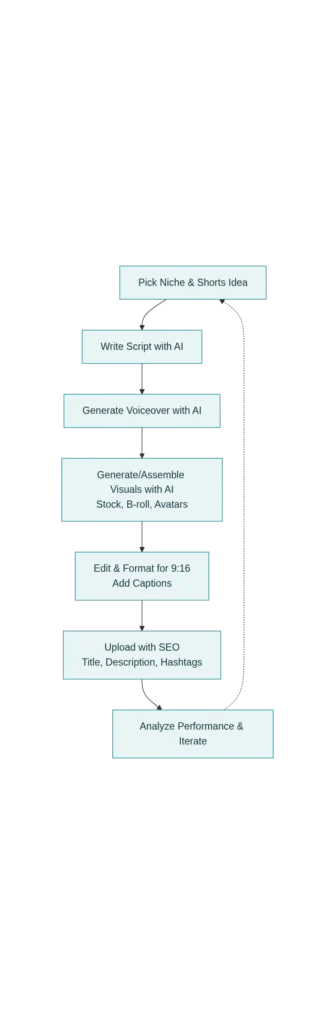
Step‑by‑Step Workflow: Create Faceless YouTube Shorts Using AI
Let us break down a practical, repeatable workflow you can use, even if you have zero editing background.
Step 1: Choose a niche and content angle
Pick a niche where:
- You can produce consistent, value‑driven short tips or explainers.
- There is proven audience interest on YouTube and other platforms.
- You can stay updated using news sites, research papers, or tools.
High‑potential niches for faceless AI Shorts include:
- AI tools and productivity hacks
- Finance and investing basics
- Tech explainers and gadget tips
- Career growth, freelancing, and skills
- Health, wellness, and habit science
Use tools such as VidIQ, TubeBuddy, or YouTube’s own search suggestions to identify keyword clusters and questions people are already searching for.
Step 2: Generate your script with AI (but edit like a human)
AI models are very good at generating structured, concise scripts for short videos, yet they still need human guidance for tone, accuracy, and storytelling.
A simple scripting framework for a 30–40 second Short:
- Hook (0–3s) – One line that directly hits a pain point or curiosity.
- Value (3–25s) – 2–4 practical tips, steps, or facts, delivered quickly.
- CTA (25–35s) – Ask viewers to like, follow, or watch another Short.
When you prompt your AI script tool, be specific:
- Target audience (e.g., “beginners starting a faceless YouTube channel in India”).
- Duration (“30 seconds, 80–90 words”).
- Tone (“simple, conversational, professional, no hype”).
- Structure (hook, points, CTA).
Then manually:
- Fact‑check any numbers against recent data.
- Localize terms (e.g., “Rupees” instead of “dollars” where relevant).
- Shorten long sentences for better voiceover rhythm.
Step 3: Create a natural‑sounding AI voiceover
Modern AI voice tools have advanced dramatically in 2024–2025, offering multilingual, emotion‑aware narration that feels close to a real human voice.
When choosing an AI voice tool (such as HeyGen, Descript, or similar platforms):
- Look for natural prosody (rhythm and emphasis) and support for your language/accent.
- Test different tones: informative, friendly, energetic, or calm, depending on your niche.
- Adjust speed: for Shorts, slightly faster than normal conversational speed works well because screen time is limited and attention is fragile.
Export the voiceover as high‑quality audio (usually WAV or high‑bitrate MP3) to keep clarity after YouTube compression.
Step 4: Generate or assemble visuals with AI
You have three main options for visuals, and you can mix them:
- AI‑generated video clips
- AI avatar videos
- Stock media assembly with AI help
For Shorts, always ensure:
- Aspect ratio is vertical 9:16.
- Important elements and text stay within the safe zone (center area that does not get cut off by UI).
- Visuals change often enough (every 1–3 seconds) to maintain visual interest without becoming chaotic.
Step 5: Edit, add captions, and format for Shorts
Even with AI assistance, you should manually review and refine the final edit.
Key editing principles for faceless Shorts:
- Hook instantly
- Add on‑screen text and captions
- Use jump cuts and motion
- Optimize duration
Step 6: Upload with SEO‑ready titles, descriptions, and hashtags
Even though Shorts discovery is algorithm‑driven, smart metadata still matters for long‑term growth and cross‑platform visibility.
When publishing:
- Title
- Keep it clear, benefit‑driven, and under ~60 characters.
- Example: “How to Make Faceless YouTube Shorts with AI in 5 Minutes”
- Description
- In the first 1–2 lines, summarize the value in natural language, including primary keywords.
- Add supporting keywords naturally, not as a list of repeated phrases.
- Include links to related long‑form videos or playlists to encourage deeper watch sessions.
- Hashtags
Because Google increasingly surfaces Shorts in search results, clear, human‑readable titles and descriptions that match user intent are also beneficial for SEO and AdSense‑friendly ranking.
Step 7: Analyze performance and iterate using data, not guesswork
Automation without analytics is dangerous; you risk publishing endlessly without understanding what works.
Inside YouTube Studio, focus on:
- Retention graph
- Look for sharp drop‑offs in the first 3–5 seconds; that indicates your hook is weak or misleading.
- If viewers rewatch or loop sections, analyze what triggered that curiosity.
- Click‑through rate (CTR) for Shorts shelf
- Experiment with different thumbnail frames in the feed when allowed, especially for views coming from the Shorts tab vs. regular home feed.
- Engagement vs. topic
- Which topics drive more comments and shares?
- Map ideas against performance to identify “pillar themes” you should repeat in different angles.
Research shows that creators who systematically track performance and refine strategy based on analytics maintain stronger growth than those who rely on intuition alone.
Ethical, E‑E‑A‑T, and Long‑Term Considerations
To build a sustainable, monetizable faceless channel, you must look beyond “automation” and align with Google and YouTube’s emphasis on Experience, Expertise, Authoritativeness, and Trustworthiness (E‑E‑A‑T).
Use AI as an assistant, not an excuse
Google’s guidelines focus on quality and usefulness, not whether content is human‑ or AI‑written—as long as it is valuable, accurate, and not misleading.
Best practices:
- Fact‑check AI outputs, especially numbers, health, finance, or legal claims, using recent, credible sources like research papers or official statistics.
- Add your own experience where possible: show results, case studies, or real‑world examples.
- Disclose AI usage thoughtfully, especially if you are using AI avatars or fully generated visuals; research indicates that disclosure can boost engagement if users trust AI’s capabilities and perceive content quality as high.
Avoid harmful attention traps
Short‑form video has documented risks of attention fragmentation and addictive use patterns; as a creator, you share responsibility in how you design content.
You can:
- Encourage breaks or deeper learning by linking to long‑form videos or external resources.
- Avoid manipulative “endless cliffhangers” that offer no real value.
- Design Shorts that compress useful knowledge instead of just delivering dopamine hits.
Over time, this builds trust with your audience and fits well with Google’s E‑E‑A‑T philosophy, improving both user satisfaction and platform visibility.
Read More:Free Image Generators: Midjourney is Paid! Here are 5 Free AI Art Generators Unlimited.
Source: K2Think.in — India’s AI Reasoning Insight Platform.