
System prompts are the secret foundation that transform ChatGPT from a generic assistant into a specialized tool tailored to your exact needs.
Think of them as standing instructions you give to an employee before they start their shift. These instructions shape how ChatGPT thinks, responds, and interacts with you in every single conversation.
Instead of repeating the same context, preferences, and tone requirements over and over, you set them once—and ChatGPT follows them consistently.
The result is faster responses, more reliable output, and AI that actually feels like it understands your world.
This comprehensive guide walks you through everything you need to know about system prompts, from core concepts to advanced implementation strategies that professionals and major companies are actively using in 2025.
What Are System Prompts and Why Do They Matter?
A system prompt is a set of instructions that runs before any user input reaches ChatGPT’s processing engine. Unlike the prompts you type in regular conversation, system prompts operate silently in the background, establishing the AI’s personality, constraints, expertise level, and behavioral guidelines. OpenAI recently enhanced this concept by introducing the Custom Instructions feature, which allows all users—whether on free or Plus plans—to define two key fields: what ChatGPT should know about you, and how you’d like it to respond.
The distinction between system prompts and user prompts is critical. User prompts are your specific questions or requests in a conversation. System prompts are the contextual framework that shapes every response to every user prompt within that conversation. It’s like the difference between telling an actor a single line versus giving them an entire character backstory, motivation, and performance style guide.
Research published by arXiv in October 2024 revealed something profound: a single optimized system prompt performs just as well as task-specific prompts created individually for each task. The study, SPRIG (System Prompt Redundancy In Generalization), tested system prompts across 47 different task types and discovered that system-level optimization generalizes effectively across different model families, parameter sizes, and languages. This finding completely changed how organizations approach AI customization—instead of creating dozens of specialized prompts, teams can create one powerful system prompt and layer on task-specific guidance when needed.

Without a well-crafted system prompt, ChatGPT operates in what researchers call “baseline mode”—generic, one-size-fits-all responses that may be technically accurate but feel impersonal and inefficient. Organizations implementing advanced system prompts report 40-67% productivity gains while reducing error rates by 30-50% compared to basic text prompting approaches. For content creators like yourself working with SEO and AI topics, this difference is the gap between responses that feel generic and responses that actually sound like they understand your audience.
Understanding the Core Components of an Effective System Prompt
Every powerful system prompt shares five fundamental components that work together to create coherent, controlled, and contextually appropriate AI behavior. Think of these as the building blocks of AI personality architecture.
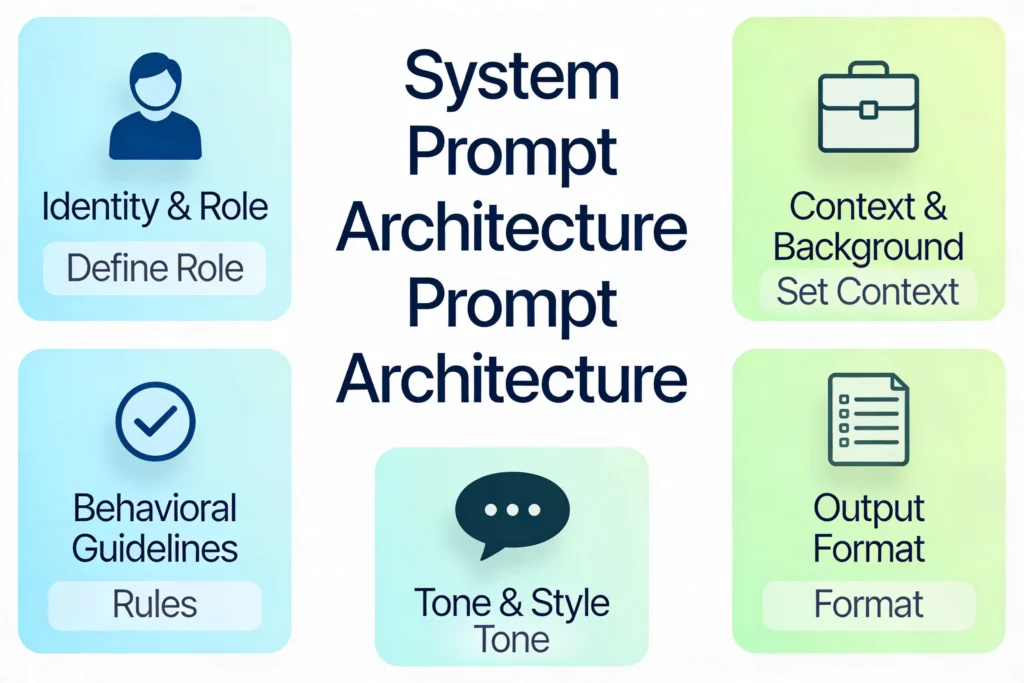
Identity and Role forms the first layer. Rather than ChatGPT pretending to be a generalist, you explicitly state what expertise it should adopt. For example, instead of asking “Explain cryptocurrency,” you could set a system prompt that says “You are a blockchain developer with 10 years of experience in DeFi protocols.” This role assignment taps into ChatGPT’s training on professional writing patterns and communication styles associated with that expertise level. Research shows that role-based prompting improves output quality by 45-65% compared to baseline approaches because the model has learned specific linguistic patterns associated with different professions.
Context and Background provide the necessary information for ChatGPT to understand your situation. This includes your industry, your audience, your technical comfort level, and any previous relevant information. If you’re a WordPress developer creating content about SEO plugins, your system prompt should include that you manage multiple sites with varying traffic levels and technical requirements. This context dramatically reduces misinterpretations and ensures responses stay relevant to your actual situation.
Behavioral Guidelines establish the rules ChatGPT must follow. These might include “never make up statistics,” “always cite sources,” “ask clarifying questions if the request is ambiguous,” or “prioritize user safety.” Guidelines create boundaries that prevent hallucinations, ensure accuracy, and maintain consistency with your values. The most effective behavioral guidelines are specific rather than vague—”provide accurate, cited statistics” works better than “be accurate.”
Output Format specifications prevent the common frustration of ChatGPT giving you responses in a format you don’t want. Instead of repeatedly asking for bullet points or markdown tables, your system prompt can specify: “Format all responses with clear headings, concise paragraphs of 3-4 sentences, and bullet points for lists. Use markdown formatting.” This consistency saves enormous amounts of editing time and ensures ChatGPT’s output is immediately usable.
Tone and Style determine how ChatGPT communicates. This includes formality level, emotional tenor, vocabulary complexity, and personality traits. You might specify “conversational but professional,” “explain technical concepts like I’m a high school student,” or “use industry jargon appropriate for enterprise software architects.” Recent research from 2025 shows that ChatGPT can now maintain distinct personality profiles, including variations in warmth and enthusiasm. Users can customize whether they want a warmer, more enthusiastic bot or something more neutral and professional.
The Research Behind System Prompt Effectiveness
The scientific community has invested significant effort into understanding how system prompts actually work and why they’re so effective. A landmark 2024 study published in Nature examined how different prompt styles impact performance on scientific literature review tasks. The research revealed that prompts incorporating markdown table formatting combined with chain-of-thought reasoning—where the AI shows its thinking process step-by-step—significantly outperformed both baseline prompts and simpler structured prompts.
Chain-of-thought prompting works by instructing ChatGPT to break down its reasoning into explicit steps before providing a final answer. Instead of asking “Is this marketing copy effective?”, you ask “Walk me through the marketing principles that apply here, evaluate how the copy implements each principle, then give your overall assessment.” This technique produces 40-60% performance improvements because it forces the model to articulate intermediate reasoning, which reduces errors and provides transparency.
Another powerful technique is multi-expert prompting, where you assign ChatGPT multiple simultaneous roles—a behavioral psychologist, a copywriter, and a data analyst working together to solve a problem. This approach, tested by researchers who evaluated 1,000 ChatGPT prompts in 2025, produced a 14% engagement rate on LinkedIn posts targeting AI consultants, compared to only 2% with generic prompting. Multi-expert prompting shows 50-70% improvement in output quality because different expertise perspectives catch gaps and produce more comprehensive solutions.
Research from the Frontier AI journal examining ChatGPT 4’s ability to infer personality traits from text found something fascinating: prompt composition dramatically impacts accuracy. When the specific task was positioned at the end of the prompt rather than the beginning, performance improved. When prompts included explicit confidence scoring requests, outputs became more reliable and well-reasoned. This research demonstrated that ChatGPT 4 has “moderate but significant abilities” to maintain complex personality profiles when properly prompted.
A critical insight from biomedical research published in Frontiers in Artificial Intelligence emphasized that poorly constructed prompts can actively harm decision-making in high-stakes domains. The study highlighted that “a well-crafted prompt is more than a simple question; it is a structured communication that encodes the user’s objectives, constraints, and expectations. The quality of a prompt can dramatically influence the reliability and utility of AI-generated responses, particularly in high-stakes domains such as medical statistics.”
How to Create Your Own System Prompts: Step-by-Step Implementation
Creating an effective system prompt follows a structured process that leads to dramatically better results than using ChatGPT without customization. The first step is self-assessment—understand your actual needs and preferences rather than what you think you should want. A community-driven approach suggests using ChatGPT itself to generate an initial draft of your custom instructions. Here’s how: gather your LinkedIn profile, resume, and three writing samples, then ask ChatGPT to generate preliminary custom instructions. This usually takes 5-10 minutes and gives you a strong foundation.
Field 1: What ChatGPT should know about you (maximum 1,500 characters). This section answers the question “who am I and what matters to me?” Include your role, your industry, your primary goals with ChatGPT, your technical skill level, and any important context about your work environment. For a WordPress website owner managing food and government services portals, this might look like:
“I’m a WordPress developer managing two sites: chefy.in (food/culinary content) and a government services portal. I’m self-taught but proficient with PHP, HTML, CSS, and basic JavaScript. I focus heavily on SEO optimization, Rank Math plugin customization, and AI tool integration. I frequently troubleshoot plugin conflicts and work with RSS feeds. I use AI for content optimization and feature ideation, not for writing entire articles from scratch.”
This context is crucial because it prevents ChatGPT from giving generic advice that doesn’t fit your actual technical level or business situation.
Field 2: How you’d like ChatGPT to respond (maximum 1,500 characters). This describes your preferred communication style, output format, and quality standards. It might include:
“Use clear, professional language appropriate for technical documentation but make it understandable for non-technical readers. Format all content with H2 and H3 headers, concise paragraphs (3-4 sentences max), and bullet points for lists. Cite specific sources and statistics with [source] notation. When I ask for code, always include inline comments explaining what each section does. Assume I have intermediate WordPress knowledge but want to learn advanced techniques. Prioritize practical, actionable advice over theoretical concepts. Avoid corporate jargon and marketing speak.”
Once you’ve completed these initial sections, it’s critical to test and iterate. Use ChatGPT across different types of tasks—writing, coding, analysis, brainstorming—and note where it succeeds and where it misses your expectations. Refine your instructions based on real usage rather than theoretical preferences. Research shows that this iterative refinement process is essential because organizations typically reach maximum effectiveness only after 4-6 weeks of optimization.
A practical tip: update your custom instructions weekly as your focus shifts. If you’re moving from strategic planning to content execution, adjust your instructions. If you’re learning new skills, update your stated expertise level. Treat custom instructions as living documents, not static configurations.
Advanced System Prompt Strategies: Beyond the Basics
Once you’ve mastered basic custom instructions, advanced techniques unlock dramatically better results. The DEPTH Method, tested with 1,000 ChatGPT prompts in 2025, provides a framework that consistently outperforms simpler approaches.
D – Define Multiple Perspectives: Rather than asking ChatGPT a single question, have it adopt multiple expert roles simultaneously. If you want marketing email copy, ask: “Assuming you’re a behavioral psychologist, a direct copywriter, and a data analyst, collaborate to write…” This multi-perspective approach catches gaps that single-role prompting misses.
E – Establish Success Metrics: Instead of vague requests like “Make it good,” specify measurable criteria: “Aim for a 40% open rate and 12% click-through rate. Incorporate three psychological triggers that increase email engagement.” When ChatGPT knows the specific performance target, it optimizes differently.
P – Provide Context Layers: Don’t just state “for my business.” Elaborate with actual context: “Context: B2B SaaS priced at $200/month, targeting overwhelmed founders. Previous emails achieved 20% open rates. Audience pain point: tool overwhelm and feature overload.”
T – Task Breakdown: Instead of “create a campaign,” detail the steps explicitly. “Step 1: Identify three main pain points. Step 2: Create a hook addressing the biggest pain. Step 3: Establish your unique value. Step 4: Include a soft call-to-action.” Task decomposition reduces AI confusion and improves output quality.
Context layering, where you integrate metadata like timestamps, user roles, and urgency signals, produces 40-60% improvement in relevance and accuracy. This technique mirrors how human collaborators adapt during brainstorming—they understand not just the task but also the constraints and context.
Iterative refinement is particularly powerful for content creators and SEO specialists. Rather than asking for a final article in one prompt, break the process into sequential steps: request an outline first, then refine it, then write sections individually, then edit and optimize. This approach lets you catch and correct problems at each stage rather than starting over from scratch. Organizations implementing this multi-turn approach report 35-50% accuracy improvements and significantly reduced error rates.
System Prompts and E-E-A-T: Building Authority and Trust
For content creators and SEO professionals, system prompts directly impact E-E-A-T (Experience, Expertise, Authoritativeness, and Trustworthiness) compliance. Google’s Search Quality Rater Guidelines explicitly state that “trust is the most important member of the E-E-A-T family because untrustworthy pages have low E-E-A-T no matter how experienced, expert, or authoritative they may seem.”
When you properly configure your system prompt with your credentials, experience, and expertise level, ChatGPT generates content that reflects genuine knowledge rather than surface-level information. For example, if your system prompt states “You are writing for SEO professionals with 5+ years of experience. Assume audience knowledge of core concepts like backlinks and keyword research. Focus on advanced techniques and emerging trends,” the output naturally incorporates the depth and nuance that E-E-A-T requires.
Authoritativeness is strengthened when your system prompt emphasizes specific sources and citation standards. By instructing “Always cite specific studies, tools, or publications. When citing research, include publication date and source credibility assessment,” you ensure ChatGPT’s outputs can serve as credible building blocks for authoritative content. This is especially critical for YMYL (Your Money or Your Life) topics that directly impact health, finances, or safety decisions.
Experience becomes evident in content when your system prompt includes real-world examples and case studies. A prompt that states “When explaining technical concepts, always include real-world examples or case studies from your experience managing WordPress sites, working with APIs, and optimizing for search” produces content that feels rooted in practical knowledge rather than theoretical abstraction.
The 2025 evolution of E-E-A-T into GEO (Generative Engine Optimization) and LLMO (Large Language Model Optimization) means that AI systems now use these same trustworthiness signals when deciding which content to cite and recommend. Your system prompts directly influence whether ChatGPT’s outputs can support or contribute to your authority in your domain.
Real-World Applications: How Professionals Use System Prompts in 2025
Content creators and writers use system prompts to maintain consistent voice across multiple projects. A blogger might set a system prompt that captures their unique writing style, then reuse it across different articles without rewriting style guidance each time. Research on custom instructions for research applications shows that teams reduced analysis time by 40% compared to traditional methods by using properly configured system prompts.
Business analysts and consultants use role-based system prompts to transform ChatGPT into industry-specific advisors. A healthcare consultant would set a system prompt positioning ChatGPT as a healthcare industry strategist with knowledge of regulatory requirements, reimbursement models, and market dynamics. This approach produces more relevant, actionable recommendations than generic consulting advice.
Customer support teams configure system prompts to ensure consistent, brand-aligned responses. Octopus Energy, a UK energy supplier, integrated ChatGPT into customer service channels and reports that it now handles 44% of customer inquiries with higher satisfaction ratings than human agents—a capability directly enabled by careful system prompt configuration. The company trained its system prompts to reflect brand values, communication style, and specific knowledge about energy products.
Educators use system prompts to customize ChatGPT for different teaching styles and student populations. Research on educational applications found that teachers using custom instructions saw a 25% improvement in student engagement compared to those using generic ChatGPT. A typical educational system prompt might specify “You are a high school biology teacher. Explain concepts using analogies appropriate for 15-year-olds. Provide step-by-step reasoning for complex processes. Ask follow-up questions to check understanding rather than just providing answers.”
SaaS companies have developed custom GPTs with sophisticated system prompts that serve as specialized assistants for specific product domains. Microsoft enhanced AI performance by using system prompts to refine models’ ability to generate accurate, contextually relevant responses to user queries. Companies like Coca-Cola partner with consultants to design system prompts that enable personalized marketing at scale.
Avoiding Common Mistakes: What Kills System Prompt Effectiveness
The most common mistake is overcomplication—cramming too much information into your system prompt thinking more detail always equals better results. In reality, overly complex instructions confuse both AI and humans. Experts recommend focusing on clarity and intent, much like crafting a thesis statement. A concise, well-written system prompt typically outperforms a lengthy, rambling one.
Ambiguity in behavioral guidelines creates confusion. Instead of “Be helpful and accurate,” specify exactly what that means: “Cite sources for all statistics. When you’re uncertain, say ‘I’m not confident about this, but…’ rather than guessing. Ask clarifying questions if the request lacks important context.” Specificity eliminates uncertainty.
Ignoring prompt composition order sounds trivial but dramatically impacts performance. Research demonstrated that positioning your specific task or request at the end of a prompt produces better results than positioning it at the beginning. If you’re asking ChatGPT to evaluate something, the format matters: background context first, then specific evaluation criteria, then the thing you want evaluated.
Static instructions that never evolve limit effectiveness. Your needs change as you grow, learn new skills, or shift focus. System prompts that worked brilliantly for beginner-level questions become limiting as your expertise increases. Regularly review and refine instructions—at minimum monthly, ideally weekly if your work changes frequently.
Conflicting instructions between your custom instructions, saved memories, and in-conversation guidance reduce personality consistency. If your custom instructions emphasize professional formality but you later save a memory requesting casual language, the conflict weakens performance. Ensure your different instruction layers reinforce rather than contradict each other.
Measuring System Prompt Effectiveness: Tracking What Works
Knowing whether your system prompts actually work requires defining measurable metrics. Accuracy measures whether outputs are factually correct and free of hallucinations. Track this by spot-checking citations, calculations, and claims against original sources. Consistency measures whether ChatGPT gives similar responses to similar prompts—high consistency means your instructions are working. Test this by asking the same question multiple times and comparing responses.
Relevance measures whether outputs actually address your specific situation rather than generic alternatives. Compare ChatGPT output with what you’d expect from a human expert in your field. Efficiency measures response time and token usage—do you get useful answers faster after system prompt optimization? Track response times before and after implementing system prompts.
User satisfaction is ultimately what matters. Are you actually using ChatGPT more frequently? Are your outputs requiring less editing? Are you accomplishing tasks faster? Organizations implementing advanced system prompts report 2-4 week optimization periods before reaching maximum effectiveness, but the productivity gains are quantifiable.
A practical evaluation workflow: identify key metrics for your use case, generate baseline measurements using generic ChatGPT, implement and refine your system prompt over 2-4 weeks, then re-measure using the same metrics. Compare results. The difference should be substantial.
The Future of System Prompts: Where This Is Heading
System prompts are evolving rapidly. OpenAI’s December 2024-January 2025 updates introduced personality customization allowing users to select warmth levels and communication styles directly from preset options. Rather than writing detailed personality descriptions, you can now choose “Listener” (reflective and thoughtful), “Sage” (analytical and deep), “Pioneer” (creative and exploratory), or other profiles. This democratizes advanced customization for users who don’t want to invest time writing detailed system prompts.
The research community is moving toward dynamic system prompts that adjust based on user behavior and context. Imagine a system prompt that recognizes when you’re brainstorming versus executing, then adjusts its communication style automatically. We’re not there yet, but the research trajectory is clear.
Multi-modal system prompts that handle text, images, audio, and code simultaneously are becoming standard. Your system prompt might include guidelines for how ChatGPT should handle diagrams, provide code with comments, reference images in explanations, and process audio transcripts—all within one consistent personality and style framework.
Custom GPTs are essentially system prompts on steroids—full applications built around specialized system instructions. Companies are creating industry-specific GPTs that represent years of accumulated knowledge and best practices, all expressed through carefully crafted system prompts and training data. This trend suggests that system prompts will become increasingly central to how organizations deploy AI.
Read More:Reverse Prompting Secrets: How to Instantly Get the Exact Prompt from Any Image
Source: K2Think.in — India’s AI Reasoning Insight Platform.