
Imagine finding a stunning AI-generated artwork online and wondering: What exact instructions created this? Or discovering a beautiful photograph and wanting to recreate it with slight variations? Reverse prompting—the art of extracting the text prompt that created an image—is the solution. This technique has evolved from a niche technical concept into an essential skill for digital creators, designers, marketers, and AI enthusiasts. Unlike traditional prompt engineering where you create prompts to generate images, reverse prompting works backward: you analyze an existing image and deduce the likely prompt that produced it. In 2025, this capability has become more accessible, accurate, and powerful than ever before, with specialized tools and AI frameworks achieving remarkable precision in prompt recovery.
Understanding Reverse Prompting: The Fundamentals
Reverse prompting is the process of analyzing a finished image and determining what text prompt or instructions were likely used to generate it. This differs fundamentally from traditional prompt engineering, where creators write prompts to guide AI image generators. The concept emerged alongside the explosive growth of text-to-image models like Stable Diffusion, DALL-E, and Midjourney, where users quickly realized the value in understanding the relationship between text descriptions and visual outputs.
At its core, reverse prompting answers a critical question: How can we decode the semantic relationship between an image and language? When an AI image generator creates an image from a prompt like “a serene Japanese garden at sunset with cherry blossoms reflecting in a koi pond, oil painting style,” the model doesn’t simply store this text. Instead, it converts both the image and text into mathematical representations called embeddings—high-dimensional vectors that capture meaning. Reverse prompting leverages this relationship by asking the inverse question: given an image embedding, what text embedding (and thus what prompt) would have generated it?
This technique has profound implications. Content creators can replicate visual styles they admire. Researchers can understand how text-to-image models interpret language. Developers can improve AI safety by analyzing what instructions produce specific outputs. Designers can speed up their workflow by extracting and modifying existing successful prompts rather than starting from scratch.
The Science Behind Image-to-Text Extraction
The technical foundation of reverse prompting rests on two revolutionary AI models: CLIP (Contrastive Language-Image Pre-training) and BLIP (Bootstrapped Language-Image Pre-training). Understanding how these systems work illuminates why reverse prompting is possible and why it’s becoming increasingly reliable.
CLIP: The Vision-Language Bridge
CLIP, developed by OpenAI in 2021, fundamentally changed how computers understand images and text together. Rather than treating vision and language as separate problems, CLIP uses a elegant dual-encoder architecture: an image encoder (typically a Vision Transformer or ResNet) and a text encoder (a standard Transformer). Both encode their respective inputs into a shared embedding space—imagine a multidimensional mathematical space where similar images and matching text descriptions cluster together.
During training, CLIP processes 400 million image-text pairs using contrastive learning. This teaches the model to maximize similarity between matching pairs (an image and its correct description) while minimizing similarity between non-matching pairs. The result is a model that can compare any image with any text description by calculating the cosine similarity between their embeddings. This foundational capability is what enables reverse prompt extraction: CLIP can measure how well a candidate prompt matches a reference image.
BLIP: The Caption Generator
While CLIP excels at matching images to text, BLIP takes the next step by generating captions from scratch. Introduced by Salesforce in 2022, BLIP is a multitask vision-language model that combines both contrastive learning and generative modeling. It processes images through a vision encoder and generates natural language captions through an autoregressive text decoder. Crucially, BLIP includes a filtering mechanism called CapFilt (Captioning and Filtering) that bootstraps its training data by generating high-quality synthetic captions and filtering out low-quality ones, allowing it to scale effectively across diverse image domains.
In the reverse prompting pipeline, BLIP typically serves as the initialization step. Given an image, BLIP generates an initial text description that captures the core elements: “a black and white cat with blue eyes wearing a bow tie.” This description forms the foundation that subsequent refinement steps will improve.
How Reverse Prompting Works: The Complete Process
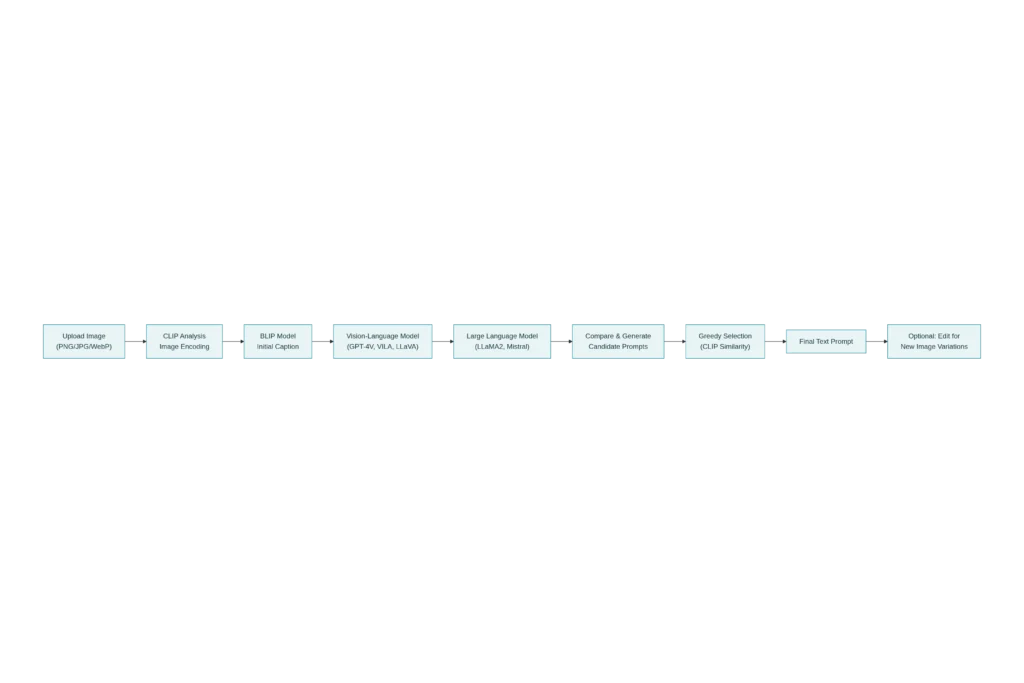
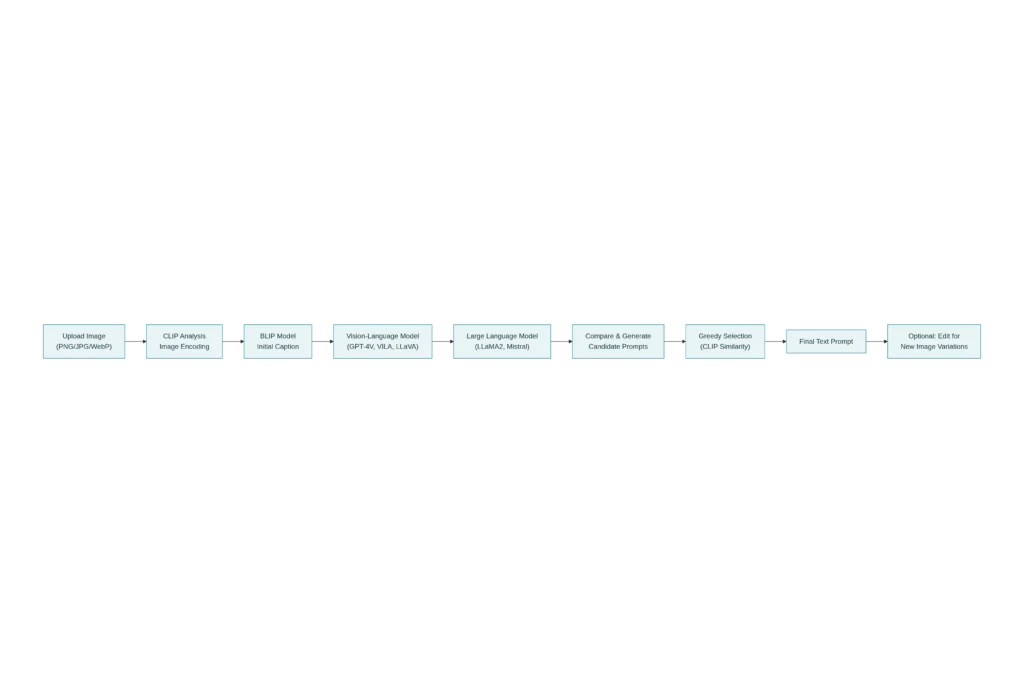
The most advanced reverse prompting method in 2025 is ARPO (Automatic Reverse Prompt Optimization), introduced in 2025 research that combines iterative optimization with large language models. Understanding this framework reveals the sophistication now available.
Step 1: Image Upload and Encoding
The process begins when you upload an image (PNG, JPG, WebP formats are standard) to a reverse prompting tool. The system immediately encodes the image using CLIP’s vision encoder, converting it into a numerical embedding that captures visual features, composition, color palette, style characteristics, and semantic content.
Step 2: Initial Prompt Generation with BLIP
ARPO starts with a quick initialization using BLIP to generate a basic caption. For a landscape painting, BLIP might produce: “a misty mountain valley at dawn with evergreen forests and a winding river below.” This initial prompt is crude but directionally correct—it identifies the major content without capturing nuance.
Step 3: Iterative Refinement Loop
The system enters an optimization loop (typically 4-10 iterations) where three processes repeat:
Image Generation: The current prompt is fed to a text-to-image model (Stable Diffusion, SDXL, or PixArt-Alpha) to generate a new image. This recreated image serves as feedback: does it match the reference image?
Prompt Generation: A vision-language model like GPT-4V or VILA analyzes both the reference image and the newly generated image, identifying the differences. These differences are passed to a language model (LLaMA2 or Mistral) which generates candidate prompt improvements—stylistic elements that were missing, compositional details that are off, or color schemes that don’t match.
Prompt Selection: A greedy selection algorithm compares all candidate prompts and selects the one that maximizes CLIP similarity with the reference image. The best candidate is incorporated into the current prompt, and the loop repeats.
Step 4: Final Prompt and Classification
After optimization, the system uses a language model to classify the final prompt into content elements (objects, scenes, composition) and style elements (artistic medium, lighting, color palette, artist influences). This separation enables users to generate novel images by editing specific components—keeping the style while changing the content, or vice versa.
Practical Tools for Reverse Prompting in 2025
The democratization of reverse prompting has produced a rich ecosystem of tools, each with distinct strengths. Here’s a comprehensive breakdown of what’s available:
Free Online Tools
Vheer Image to Prompt Generator stands out as the most user-friendly free option. Upload any image, and within seconds receive a detailed, tag-formatted prompt optimized for Midjourney, Stable Diffusion, and DALL-E. The interface requires no login, supporting up to 5 daily conversions for free users.
ImagePrompt.org offers 5 free generations daily with paid tiers starting at $15/month. Its strength lies in layered AI analysis that produces prompts suitable for multiple platforms, with three style options: Basic, Detailed, and Creative.
Fotor’s Free Image to Prompt Generator provides five free daily extractions using advanced deep learning models. It identifies objects, actions, context, emotions, and lighting conditions, outputting comprehensive prompts in seconds.
ImagetoPrompt specializes in batch processing with CSV export capabilities, making it ideal for creators managing large image libraries. Free tier allows 10 frames monthly; creator tier ($12/month) unlocks unlimited processing.
Specialized and Advanced Tools
PhotoDirector (by CyberLink) leads the paid market with comprehensive analysis that identifies famous artworks, artistic styles, and specific visual features. Its $9.99/month premium tier includes advanced image editing, style reference tools, and image fusion capabilities.
MyEdit.Online offers extensive customization options, allowing users to adjust prompts and regenerate variants without downloading images. The platform updates monthly with new AI capabilities and integrates audio editing and branding tools.
CLIP Interrogator (available on Hugging Face and Replicate) remains the most technically accessible option for developers. It’s free but requires understanding of the underlying technology. It combines BLIP initial captions with CLIP’s semantic matching against large-scale tag databases.
Flux1 AI provides style-specific prompt generation with real-time preview capabilities. Users can select from pre-built style filters before generation, guaranteeing outputs tailored to specific artistic aesthetics.
API Integration for Developers
For developers building applications, Replicate’s Image-to-Prompt API offers programmatic access. Using the img2prompt model, developers can integrate reverse prompting into Node.js, Python, or other applications. Stability AI’s Stable Diffusion 3 API also supports image analysis, enabling automated prompt extraction within larger workflows.
Metadata Extraction: The Direct Approach
Before relying on AI analysis, check if an image already contains the prompt in its metadata. AI image generators like Stable Diffusion often embed generation parameters directly into PNG or JPEG files.
Reading PNG Metadata
PNG files store metadata in textual chunks. Tools like PNG Info Tab in Stable Diffusion’s Auto1111 UI, or online services like Compress-or-Die, display this embedded data. Simply upload or drag-and-drop a PNG, and the system extracts EXIF, IPTC, and XMP data, including original prompts if they were preserved.
EXIF and IPTC Data
Professional image metadata follows three standards:
- EXIF: Technical camera data (settings, date, GPS coordinates, camera model)
- IPTC: Editorial metadata (caption, credit, copyright, keywords) used by journalists
- XMP: Adobe’s extensible format for editing history, ratings, and custom tags
For AI-generated images, check XMP fields first—modern generators often store prompts there. Metadata2Go, PicDefense.io, and Convertico.com offer free online metadata viewers supporting multiple formats.
Privacy and Security Consideration
⚠️ Important: Metadata can expose sensitive information—location data from tagged images, device identifiers, or proprietary AI parameters. Strip metadata before sharing confidential work using tools like ImageOptim (Mac), Verexif (online), or command-line utilities (exiftool, jpegtran).
Real-World Applications and Use Cases
Understanding reverse prompting becomes valuable when applied to concrete scenarios.
For Digital Designers and Artists
Designers discover visual inspiration online—a compelling color gradient, innovative composition, or unfamiliar artistic style. Rather than attempting to describe it to a client, they extract the prompt, modify it slightly (changing “sunset” to “midnight” or “oil painting” to “watercolor”), and generate variations instantly. This reduces iteration cycles from hours to minutes.
For Content Creators and Marketers
Marketers at agencies need consistency across campaigns. By reverse prompting a high-performing ad image, they extract the exact aesthetic parameters that resonated with audiences. These prompts serve as templates for generating seasonal variants, A/B test alternatives, or platform-specific dimensions—all maintaining visual coherence.
For E-Commerce and Product Photography
Product teams generate lifestyle images for listings. A successful image of a coffee mug in a cozy apartment setting becomes a template: extract its prompt, swap “coffee mug” for “water bottle,” add “modern minimalist desk,” and regenerate. This ensures product photography consistency without expensive reshoot days.
For AI Researchers and Developers
Researchers studying how text-to-image models interpret language use reverse prompting as a diagnostic tool. By extracting prompts that produced specific outputs, they understand model behavior, identify biases (Do neutral descriptions still show gender stereotypes?), and debug unexpected generations.
For Education and Learning
Students learning prompt engineering analyze successful prompts extracted from professional work. Understanding the exact phrasing, modifiers, and style keywords that create high-quality images accelerates their learning beyond trial-and-error.
Technical Deep Dive: The ARPO Framework and 2025 Research
The most recent advancement in reverse prompting comes from peer-reviewed research published in 2025, introducing ARPO (Automatic Reverse Prompt Optimization). This framework represents a fundamental shift from earlier methods.
Comparison with Previous Approaches
Earlier reverse prompting relied on three categories of methods, each with significant limitations:
Gradient-based methods (GCG, AutoDAN, PEZ) optimize prompts by calculating numerical gradients through the text-to-image model and discretizing continuous embeddings into words. While theoretically sound, they produce unreadable output like “the pic mew amazing god th A devils awe down the astronomy lakel swallowed rooftop !!” — technically accurate in maximizing similarity but semantically meaningless.
Image captioning methods (GPT-4V, LLaVA) directly describe images using vision-language models. However, these descriptions are often verbose, complex, and include information irrelevant to the generation model. A caption like “A solitary figure is walking down a worn street” might describe the scene but fails to be “prompt-like”—missing the artistic style, lighting specifics, and compositional keywords that the original generator used.
Data-driven methods (CLIP-Interrogator) maintain databases of 100,000+ hand-curated image-text pairs and search these databases for the best match. This approach achieves good accuracy but is fundamentally limited by dataset comprehensiveness—images outside the dataset’s scope receive poor descriptions.
ARPO’s Innovation: Iterative Refinement
ARPO introduces a gradient imitation strategy that overcomes these limitations:
- Instead of optimizing embeddings (which discretize poorly), it uses language models to generate candidate prompts as “textual gradients”
- Instead of single-pass captioning, it iterates—each loop compares the recreated and reference images, identifies differences, and proposes improvements
- Instead of relying on static databases, it’s model-agnostic and dataset-independent
Quantitative Results demonstrate ARPO’s superiority:
| Approach | CLIP-T Score | CLIP-I (Image Fidelity) | DINO | ViT |
|---|---|---|---|---|
| Gradient Methods (PH2P) | 23.76 | 76.27 ± 0.39 | 46.27 | 44.28 |
| Captioning (GPT-4V) | 28.39 | 78.14 ± 0.07 | 50.40 | 45.86 |
| Data-driven (CLIP-Interrogator) | 30.56 | 80.62 ± 0.13 | 50.43 | 46.30 |
| ARPO (LLaVA-Next, LLaMA2) | 35.58 | 83.01 ± 0.02 | 54.00 | 51.40 |
The ARPO variant achieves approximately 16% improvement in prompt fidelity (CLIP-T) over CLIP-Interrogator and 3.8% improvement in image fidelity. User studies involving 50 participants ranking methods found ARPO variants ranked #1 for content preservation, style accuracy, and overall quality.
Computational Costs and Practical Trade-offs
ARPO implementations offer two variants with different computational profiles:
Closed-source variant (using GPT-4V and GPT-4): Completes one iteration in ~20 seconds on an NVIDIA RTX 4090, costs approximately $0.07 per iteration. A typical 6-iteration optimization costs ~$0.42 and completes in 2 minutes. Ideal for small-scale professional use.
Open-source variant (VILA/LLaVA-Next + LLaMA2/Mistral): Takes ~90 seconds per iteration on dual A100 GPUs, completely free (using open-source models). Slower but cost-effective for batch processing.
Both typically converge within 4-10 iterations, with diminishing returns after iteration 10. Early stopping strategies can reduce computation further.
Step-by-Step Guide: Extracting Prompts from Your Images
Using Vheer (Recommended for Beginners)
- Visit the website: Go to vheer.com/image-to-prompt
- Upload your image: Drag-and-drop a PNG, JPG, or WebP file (max 10MB)
- Select prompt style: Choose between Simple, Detailed, or Creative output
- Generate: Click “Generate Prompt” and wait 5-15 seconds
- Copy and use: Click “Copy” to grab the prompt, or “Generate Image” to test it immediately with Vheer’s built-in image generator
- Refine: Edit any keywords if needed for your specific use case
Using CLIP Interrogator (For Technical Users)
- Access the tool: Visit clipinterrogator.org or huggingface.co/spaces/pharma/CLIP-Interrogator
- Choose analysis mode: Select from “Best” (most accurate, slower), “Fast” (quick, less detailed), or “Classic” (traditional analysis)
- Upload image: Drag your image into the designated area or paste a URL
- Select model: Optionally choose specific CLIP models (ViT-L/14 recommended for most users)
- Interrogate: Submit and wait for analysis (30 seconds to 2 minutes depending on model)
- Review output: The generated prompt appears in a text box; regenerating produces different variations
Using Metadata Extraction (Direct Approach)
- Check if metadata exists: For PNG files from Stable Diffusion, try uploading to compress-or-die.com/analyze
- Extract EXIF/XMP data: The tool displays embedded metadata including original prompts if present
- Copy the prompt: If available, the original generation parameters appear in the metadata view
- Adjust for your model: If the prompt references a specific model/sampler, modify for your target generator
Using ImagePrompt.org (For Creative Control)
- Upload image: Visit imageprompt.org and select “Upload Image”
- Choose specificity level: Select Simple (quick tags), Detailed (comprehensive), or Creative (imaginative variations)
- Add custom instructions (optional): Specify art style preferences or specific elements to emphasize
- Generate: Click “Create Prompt” and preview suggestions
- Iterate: Each generation produces variations; click “Regenerate” for alternatives
- Export: Copy prompt text or generate test images directly through the integrated generator
Advanced Techniques: Prompt Editing and Image Modification
Once you’ve extracted a prompt, the real creative power emerges—the ability to edit and generate variations.
Content vs. Style Separation
ARPO’s classification capability distinguishes between content elements and style elements:
Content elements: Specific objects, scenes, composition, spatial arrangement
- Examples: “landscape with mountains and river,” “two figures sitting on a bench,” “urban street scene”
- Edit by: Replacing or adding new objects while preserving style
Style elements: Artistic medium, lighting, color palette, artist influences, mood
- Examples: “oil painting style,” “soft morning light,” “warm golden tones,” “impressionist style,” “photorealistic”
- Edit by: Substituting artistic approaches while maintaining composition
Example Workflow
Original extracted prompt:
text"A serene forest clearing at sunset, ancient oak trees with warm golden light filtering through leaves,
soft green grass, misty atmosphere, oil painting style, inspired by Hudson River School artists,
romantic landscape aesthetic, dreamy quality, warm color palette"
Variation 1 – Change season:
Replace “sunset” with “spring morning” and “golden light” with “cool blue light” → Same location, different time and mood
Variation 2 – Change medium:
Replace “oil painting style, Hudson River School” with “watercolor style, contemporary minimalist” → Same scene, different artistic approach
Variation 3 – Change subject:
Keep all style elements; replace “forest clearing” with “coastal beach cove” → Same artistic treatment, different setting
This separation enables rapid iteration without loss of the aesthetic that made the original image appealing.
Prompt Injection: The Security Dimension
While reverse prompting is primarily creative, understanding prompt injection attacks is crucial for responsible use. These attacks embed hidden instructions within images that cause models to ignore safety guidelines or produce harmful content.
Text-based injection: Malicious instructions hidden in white text on white background or font-size 0, imperceptible to humans but readable by models
Visual injection: Specially crafted noise or patterns in images that encode text instructions, causing models to follow hidden directives
Multimodal injection: Combining text and visual injections across multiple images to bypass safeguards
Research from 2025 demonstrates that vision-language models exhibit vulnerabilities to prompt injection despite safety training. This emphasizes that understanding reverse prompting includes understanding its potential misuse—a responsibility for both developers and users.
Comparing Approaches: When to Use Each Method
Choosing the right tool depends on your specific needs:
| Scenario | Recommended Tool | Why |
|---|---|---|
| Quick inspiration, no signup | Vheer or Fotor | Free, instant, no friction |
| Professional design work | PhotoDirector or MyEdit | Advanced features, style control, batch processing |
| Batch processing 100+ images | ImagetoPrompt or custom API | CSV export, cost-effective at scale |
| Technical control, custom pipelines | CLIP Interrogator or Replicate API | Programmatic access, fine-grained model selection |
| Research and experimentation | ARPO implementation (local) | State-of-the-art accuracy, detailed analysis |
| Social media content | Vheer or Flux1 AI | Simple interface, platform-optimized outputs |
| Archival and metadata discovery | Compress-or-Die or Metadata2Go | Direct metadata extraction, no AI-based inference |
Common Challenges and Solutions
Challenge 1: Low-Quality Extractions for Complex Images
Problem: Highly abstract, surreal, or photomontage images produce vague or inaccurate prompts.
Solution: Use the “Detailed” or “Best” analysis mode rather than “Fast.” ARPO’s iterative approach or GPT-4V captioning often handles complexity better than fast CLIP variants. If using an API, increase the number of optimization iterations.
Challenge 2: Style Loss in Heavily Edited Images
Problem: Images substantially modified in post-production lose original style information.
Solution: This is a fundamental limitation—the prompt describes the generated image, not post-edit effects. Accept that extracted prompts capture the generation phase, not subsequent Photoshop editing. Edit the prompt to add “post-processed” or “enhanced in post” if relevant.
Challenge 3: Metadata Stripping by Social Platforms
Problem: Most social media platforms (Instagram, Facebook, Twitter) strip metadata when images are uploaded.
Solution: Always request original image files from creators if metadata is important. Work with direct PNG/JPG downloads rather than platform URLs. If metadata is lost, AI-based reverse prompting becomes necessary.
Challenge 4: Model-Specific Prompting
Problem: A prompt optimized for Stable Diffusion may not work identically in Midjourney or DALL-E.
Solution: Modern tools generate platform-specific variants. ImagePrompt.org and Vheer output prompts optimized for specific models. Alternatively, use tools that offer “Midjourney mode” or “DALL-E optimization” to adjust prompt syntax.
Challenge 5: Ethical Concerns with Artist Attribution
Problem: Extracting prompts that reference specific artists (e.g., “in the style of Van Gogh”) and using them raises questions about artistic attribution and copyright.
Solution: When using reverse prompts that credit specific artists, honor that attribution. Modify to be transformative (e.g., combining multiple influences) rather than directly copying. Consider this equivalent to “inspired by” rather than “copying”.
SEO and AdSense Optimization Considerations
For creators publishing reverse prompting content: Long-tail keywords like “how to reverse engineer image prompts for Midjourney,” “extract CLIP prompts from screenshots,” and “AI image metadata extraction” currently rank with lower competition and high intent. Feature actual tool comparisons with current 2025 screenshots, include video walkthroughs, and update quarterly as new tools emerge. Comprehensive how-to guides with internal linking to specific tool reviews rank consistently.
Conclusion and Future Directions
Reverse prompting has evolved from an obscure technical curiosity into an accessible, powerful creative tool in 2025. The combination of mature vision-language models (CLIP, BLIP, GPT-4V), language models (LLaMA2, Mistral, GPT-4), and automated optimization frameworks (ARPO) has made prompt extraction reliable enough for professional use.
The field continues advancing. Emerging research explores multi-image reverse prompting (extracting prompts from video frames or image series), style transfer prompts (maintaining one image’s style while changing another’s content), and prompt canonicalization (reducing verbose prompts to essential keywords). Vision-language models are becoming increasingly sophisticated, with models like Pixtral and newer CLIP variants showing improved understanding of artistic nuance.
For users in 2025, the immediate opportunity is clear: use reverse prompting to accelerate your creative workflow. Whether you’re a designer seeking inspiration, a marketer ensuring brand consistency, an educator teaching prompt engineering, or a researcher studying AI behavior, the tools exist and are easier to use than ever.
The process is straightforward: find an image that speaks to you, extract its prompt, modify it, and generate variations. In minutes, what once required hours of trial-and-error prompt iteration is now immediate and reproducible. This democratization of creative AI capability represents a significant shift in how humans and AI collaborate on visual content creation.
Read More:Mega-Prompts Mastery: How to Write Irresistible 1000-Word Prompts for Coding
Source: K2Think.in — India’s AI Reasoning Insight Platform.