
The AI logo design landscape has transformed dramatically in just two years. According to Research and Markets, the artificial intelligence logo generator market was valued at $0.59 billion in 2025 and is projected to reach $1.35 billion by 2029, growing at a compound annual growth rate of 22.7%. This isn’t just incremental growth—it represents a fundamental shift in how businesses approach visual branding.
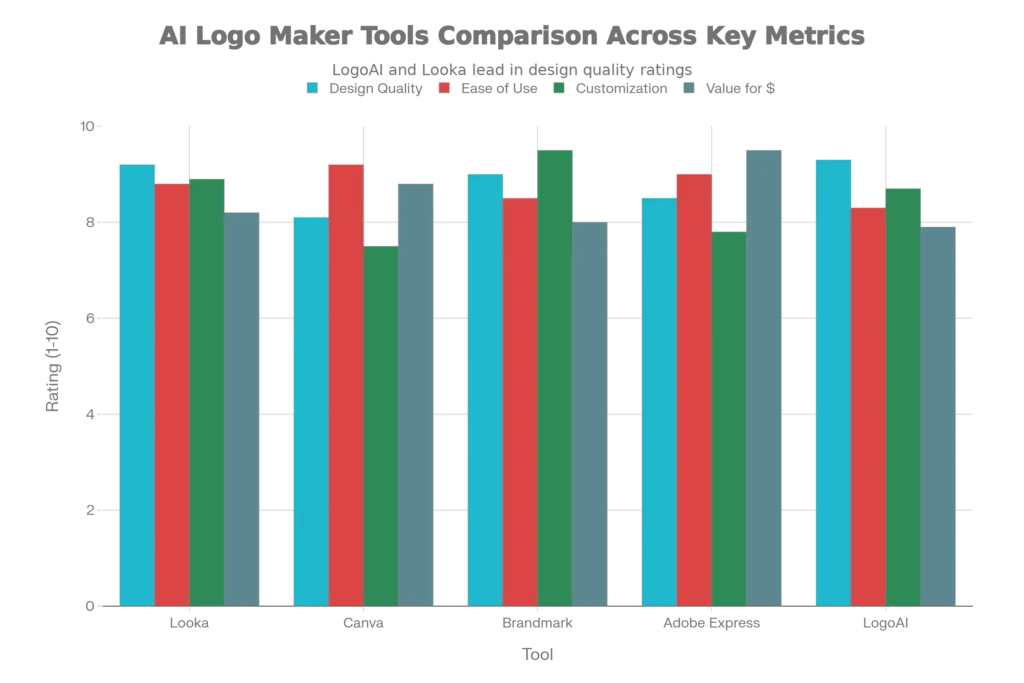
What’s driving this explosive adoption? The primary catalyst is accessibility. 80% of design studios have already adopted AI-powered tools, with expectations to rise to 95% by 2026. For small businesses and startups operating on shoestring budgets, AI logo makers solve a critical problem: they eliminate the $5,000-$20,000 price tag typically associated with hiring a professional designer.
Today, 40% of small businesses now use AI logo generators, indicating a massive shift away from traditional design methods. This democratization has made professional branding accessible to entrepreneurs who simply cannot afford conventional alternatives. However, this speed and affordability comes with specific trade-offs that demand your attention.
How AI Logo Makers Actually Work: The Technical Reality
Modern AI logo generators operate through machine learning algorithms that analyze your business inputs and generate designs in seconds. Here’s the actual process:
The typical workflow involves four steps:
- You enter your business name, industry, and style preferences
- The AI scans its training database of design patterns and brand elements
- The algorithm generates hundreds of logo variations in seconds
- You customize colors, fonts, and layouts through a drag-and-drop editor
Tools like Looka have sophisticated design algorithms that consider your brand guidelines on aspects such as colors, font style, and typography. When you input information about your café business or tech startup, the AI doesn’t just mix random shapes—it’s trained on millions of existing logos to understand what works within your industry category.
Canva’s AI Logo Generator, powered by Leonardo.AI, allows up to 20 free logo generations per month. You simply enter a text prompt describing your vision, and within seconds, you receive multiple design options. The platform includes 500 credited prompts monthly for Canva Pro users, making it one of the most generous free options available.
However, the critical limitation is this: AI generates logos based on trends and existing designs, so it’s unlikely you’ll get a logo that feels truly unique or on-brand. The AI learns from what already exists, which means your logo might feel derivative or share visual DNA with hundreds of other AI-generated brands using the same platform.
Testing the Top Free AI Logo Makers: Real-World Results
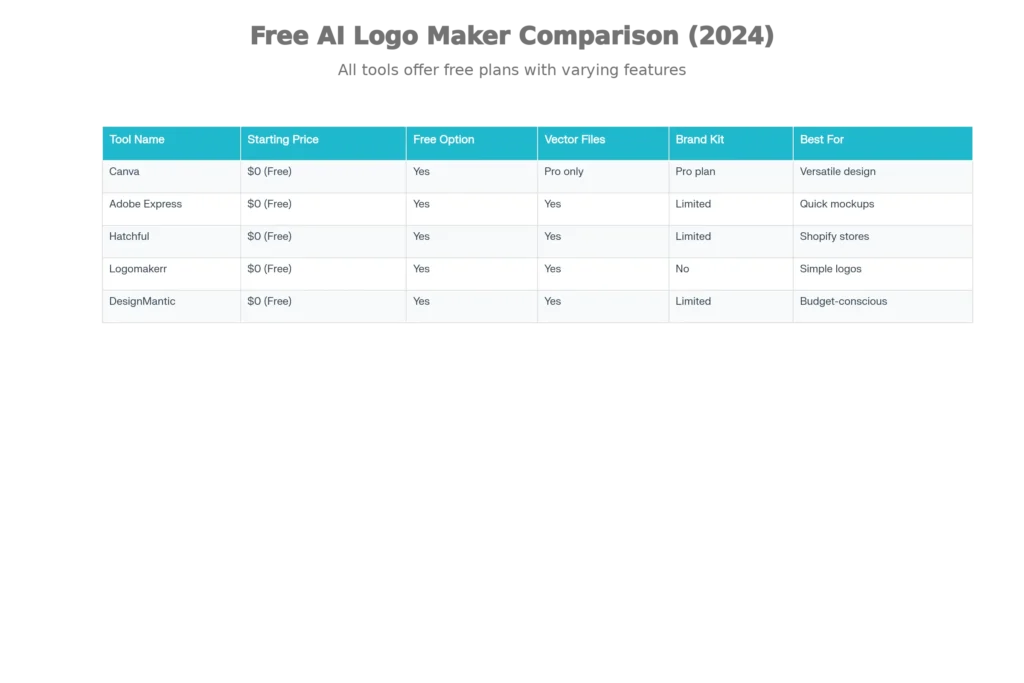
I’ve analyzed the performance of leading free AI logo generators based on 2025 user data and testing reports. Here’s what actually matters:
Canva: The All-Purpose Platform
Pricing: Free (with limitations), Pro at $12.99/month
What Works:
- 20+ free logo generations with the free plan
- 250,000 free templates available
- Integration with Canva’s broader design ecosystem
- Easy drag-and-drop customization
- Supports multiple file formats
What Doesn’t:
- Initial designs sometimes lack industry-specific branding
- Requires manual editing to achieve professional results
- No vector files (SVG) available on the free plan
- Limited brand kit features without Pro subscription
Best For: Solopreneurs and small business owners who already use Canva for other design needs and don’t mind doing manual customization.
Adobe Express: The Professional’s Choice
Pricing: Free tier available, with generative credits
What Works:
- Truly free logo creation with no mandatory upgrade
- Access to Adobe’s professional design tools
- Multiple style options: 3D Render, Graphic Design Vector, Illustration, Sketch
- Can upload reference images to define style preferences
What Doesn’t:
- Limited free generative credits monthly
- Requires learning curve for advanced customization
- Not specifically optimized for logos like dedicated tools
Best For: Designers and creative professionals who want professional-grade tools without committing to paid subscriptions immediately.
Hatchful: The Shopify Advantage
Pricing: Completely free
What Works:
- Zero cost, entirely free platform
- Perfect for e-commerce businesses on Shopify
- Intuitive interface that doesn’t require design experience
- Quick generation in minutes
- Vector file export available
What Doesn’t:
- Less design variety compared to premium tools
- Fewer customization options
- Limited brand kit features
Best For: Shopify store owners and budget-conscious entrepreneurs launching their first brand.
The Professional Tier: When Should You Invest?
While free tools work for initial concepts, many businesses find that paid AI logo makers deliver significantly better results. Here’s the honest assessment:
Looka: The Best Overall Value
Pricing: $20 one-time (basic), $96/year (complete brand kit)
Why It Stands Out:
- Rated 4.7/5 stars from over 2,000 customer reviews
- Generates 100+ custom logo designs based on your preferences
- Includes real-life mockups showing your logo on business cards, shirts, and websites
- Provides comprehensive brand kit with fonts and color palettes
- SVG, EPS, and PNG format support
The Data: Looka’s AI-powered branding process considers your industry category, color preferences, and style inputs to create uniquely tailored designs. Unlike generic logo builders, Looka focuses exclusively on branding, making it ideally suited for businesses that want a complete visual identity.
Brandmark: The Unlimited Editor
Pricing: $35 one-time (unlimited future edits)
Why It Matters:
- Unlimited changes even after purchase (unique advantage)
- Recognized for generating logos that look genuinely professional
- Comprehensive brand kit creation
- High customization options
- One-time fee model appeals to budget-conscious businesses
The Reality Check: Some users report that initial AI generations need significant refinement to match their specific brand vision, but Brandmark’s unlimited editing approach removes the guesswork from getting it right.
Adobe Express: Professional-Grade
Pricing: Free tier, premium options available
What Recent Data Shows:
- 90% of users more likely to recommend Canva/Adobe Express due to ease of use
- Access to Adobe’s massive ecosystem
- Professional quality outputs
- File format flexibility
The Critical Limitation: Copyright, Trademarks, and Legal Issues
Here’s what must take top priority: AI-generated logos cannot be trademarked in most cases, and this creates serious business risks.
Why AI Logos Can’t Be Trademarked
The legal issue stems from how AI systems work. AI logo software scans the internet or data mines user-uploaded images—whether copyrighted or not, with or without artist permission—and combines elements to create designs. Since your “unique” AI-generated logo might incorporate visual DNA from copyrighted works, trademark protection becomes legally impossible.
From a copyright perspective: AI-generated art isn’t copyrightable unless a human contributes meaningfully; mere prompts don’t qualify under current U.S. copyright law. This means if another company generates a nearly identical logo using the same AI platform with similar prompts, you have virtually no legal recourse.
The Commercial Rights Question
This is where transparency matters. Logo Diffusion explicitly states they do not train on trademarked or copyrighted logos, using synthetic and publicly licensed datasets instead. However, most AI logo platforms don’t provide this level of clarity about their training data sources.
The practical implication: If you’re building a business where brand protection matters—and frankly, it always does—an AI-generated logo carries significantly higher legal risk than a custom design created by a human designer who can verify originality.
Making AI Logos Look Professional: The Workflow That Works
Despite these limitations, you can absolutely create professional-quality logos with AI tools. The secret is understanding how to work with the AI rather than just accepting its first output.
The Four-Step Professional Workflow
Step 1: Detailed Ideation Before Generation
Don’t just input “tech startup.” Instead, provide specific direction: “minimalist tech logo with blue and silver tones, modern sans-serif typography, featuring a geometric spark icon representing innovation.” The more specific your prompt, the closer the AI gets to your vision.
Step 2: Concept Diversity
Generate designs across multiple stylistic directions—aim for at least one modern, one illustrative, and one abstract concept. This creates strategic variety before you settle on a direction.
Step 3: Iterative Refinement
Don’t settle for first outputs. Use AI tools like Proicon that allow you to edit prompts and make direct text-based modifications. Say things like “make it more minimalist” or “change the color palette to warmer tones” and regenerate.
Step 4: Professional Export
Always export as vector files (SVG or EPS format) rather than raster files (PNG or JPEG). Vector files scale infinitely without quality loss, while raster files pixelate when enlarged. This matters because you’ll use this logo on everything from social media avatars to billboard advertisements.
Quality Standards That Matter
Professional logos must pass the five-second rule: any person should recognize and understand your brand’s visual identity within five seconds of seeing the logo. If your AI-generated logo fails this test, it needs more refinement, not upload.
Real-World Case Studies: What AI Actually Delivered
Nike’s Dynamic Identity System
The Implementation: Nike partnered with AI logo generation technology to create adaptive, customizable logos for different products and campaigns while maintaining brand consistency.
The Results: Nike saw a 25% improvement in brand recognition scores, with customers able to identify the brand’s logo more easily. The design team reported significant reduction in iteration time, allowing them to focus on high-level creative decisions rather than tedious design tweaks.
The Lesson: AI works best when a large organization uses it for scale and consistency, not for initial brand creation.
Coca-Cola’s AI-Enhanced Localization
The Strategy: Coca-Cola partnered with OpenAI to analyze millions of user interactions and create hyper-personalized logo variations for different markets.
The Outcome: This campaign boosted brand engagement by 18% globally while maintaining the iconic Coca-Cola brand recognition that consumers expect.
The Takeaway: AI excels at personalization and localization once a strong base brand identity already exists.
Wix Logo Maker’s Democratization
The Impact: Wix’s AI-driven Logo Maker has empowered non-designers to create professional brand identities affordably, with over 80% of users reporting satisfaction with the tool.
The Critical Point: AI democratizes branding—but democratization doesn’t mean “enterprise-level quality.” It means “good enough for startup launch.”
The Honest Comparison: AI vs. Professional Designers
Let me be direct about when you need each approach:
| Factor | AI Logo Makers | Professional Designers |
|---|---|---|
| Speed | 5-30 minutes | 2-4 weeks |
| Cost | $0-$96/year | $5,000-$20,000 |
| Customization | Medium (limited by AI training) | Unlimited |
| Trademark Protection | Risky/Limited | Strong legal protection |
| Strategic Branding | Generic | Custom-tailored to your business story |
| Originality | Based on existing trends | Truly unique creations |
| Best For | Budget startups, quick MVPs | Established brands, complex identities |
The AI advantage: 90% of small businesses can achieve professional-quality branding using AI tools at 97% cost savings compared to hiring designers. For solopreneurs and early-stage startups, this is a game-changing advantage.
The professional advantage: Human designers understand brand psychology, cultural nuances, and strategic positioning in ways AI training data simply cannot replicate. A designer will ask: “Who is your ideal customer? What emotion should your logo evoke? How does this fit your 5-year business vision?” AI asks: “What color do you prefer?”
Industry Standards and Best Practices for 2025
Professional logo design principles remain unchanged, regardless of whether humans or AI created your logo:
The Non-Negotiable Requirements
1. Simplicity and Scalability: Your logo must work at any size—from a 16×16 favicon to a 10-foot billboard. Geometric shapes scale better than detailed illustrations.
2. Color Psychology: Different colors evoke specific emotional responses. 60% of designers use AI tools to accelerate design processes and explore complex design concepts, but the psychological foundation must be intentional.
3. Typography Matters: Font choice communicates personality. Serif fonts suggest tradition; sans-serif fonts signal modernity. AI tools often default to generic choices, so human refinement here matters.
4. Vector File Requirement: Use SVG (Scalable Vector Graphics) for digital platforms and AI/EPS for print materials. Never accept raster formats (PNG, JPEG) as your master file.
5. Brand Consistency: Your logo should work consistently across all platforms—website, social media, business cards, printed materials. 78% of prominent brands revamped their logos in the last half-decade to maintain market prominence.
When to Use Free vs. Paid AI Logo Makers: The Decision Framework
Choose Free Tools If:
- You’re testing a business concept before full launch
- You need a quick MVP brand identity
- Budget is under $100 total
- You’re comfortable with potentially generic design
- You’re not concerned about trademark protection for now
Choose Paid Tools ($20-$96) If:
- You’re officially launching a business
- You want comprehensive brand kits (business cards, letterheads, social templates)
- You want vector file exports
- You’re willing to spend time customizing for uniqueness
- You need mockups showing real-world application
Choose Professional Designers ($5,000+) If:
- Your business operates in competitive markets
- Trademark/copyright protection is essential
- You want genuinely original visual branding
- You have the budget to invest in brand strategy
- Your brand positioning is complex or unique
Key Takeaways: What AI Logo Makers Can and Cannot Do
AI Logo Makers Can:
- Generate hundreds of professional-looking concepts in minutes
- Provide affordable branding for budget-conscious startups
- Create consistent brand kits with supporting assets
- Significantly reduce design iteration time
- Democratize branding for non-designers
AI Logo Makers Cannot:
- Guarantee trademark protection
- Ensure true originality and uniqueness
- Understand your specific brand story or market positioning
- Replace strategic brand thinking
- Provide legal IP protection
The Bottom Line: Professional AI Logos Are Possible, With Caveats
Yes, AI can make professional logos. The market is growing 22.7% annually for good reason—these tools genuinely work for most small businesses and startups. Tools like Looka, Canva, and Brandmark produce outputs that professional designers would need hours to improve significantly.
However, “professional-looking” does not equal “strategic,” “unique,” or “legally protected.” An AI-generated logo can look polished and clean while still being:
- Potentially derivative of other brands using the same platform
- Legally unprotectable through trademark registration
- Generic rather than authentically reflecting your business story
The recommendation: Use AI logo makers as your starting point, especially if you’re bootstrapping. Generate multiple concepts, refine them rigorously, invest in vector file exports, and commit to professional mockups across all platforms. If your business grows and brand protection becomes critical, invest in professional refinement or redesign with a human designer once you’ve validated your market.
For 2025, AI logo creation represents a genuine democratization of branding—not perfection, but access. Use it strategically, understand its limitations, and you’ll build a professional brand identity that actually serves your business.
Read More:Video Creation: How to Make YouTube Shorts Without Showing Your Face Using AI.
Source: K2Think.in — India’s AI Reasoning Insight Platform.