
Let me be honest with you—if you’ve ever stared at a Python error message and felt completely lost, you’re not alone. The good news? You don’t need to be a coding expert anymore. Artificial intelligence has transformed debugging from a frustrating hunt into a straightforward conversation. In 2025, 69.1% of developers successfully resolve errors using AI-assisted tools, up from just 4.4% in 2023. Whether you’re building a website, automating tasks, or learning to code, AI can be your personal coding tutor available 24/7.
Understanding Python Errors: What’s Actually Going Wrong?
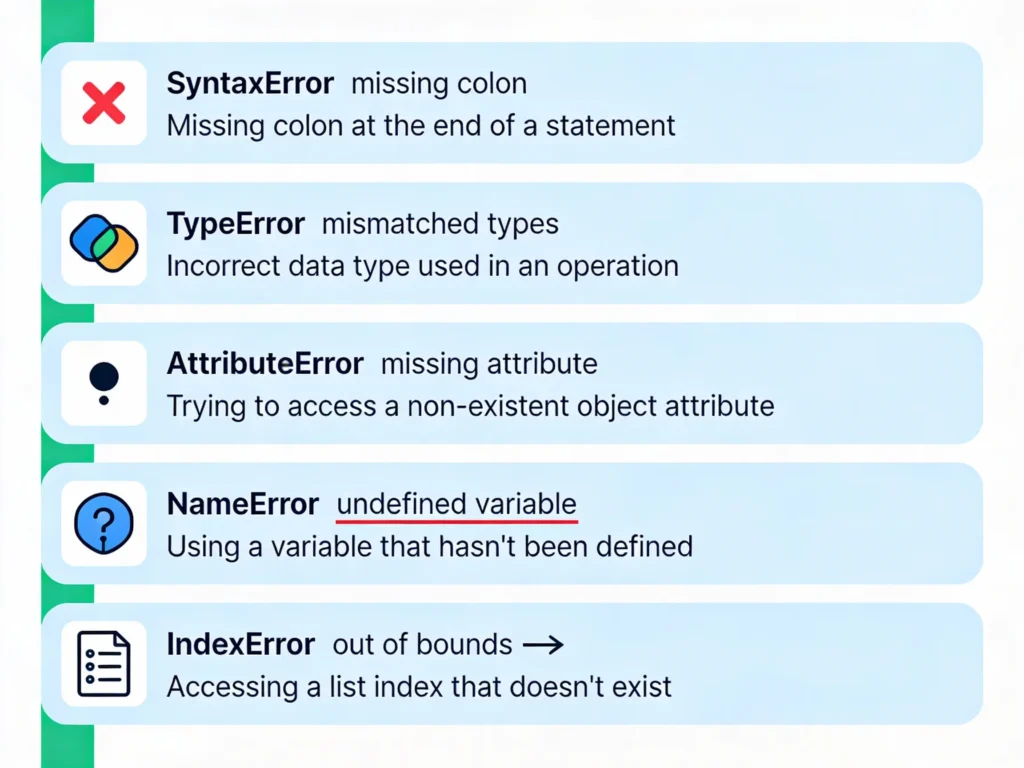
Before we talk about fixing errors with AI, let’s decode what these cryptic messages actually mean. Python errors fall into a few clear categories, and understanding them makes everything easier.
Syntax errors are like grammar mistakes in English—they break the rules of how Python code should look. If you forget a colon after an if statement or mistype a parenthesis, Python stops reading your code immediately. These are the easiest to fix because Python tells you exactly where the problem is. For example, if you write if x > 5 print("yes"), Python will flag the missing colon after the condition.
Runtime errors happen while your code is actually running. A TypeError occurs when you try to mix incompatible data types, like adding a number to text without converting it first. AttributeError strikes when you try to access something that doesn’t exist on an object—imagine asking a list for a .lowercase() method that only strings have. NameError means you referenced a variable that was never defined. IndexError happens when you try to access a list element that’s out of range.

The challenge is that beginners often panic when seeing these errors. But here’s the secret: every single one of these has a pattern. And AI knows every pattern.
Why AI is a Game-Changer for Debugging
Here’s what makes AI genuinely transformative for non-programmers: it speaks plain English. You don’t need to know technical jargon to get help anymore.
87% success rate with just one or two queries—that’s the real-world metric. AI-assisted debugging tools can now diagnose and fix defects with remarkable accuracy. In practical terms, this means you describe what went wrong, paste the error message, and get a clear explanation plus working code within seconds.
The 2025 Stack Overflow Developer Survey, which gathered responses from 49,009 developers worldwide, shows that 84% of developers use AI coding tools. What’s more telling is that 51% of professional developers use them daily, treating them as essential to their workflow. This isn’t niche behavior anymore—it’s mainstream.

The time savings are substantial. When developers use AI coding assistants, they save between 30-75% of their time on debugging, testing, and documentation tasks. For someone learning Python, that’s the difference between spending three hours tracking down a bug versus ten minutes.
The AI Tools Reshaping Python Debugging Today
Let’s talk practical tools. If you’re serious about fixing Python errors without becoming a coding expert, these are your best bets in 2025.
ChatGPT remains the most accessible entry point. With 82% adoption among AI tool users, it dominates for good reason. You can paste any error message and describe what you’re trying to do. ChatGPT will explain why the error occurred, suggest fixes, and often provide corrected code. The key is being specific: instead of “my code doesn’t work,” try “I’m getting a TypeError when I try to add a string and a number in this function.”
GitHub Copilot uses 68% adoption among developers and integrates directly into popular code editors like VS Code. The advantage here is real-time suggestions as you type. You don’t have to copy-paste errors—Copilot flags problems before they even run, offering inline fixes as you code.
Cursor and Windsurf are newer AI-powered IDEs (Integrated Development Environments) that function like having a senior developer watching your every keystroke. Cursor can analyze stack traces and suggest root causes without you having to explain much.
PyCharm includes built-in AI assistance through JetBrains AI Assistant. It provides line-by-line debugging suggestions, intelligent error detection, and follows Python best practices automatically.
Workik AI specializes in real-time Python code analysis. It not only catches errors but suggests performance optimizations.
For absolute beginners, Python Tutor offers visual debugging—you can see your code execute step-by-step, making it clear where things break.
Your Step-by-Step Process for AI-Powered Debugging
Now here’s the practical system that actually works. I’m walking you through it because the method matters as much as the tool.
Step 1: Identify and isolate the problem. Don’t paste your entire 500-line script into ChatGPT. Create what’s called a “Minimal Reproducible Example” (MRE)—the smallest piece of code that still triggers the error. This discipline alone teaches you more about debugging than most beginner tutorials.
Step 2: Gather your materials before asking for help. You’ll want:
- The exact error message (copy the entire traceback)
- The problematic code snippet
- A clear description of what you expected to happen
- What actually happened instead
Step 3: Ask the AI clearly. Don’t say “fix my code.” Instead try: “I’m trying to create a list of student names and ages. When I run this code, I get a TypeError. Can you explain what went wrong and show me the correct approach?”
Step 4: Understand the explanation, not just the fix. This is critical. The explanation is where real learning happens. If ChatGPT says “you can’t concatenate string and int types directly,” ask why or request it in simpler terms. Repeat back what you learned to confirm understanding.
Step 5: Test the fixed code immediately. Run it in your Python environment right away. If it works, fantastic. If not, follow up with the AI, providing the new error message.
Real-World Examples: From Error to Solution in Minutes
Let me show you how this works in practice.
Scenario 1: The TypeError
You write:
pythonage = 25
message = "I am " + age + " years old"
print(message)
Error: TypeError: can only concatenate str (not "int") to str
Without AI: You’d spend 20 minutes reading Python documentation trying to understand type conversion. With AI: You tell ChatGPT “I’m getting a TypeError when concatenating a string and number” and receive this solution:
pythonage = 25
message = "I am " + str(age) + " years old"
print(message)
Plus an explanation: “Python doesn’t automatically convert integers to strings. Use str() to convert the number first.” Total time: 2 minutes.
Scenario 2: The AttributeError
You write:
pythoncar = None
print(car.make)
Error: AttributeError: 'NoneType' object has no attribute 'make'
With AI assistance: You describe “I’m trying to access a property of an object but getting an AttributeError.” The AI explains that your variable contains None (emptiness) instead of an actual car object. It suggests:
pythonif car is not None:
    print(car.make)
else:
    print("Car object is not initialized.")
You learn not just the fix but why it failed—a critical insight.
Scenario 3: The SyntaxError
You write:
pythonif x > 5
    print("x is greater than 5")
Error: SyntaxError: expected ':'
AI highlights the missing colon and explains: “Python requires a colon after conditional statements.” You add it and move on.
The Smart Limitations: When AI Isn’t Quite Right
Here’s where I need to be honest. AI isn’t perfect. According to 2025 research, only 33% of developers trust AI accuracy, and 46% actively distrust it. Even more striking, just 3% say they “highly trust” AI output.
The issue isn’t that AI fails—it’s that it can hallucinate. ChatGPT might suggest a module that doesn’t actually exist or write code that looks right but has subtle logic errors. On complex problems, AI success drops below 40%.
Here’s the critical rule: always review AI-generated code before trusting it. Test it. Ask yourself if it makes sense. This is especially important for security-sensitive code.
The sweet spot for AI debugging is medium-complexity problems with clear error messages. Syntax errors? AI nails them. Logic errors in a 50-line function? Excellent. Architectural problems in a 10,000-line codebase? You’ll need human code review too.
Building Your Own AI Debugging Habits
The developers who get the most from AI aren’t the ones copy-pasting code blindly. They’re the ones with systems.
Habit 1: Write descriptive error-reporting prompts. Instead of dumping code and hoping, structure your request. “I have a Python function that’s supposed to sort a list of student records by grade. When I run it with this sample data, I get [error message]. The expected output should be [what you want]. What’s wrong?”
Habit 2: Ask for multiple approaches. A single solution isn’t always best. Ask: “Can you show me three different ways to fix this?” You’ll learn which method is most Pythonic.
Habit 3: Use linters alongside AI. Tools like Pylint and Flake8 catch many errors before AI even needs to intervene. Python’s pdb debugger lets you step through code line-by-line, understanding exactly where things go wrong.
Habit 4: Document what you learned. After AI fixes your error, write a one-sentence explanation in a comment. Next time you hit a similar issue, you’ll remember the solution.
The Broader Picture: AI’s Role in Your Learning Journey
Here’s something crucial I want to emphasize: using AI doesn’t make you a worse programmer. It’s like using a calculator—mathematicians still exist, and they use calculators. What changes is that you focus on logic and problem-solving rather than syntax memorization.
The 2025 data is telling. Developers save 30-75% of time on routine tasks when using AI. That freed-up time? That’s where the real learning happens. You can tackle harder problems, build cooler projects, and understand computer science at a deeper level.
The caveat is consistent: AI works best as a helper, not a replacement for learning. Use it to debug errors quickly, but take time to understand why the error occurred. This approach accelerates learning instead of replacing it.
Your Practical Starting Point Right Now
If you’re reading this and thinking “Okay, I want to try this,” here’s your 5-minute action plan:
- Visit ChatGPT.com or use GitHub Copilot (free tier exists for both)
- Write a simple Python script that has a deliberate error—maybe a syntax mistake or type mismatch
- Copy the error message and describe what you were trying to do
- Paste into the AI and ask for an explanation
- Run the suggested fix and verify it works
That’s it. You’ll immediately see why developers are adopting these tools at 84% rates. The experience is genuinely different from traditional debugging.
The landscape has shifted. In 2023, you needed deep Python knowledge to debug effectively. In 2025, you need curiosity and access to an AI tool. The barrier to entry has collapsed.
Conclusion: The Future of Coding Without Expertise
We’re at an inflection point. The question “Can I learn to code without being naturally gifted?” now has a clear answer: yes, with the right AI partner. Error fixing—historically the most frustrating part of learning to code—is now almost trivial.
The real work isn’t debugging syntax anymore. It’s thinking through problems logically, understanding what your code should accomplish, and iterating toward solutions. AI handles the tedious part. You handle the thinking.
With 69.1% of code problems now solvable through AI assistance, and tools improving daily, the traditional gatekeeping of “programmer knowledge” is dissolving. A beginner with an AI debugging partner can often solve problems faster than an experienced developer with just a text editor.
The only catch is that you still need to care about understanding. Use AI as a teacher, not a shortcut. Ask it to explain. Verify the solutions. Build actual projects. When you combine human curiosity with AI capability, that’s when real programming skill develops.
Read More:PDF Chatting: How to “Talk” to Your Textbook: Guide to Using ChatPDF for Free.
Source: K2Think.in — India’s AI Reasoning Insight Platform.