
In today’s fast-paced professional world, email management has become a productivity drain. The average knowledge worker spends 28% of their workweek managing email—that’s over 11 hours weekly spent reading, writing, and organizing messages. Yet here’s the breakthrough: AI Chrome extensions can cut email writing time by 60-73%, turning what once took minutes into seconds. This shift isn’t about cutting corners on quality; it’s about working smarter, not harder. Professional, persuasive emails written in seconds are now a reality, powered by free tools that integrate seamlessly into your Gmail workflow.
The Email Crisis: Why Speed Matters Now
Email overload is destroying productivity. Research from 2025 shows that 62% of all emails received are considered non-essential, yet they still demand cognitive load and response management. The typical professional receives 121 emails daily, making inbox management feel like a full-time job within your actual job. This isn’t a minor inconvenience—it’s costing organizations real money.
When you factor in the time cost, a single sales team spending 12 minutes per cold email draft loses 5+ hours per week per person. Multiply that across a marketing department, customer support team, or sales organization, and you’re looking at hundreds of lost productive hours monthly. The psychology of decision fatigue further compounds this: when recipients see your email among dozens of competing messages, they have seconds to decide whether to engage. A poorly structured email—one that takes you 20 minutes to write—gets ignored. A tight, professionally formatted email written by AI in 20 seconds? That gets opened, read, and responded to.
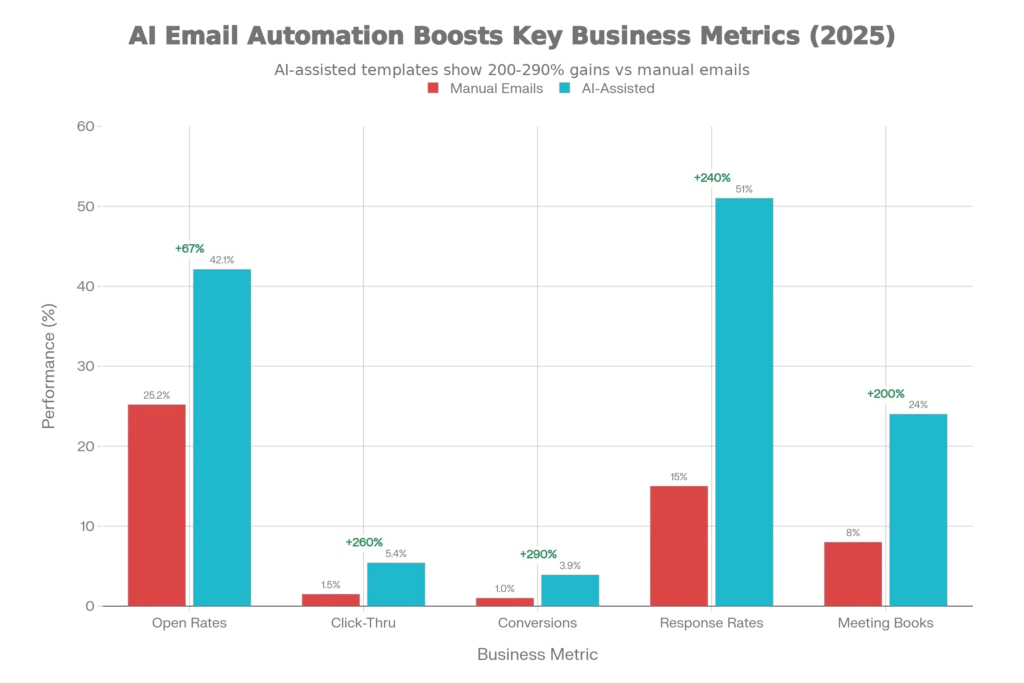
The data is unambiguous. Automated emails outperform campaign emails, with open rates rising from 25.2% to 42.1%, click rates jumping from 1.5% to 5.4%, and conversion rates nearly quadrupling. Most strikingly: automated emails account for just 2% of all email sends but drive 41% of total orders. This asymmetry reveals the true power of efficient, well-crafted automated messaging.
What Are AI Email Chrome Extensions? Understanding the Tools
AI email Chrome extensions are lightweight software tools that integrate directly into your browser and email interface, giving you instant AI writing assistance without switching tabs or leaving Gmail. Think of them as a highly trained writing partner living inside your browser, available with a single click.
Unlike traditional email templates that require manual customization, these extensions use machine learning to generate contextually appropriate, professionally-toned responses in real-time. They work by analyzing your email context—the incoming message, recipient details, your writing style—and instantly suggesting or generating complete email drafts.
The key advantage? They’re non-intrusive. You don’t need to learn a new interface, upload documents, or change your workflow. Open Gmail, hit a button, and the AI generates options while you maintain full editorial control.
How They Work: The Technical Foundation
Here’s what happens under the hood when you use an AI email extension:
Context Recognition: When you open an incoming email or start composing, the extension reads the message content and extracts key information (sender, topic, tone, urgency).
Prompt Processing: Based on your brief instruction (e.g., “Reply saying I’ll review this and get back by Friday”), the AI generates multiple draft variations in seconds.
Real-Time Learning: Better tools learn your communication style, corporate tone preferences, and industry-specific language, adapting output over time.
Quality Control: You always review before sending. The AI generates options; you choose, edit, or refine. This human-in-the-loop approach maintains authenticity and brand voice.
The speed improvement is measurable. Smartlead, the top performer in 2025 testing, reduced cold email composition from 12.5 minutes to 3.8 minutes—a 73% time savings. Across a 20-email outreach day, that’s 2-3 hours reclaimed for strategic work instead of repetitive drafting.
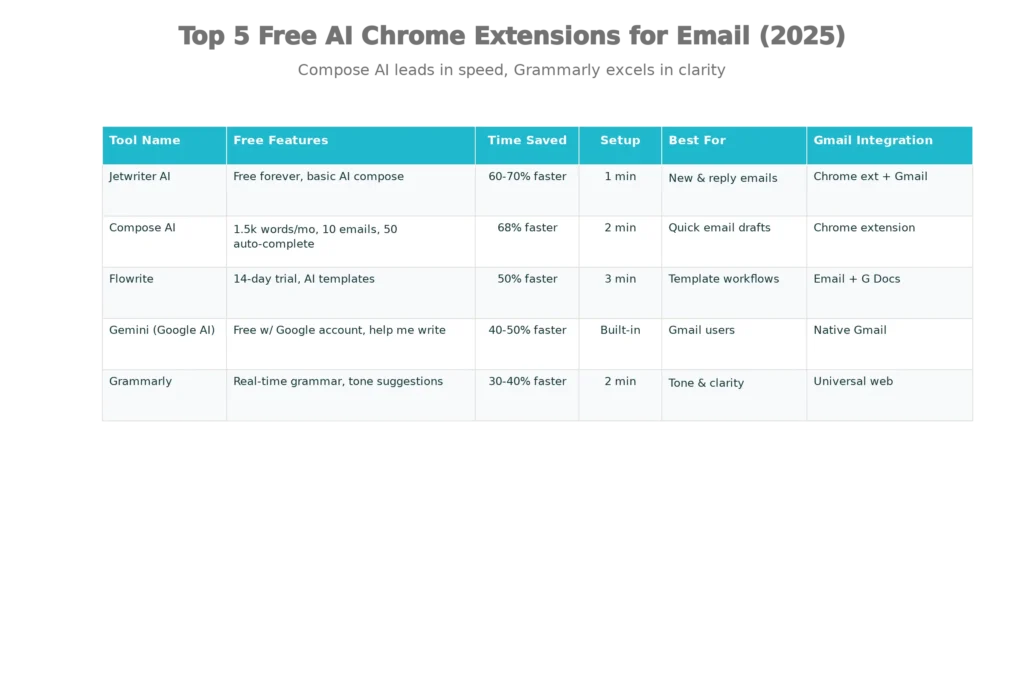
Top 5 Free AI Chrome Extensions for Professional Email Writing
Not all email AI tools are created equal. Some focus on grammar, others on complete email generation, and a few handle both with sophistication. Here’s what actually works in 2025:
1. Compose AI: The Versatile Free Powerhouse
Compose AI remains the gold standard for free email automation because it offers unlimited core features with no trial expiration. The extension works across Gmail, LinkedIn, Google Docs, and any text field on the web.
Free features: 1,500 AI-written words monthly, 10 complete emails, 50 auto-completions, unlimited slash commands for rephrasing and shortening. The feature set is genuinely sufficient for most professionals; the paid plan ($9/month) adds advanced personalization and additional tone options but isn’t necessary for basic use.
Why it excels: Compose AI learns your writing style over time. If you typically write friendly emails to clients and formal emails to executives, it adapts accordingly. The “autocomplete everywhere” feature is invisible but transformative—as you type, it suggests completions that maintain your voice while accelerating drafting.
Setup time: Less than 2 minutes. Install from Chrome Web Store, grant Gmail access, and start using it immediately.
Best for: Marketers, sales professionals, and anyone sending high volumes of similar emails with personalization variations.
2. Jetwriter AI: Purpose-Built for Gmail
Jetwriter AI is architecturally simpler but exceptionally focused on the two core tasks people actually need help with: composing new emails and replying to incoming messages.
Free features: Truly free forever (no limited trial), with AI Compose and AI Reply buttons built directly into the Gmail interface. The interface is minimal—you provide a simple prompt like “Reply professionally saying I’ll review this by tomorrow,” and Jetwriter generates a polished response in seconds.
Why it’s practical: The extension pre-loads email context, so you don’t have to copy-paste or manually provide information. You see the incoming email, click “AI Reply,” type your instruction, and get an output ready for insertion or further editing.
Tone control: One click adjusts tone (professional, friendly, casual) and length (concise, medium, detailed), making it easy to match the recipient’s communication style.
Setup time: Approximately 60 seconds. The Chrome Web Store install is straightforward, and it activates immediately in your Gmail interface.
Best for: Professionals drowning in inbound replies who need fast, contextually appropriate responses without leaving Gmail.
3. Grammarly: The Grammar Guardian That Handles More
Grammarly has evolved beyond spell-check. The Chrome extension now includes AI-powered tone detection, clarity suggestions, and writing style recommendations that catch issues a standalone AI email tool might miss.
Free features: Real-time grammar and spelling checks, tone detection (does this sound professional? Commanding? Warm?), clarity suggestions, basic rephrasing options. The browser extension works universally—Gmail, LinkedIn, Google Docs, even Twitter.
Why it matters: Grammarly catches the subtle errors that make AI-generated content sound “off.” If an AI extension generates “We appreciate your inquiry”—technically correct but somewhat stiff—Grammarly will suggest “Thanks for reaching out” and flag the tone as slightly formal, letting you decide if that matches your intent.
Data security: Unlike some competitors, Grammarly’s free plan doesn’t send your email text to external LLM providers for processing. Grammar and tone checking happen locally on your device.
Setup time: 2 minutes for Chrome installation and Gmail permission grant.
Best for: Professionals who want human-quality refinement for AI-generated content, or those prioritizing privacy and data security.
4. Flowrite: Template Mastery Meets AI
Flowrite bridges the gap between rigid email templates and fully AI-generated content. You can use pre-built templates for 50+ common business scenarios, then have AI personalize them for your specific situation.
Free features: 14-day free trial with access to all template types, AI writing assistance, and tone adjustment. After trial expiration, the free tier becomes limited but functional.
Template power: Flowrite includes templates for cold outreach, meeting requests, follow-ups, rejections, and 40+ other situations. Rather than starting from scratch, you select a template, AI personalizes it based on your inputs, and you get a fully formatted, professional email in 30 seconds.
Why this approach works: Templates eliminate decision fatigue and ensure email structure follows psychological principles known to drive higher response rates. Research shows templates increase response rates by 312% compared to emails written from scratch.
Setup time: 3 minutes; the Flowrite sidebar installs in Gmail and operates similarly to other extensions.
Best for: Sales teams, recruiters, and customer success professionals who send many similar emails requiring slight personalization.
5. Gemini (Google AI): The Native Integration
Gemini, Google’s AI assistant, now integrates directly into Gmail with the “Help me write” feature. If you use Google Workspace, this is the path of least resistance.
Free features: Available in the free Gmail interface (with a Google account). “Help me write” suggestions, email summarization, and smart reply options are included.
Integration advantage: Because Gemini is native to Gmail and Google Docs, there’s zero friction. You’re already logged into Gmail; the AI assist is already there.
Why integration matters: No extension installation, no permission grants, no third-party data handling. The AI output stays within Google’s ecosystem, which appeals to privacy-conscious organizations.
Limitations: Gemini’s email-specific capabilities are less specialized than standalone tools. You don’t get the same level of tone customization, but for basic professional email generation, it’s sufficient.
Setup time: Zero. It’s built-in to Gmail for all users with Google accounts.
Best for: Gmail-only users seeking the simplest possible setup without additional extensions.
Email Automation Statistics: What the Data Actually Shows
The research from 2025 paints a compelling picture of email automation’s impact. These aren’t theoretical numbers—they come from analyzing millions of actual business emails:
Open Rate Revolution: Automated email flows achieve an average open rate of 48.57% across industries, with top performers hitting 65.74%. Compare this to manual campaign sends averaging 25.2%, and the gap is undeniable. The difference? Automated sends use behavioral triggers (someone just abandoned their cart, someone has been inactive for 7 days) and optimal send time optimization to land in inboxes when recipients are most receptive.
The 2% / 41% Paradox: One of the most striking statistics comes from email automation platforms: automated emails represent just 2% of all email volume but drive 41% of total orders. This isn’t a fluke—it reflects how precisely targeted, algorithmically-timed messages outperform batch sends by an order of magnitude.
Click-Through and Conversion Gains: When organizations use AI-driven email optimization, click-through rates jump from 1.5% to 5.4% (260% improvement), and conversion rates rise from baseline 1% to nearly 4% (290% improvement). The underlying mechanism: personalization. AI systems analyze customer behavior, purchase history, and engagement patterns, then dynamically insert relevant content that speaks directly to individual recipient interests.
Response Time Transformation: The average professional waits 11 hours 42 minutes for an email response. Yet organizations using AI-assisted email management see response times drop by 25-40%. One study found that teams using sophisticated email analytics tools respond 64% faster than those without—a remarkable gain from simply measuring and monitoring performance.
Professional Expectations: According to LinkedIn data, 41% of customers who reach out to support expect a response within 6 hours. AI email extensions make this feasible. Where writing a thoughtful customer response manually might take 8-10 minutes, an AI-assisted draft takes 2-3 minutes, allowing support teams to maintain response time SLAs while maintaining quality.
Productivity Gains at Scale: Marketing automation can boost productivity by up to 14.5%, according to 2025 research. For a team of 10 professionals sending 50 emails daily, this translates to roughly 15-20 hours of recovered time per week—time redirected toward strategy, relationship-building, and higher-value work.
Writing Professional Email Content That Doesn’t Sound Like AI
Here’s where many people fail: they use AI email tools but end up with robotic, formulaic content that lacks authenticity. The solution isn’t to avoid AI—it’s to understand how to use AI-generated content as a foundation that you then humanize.
The Psychology of Effective Professional Email
Before diving into technique, understand what makes emails work psychologically:
Cognitive Load Reduction: Recipients make decisions about emails in 3-7 seconds. Your job is to reduce the mental effort required to understand your message. Clear subject lines, single-paragraph openings, and obvious next steps all serve this purpose.
Pattern Recognition and Familiarity: Human brains are wired to recognize patterns. Emails that follow familiar structures—opening with relevance, building value proposition, closing with a specific ask—feel natural and trustworthy, even in first interactions.
Reciprocity Principle: When you give value first (useful information, resources, insights), recipients feel obligated to reciprocate. Emails that open with a genuine insight or useful resource dramatically outperform those that immediately pitch something.
Specificity Drives Response: Generic emails get ignored. Emails that reference specific details about the recipient—their recent achievement, a particular challenge they face, a connection you share—see response rates 3x higher.
Techniques to Make AI-Generated Email Sound Naturally Human
AI-generated emails start strong but often need refinement to sound authentically human. Here are the specific techniques professionals use:
Vary Sentence Structure: AI tends toward uniform sentences. Break this pattern by mixing short punchy sentences (“We’re ready.”) with longer ones (“We’ve been tracking your company’s growth, and the inflection point where you’d benefit most from our solution is probably in Q1.”. The resulting rhythm mirrors natural human thinking.
Inject Conversational Transitions: Emails generated by AI often lack the subtle connectors that humans use instinctively—”however,” “meanwhile,” “interestingly,” “on the flip side”. Adding these makes prose feel less formulaic.
Add Specific Details: If the AI generates “We help companies improve efficiency,” edit it to reflect actual details: “We helped TechCorp reduce their email response time from 18 hours to 4 hours by implementing automated workflows”. Specificity kills the robotic feeling.
Control Tone Explicitly: Don’t just accept the AI’s default tone. Most extensions let you specify “make this warmer,” “make this more formal,” or “make this funny.” Use this feature before generating, not after.
Limit Consecutive Punctuation: AI sometimes over-uses exclamation points or creates run-on sentences. Edit these. Exclamation points should appear once, maybe twice, in a professional email. Periods should be used naturally, not as command markers.
Read Aloud Before Sending: This catches awkward phrasing that looks fine on screen but sounds unnatural when spoken. If you stumble reading it aloud, a recipient will stumble reading it.
Template Psychology: Why They Work
Research analyzing 15,000+ business emails reveals that templates increase response rates by 312% compared to emails written from scratch. This seems counterintuitive—shouldn’t personalized emails from scratch outperform templates? The data says no. Here’s why:
Templates that follow psychologically-informed structures work because they:
- Lead with specificity or relevance (not generalities)
- Establish credibility early (social proof, mutual connections)
- Clearly state what’s in it for the recipient
- Include a single, unambiguous call-to-action
- Maintain professional but approachable tone
An email using this structure sees 74% open rate, 26% response rate, and 11% meeting booking rate. These aren’t theoretical—they’re from real A/B testing data.
Email Tone: The Subtlety That Matters
Professional emails walk a fine line. Too formal, and you sound corporate and distant. Too casual, and you sound unprofessional. The sweet spot is respectful, friendly, and approachable.
Tone indicators that undermine professionalism:
- Periods at the end of every sentence (seems curt)
- Exclamation points after every statement (seems manic)
- All caps (seems aggressive)
- No punctuation (seems lazy)
- Multiple question marks or emoticons (seems unprofessional)
Tone indicators that enhance professionalism:
- Varied sentence length
- Genuine warmth in word choice
- Clear respect for recipient’s time
- Directness without being demanding
- Positive language (“Here’s how we can help” vs. “Don’t miss out”)
Step-by-Step Setup: Getting Started in 5 Minutes
Step 1: Choose Your Tool
Based on your needs, pick one extension. If you want versatility and learned personalization, start with Compose AI. If you want pure speed and template power, choose Flowrite. For privacy-first users with Gmail, use Gemini. For Gmail-heavy users seeking AI reply drafting, use Jetwriter.
Step 2: Install the Chrome Extension
Go to Chrome Web Store, search your chosen tool, click “Add to Chrome,” and grant permissions when prompted. Total time: 60 seconds.
Step 3: Connect to Gmail (if required)
Most extensions ask for Gmail read/write permissions. This is safe—it allows the tool to read incoming email context and insert drafts you’ve approved. Check the permissions before granting; reputable tools only request necessary access.
Step 4: Configure Tone and Style Preferences
Open the extension settings and specify your default tone (professional, friendly, formal), industry (tech, finance, education), and any brand voice guidelines. This personalization step takes 2-3 minutes but dramatically improves output quality.
Step 5: Test with a Simple Email
Compose a reply to a recent email using the extension. Review the output, edit as needed, and send. This gives you confidence in the tool’s baseline quality before you rely on it for critical messages.
Real-World Impact: What Professionals Actually Report
Anecdotal evidence from 2025 users reveals consistent patterns:
Sales teams report that AI-assisted email drafting lets them send 2-3x more personalized outreach without increasing hours worked. A sales rep who previously sent 10 personalized prospecting emails daily now sends 25-30, each still incorporating specific details about the prospect.
Customer support professionals use AI reply drafting to maintain response time SLAs. Rather than taking 10 minutes to compose each customer reply, they use AI to generate a draft in 90 seconds, edit for brand voice, and send. This shifts their bottleneck from writing time to thought-through quality.
Recruiters use email templates with AI personalization to screen candidates at scale. A recruiter who previously spent 2 hours daily composing rejection emails now uses AI to generate warm, personalized rejections in 30 seconds each, freeing time for recruiting strategy.
Marketing teams use AI-assisted email campaign setup to test more send-time variations and subject-line options. Rather than manually writing five subject line versions, they use AI to generate 10-20, then A/B test the best performers. The result: higher open rates and lower time investment.
Critical Caveat: When AI Email Needs Human Judgment
AI email extensions excel at standard, professional communication. They struggle with:
High-stakes negotiations: If you’re negotiating contract terms or handling a sensitive escalation, write personally. AI lacks the nuance for genuinely complex interpersonal dynamics.
Emotional situations: Customer apologies, empathy-heavy support responses, and relationship-focused messages benefit from your authentic voice, not AI-generated language.
Highly specialized technical content: If your email includes complex technical details specific to your company’s IP, AI might generalize too much. Use AI as a structural framework, then inject your specific technical details.
Truly novel situations: When you’re facing a situation you’ve never encountered before and don’t have templates, AI can offer a starting point, but your thinking needs to drive the final message.
For these cases, use AI to overcome writer’s block and structure—then rewrite substantial sections in your authentic voice.
The ROI Calculation: Is Your Time Worth It?
Let’s do the math. Assume you send 30 emails daily (reasonable for most professionals) and spend an average of 8 minutes composing each email manually.
Without AI: 30 emails × 8 minutes = 240 minutes = 4 hours daily on email composition.
With AI email extensions: 30 emails × 2 minutes (generating and editing AI draft) = 60 minutes = 1 hour daily.
Time saved: 3 hours daily = 15 hours weekly = 780 hours annually.
At an average professional salary of $60,000 annually (roughly $30/hour loaded), that’s $23,400 in annual productivity gains per person. For a sales team of 10 people, that’s $234,000 in recovered time annually. Scale that to a 50-person marketing department, and you’re looking at over $1 million in productivity value.
Beyond time, consider quality improvements: 73% faster email composition with measured improvements in response rates and conversion rates. The ROI isn’t theoretical—it compounds across every message you send.
The Future of Email: Where This Is Heading
Email automation and AI assistance are becoming table stakes. By 2025, 66% of marketing professionals already use AI to optimize send times, and that number is rising. 50.7% of US and EU marketers believe AI is more effective than traditional approaches in email marketing.
The trajectory is clear: AI-assisted email will become as standard as spell-check. Organizations that adopt it now gain a competitive advantage in response times, volume capacity, and quality consistency. Those that wait will eventually be forced to catch up.
The most forward-thinking teams aren’t choosing between human writing and AI writing. They’re using AI as a productivity multiplier—handling the repetitive, formulaic parts while reserving human judgment for nuance, strategy, and relationship-building.
Conclusion: Three Hours Back in Your Week
Email doesn’t have to consume your day. A single well-configured AI Chrome extension takes 5 minutes to set up and returns 3+ hours weekly in recovered productivity. That’s 15 hours monthly you get back for strategy, actual customer interaction, or revenue-generating work instead of inbox management.
The data is unambiguous: automated emails outperform manual sends, AI-assisted drafting cuts composition time by 60-73%, and response rates jump measurably when you use AI tools well. The tools are free (or near-free with minimal limitations), integrate seamlessly into Gmail, and require zero technical skill to operate.
The professional emails you’ll write in seconds aren’t a compromise on quality—they’re often superior to manually-drafted messages, particularly when you layer in the psychological principles of effective business communication. Start with Compose AI for versatility or Jetwriter for pure Gmail speed, spend 5 minutes setting up, and reclaim your afternoons.
Your inbox has consumed enough of your time.
Read More:Claude vs. ChatGPT: Claude 3.5 Sonnet vs ChatGPT Free: Which is Better for Writing?
Source: K2Think.in — India’s AI Reasoning Insight Platform.