
The bottom line: An AI PC with an NPU is worth buying if you regularly use productivity tools, value data privacy, work with creative content, or plan to leverage integrated AI features like Microsoft Copilot. However, if you only use cloud-based AI services like ChatGPT and don’t need offline processing, a regular laptop will suffice—and save you ₹6,000–8,000.
The term “AI PC” has exploded across marketing materials, tech reviews, and boardroom discussions throughout 2024 and 2025. Yet most people remain confused: What exactly is an NPU? Why should I care? And most importantly, do I actually need one? This article cuts through the hype and provides practical, fact-based guidance grounded in real 2025 data and technical specifications.
Understanding NPU: The Brain Behind AI PCs
What Is a Neural Processing Unit?
An NPU (Neural Processing Unit) is a specialized microchip designed exclusively to accelerate artificial intelligence and machine learning workloads. Unlike your laptop’s general-purpose CPU (Central Processing Unit) or graphics-focused GPU (Graphics Processing Unit), an NPU optimizes its entire architecture specifically for neural network operations—the mathematical foundation of AI.
Think of it this way: A CPU is like a skilled generalist who can handle any task reasonably well. A GPU is a parallel processor excelling at rendering graphics and high-throughput computations. An NPU, however, is a specialist built from the ground up for one job: executing the matrix multiplications and tensor operations that power deep learning models. This specialization creates dramatic efficiency gains that matter in real-world computing scenarios.
NPUs operate using a “data-driven parallel computing” architecture, which means they process multiple data points simultaneously across specialized hardware units called Systolic Arrays. These arrays contain thousands of small processing elements organized in a grid pattern, perfectly matched to the mathematical operations neural networks require. This dedicated approach allows NPUs to perform AI inference—running already-trained AI models to make predictions—at exceptionally high speeds while consuming minimal power.
How NPUs Differ From CPUs and GPUs
The architectural differences between these three processors are fundamental. A CPU excels at sequential logic, branching, and general-purpose computing. It’s optimized for tasks like opening files, running applications, and managing system operations. A GPU parallelizes work across thousands of small cores, making it ideal for rendering graphics, training AI models, and processing large batches of data simultaneously. Both, however, incur significant overhead when running AI inference because neither was purpose-built for that specific workload.
An NPU, by contrast, eliminates this overhead entirely. It performs 60% faster inference than modern GPUs while consuming 44% less power, according to recent KAIST benchmarks. This performance advantage stems from optimized memory hierarchies, minimal data movement between storage and compute units, and instruction sets specifically crafted for neural network operations. The result is sub-millisecond latency for AI tasks and exceptional power efficiency—some designs achieve 38.6 TOPS/Watt on ResNet-50 benchmarks with minimal accuracy loss.
In practical terms: When you use Microsoft Copilot’s background blur feature during a video call, Windows Studio Effects, or real-time transcription, the NPU handles these computations locally on your device without burdening the CPU or GPU. This frees those general-purpose processors to manage other tasks, resulting in smoother multitasking, longer battery life, and faster AI response times.
The AI PC Market Explosion: By the Numbers
Market Growth Trajectory
The adoption curve for AI PCs is accelerating at an unprecedented pace. In 2024, AI PC shipments reached approximately 43 million units globally, representing just 15.6% of the total PC market. By the end of 2025, that figure is projected to surge to 77.8 million units shipped, capturing 31% of worldwide PC shipments. Looking ahead to 2026, analysts forecast 143 million units with 54.7% market share—meaning AI PCs will become the dominant form factor, not the exception.
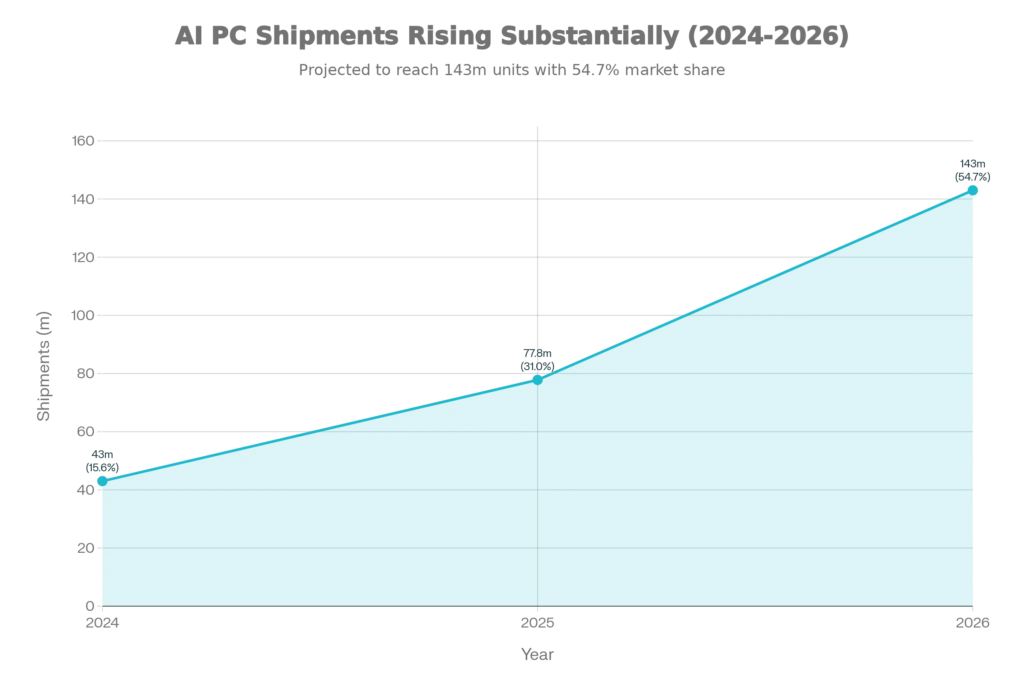
This represents explosive growth of 165.5% year-over-year expansion from 2024 to 2025. Market research firms project the AI PC market will escalate from ₹61 billion ($730+ million USD) in 2025 to ₹2,551.8 billion by 2035, reflecting a compound annual growth rate (CAGR) of 42.8%. Even more conservatively, other forecasters anticipate the market reaching $260–992 billion by 2030–2035, depending on adoption rates and use case development.
Who’s Buying AI PCs in 2025?
The initial wave of AI PC adoption is dominated by early adopters aged 18–25, professionals in creative industries, software developers, and forward-thinking enterprises. However, adoption hinges on one critical factor: solidifying real-world use cases. As of late 2025, many organizations remain in “pilot mode,” testing whether AI PCs deliver measurable productivity gains to justify the ₹6,000–8,000 price premium over conventional laptops.
IDC analysts predict that once use cases mature—likely by Q2–Q3 2025—AI PC adoption will accelerate dramatically, potentially capturing 15% of total enterprise PC spending within two years. In India specifically, the market is expected to grow at a CAGR of 53.5% between 2025 and 2035, driven by rapid digital transformation in IT, finance, healthcare, and education sectors, plus booming startup ecosystems in Bengaluru, Hyderabad, and Pune.
The Three AI PC Processor Platforms: A Practical Comparison
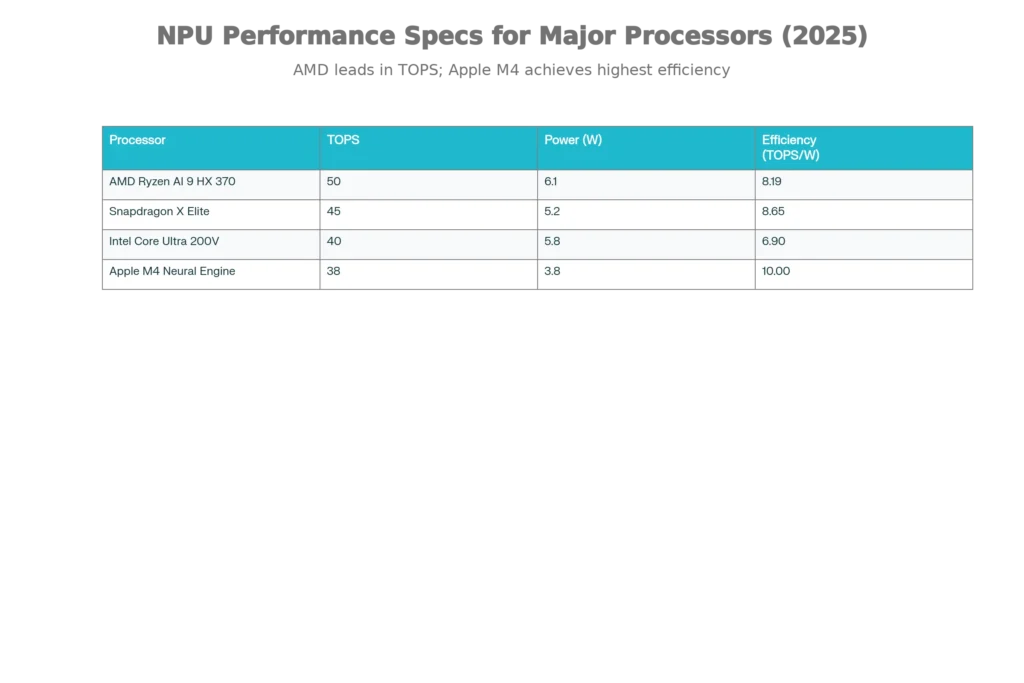
Snapdragon X Elite: Mobile AI Champion
Qualcomm’s Snapdragon X Elite represents the newest entrant to the AI PC market, built on ARM architecture rather than traditional x86. This matters because ARM chips are fundamentally different from what most Windows laptop users expect, yet they deliver remarkable advantages.
Performance specifications: The Snapdragon X Elite NPU delivers 45 TOPS of AI performance with exceptional power efficiency. Real-world testing shows it generates the first word of text in just 1.09 seconds (first token latency), and produces 18.55 tokens per second for follow-up text generation. This makes it the fastest NPU for real-time interactions currently available.
Battery life is legendary: Snapdragon X Elite laptops consistently deliver 20–34 hours of continuous use without charging, making them ideal for travelers, remote workers, and professionals who change locations frequently. Extensive testing confirms that ARM’s efficiency architecture genuinely delivers 40% better energy efficiency than x86 competitors during similar workloads.
Best for: Mobile professionals, travelers prioritizing all-day battery life, remote workers with inconsistent connectivity (many Snapdragon X laptops include integrated 5G/LTE), and users who want the latest cutting-edge technology. If you frequently work from coffee shops, airports, or client sites, Snapdragon X Elite is a strong choice.
Limitations: Some older Windows software may require emulation to run on ARM architecture, introducing minor compatibility friction. Gaming support lags behind x86 competitors. Snapdragon X laptops command premium pricing in markets like India, with models starting around ₹65,990–₹1,25,000+.
AMD Ryzen AI 300 Series: Best Value and Performance Balance
AMD’s Ryzen AI 9 HX 370 processor represents the strongest integrated AI performance currently available in x86 laptops. It delivers 50 TOPS of NPU performance—the highest among conventional x86 chips—alongside strong multi-core CPU performance and capable integrated Radeon graphics.
Real advantages: The Ryzen AI 9 HX handles demanding workloads that would choke lesser processors. Content creators editing photos, graphic designers working in Photoshop or Figma, software developers, and anyone multitasking with dozens of browser tabs will experience noticeably snappier performance compared to entry-level NPUs. AMD’s balanced architecture means the CPU, GPU, and NPU work together seamlessly without creating bottlenecks.
Battery life realistically runs 12–16 hours, which covers a full workday for most professionals. More importantly, AMD prices its Ryzen AI processors competitively—you get exceptional value compared to premium Intel or Snapdragon options. In India, Ryzen AI laptops are available starting around ₹69,990–₹85,990, making them accessible to middle-class professionals.
Best for: Content creators, videographers, designers, software developers, students, budget-conscious professionals seeking best-value AI performance, and businesses standardizing on a cost-effective platform. If you’re unsure whether you need Snapdragon’s battery life or Intel’s enterprise focus, Ryzen AI is the sensible middle ground.
Realistic limitations: Thermal performance under sustained heavy loads can run warm, and gaming performance, while competent, trails behind dedicated gaming laptops with discrete GPUs.
Intel Core Ultra 200V Series: Enterprise and Copilot+ Focus
Intel’s Core Ultra 200V (“Lunar Lake”) processors deliver 40+ TOPS of NPU performance with seamless integration into Microsoft’s Copilot+ PC ecosystem. While the TOPS number trails AMD and Snapdragon, Intel’s optimization for Windows AI features means real-world performance for Copilot integration feels faster and more responsive than the raw numbers suggest.
Enterprise advantages: Intel Core Ultra laptops are ideal for IT-managed environments, corporate deployments, and organizations requiring proven vendor support, consistent security updates, and straightforward management tools. The processors were specifically engineered for business reliability, not bleeding-edge consumer features.
Copilot+ PC exclusivity: If you want guaranteed access to exclusive Copilot+ features like Recall (browsing history visualization), Click-to-Do (contextual AI actions), and advanced Windows Studio Effects, Intel Core Ultra and Snapdragon X are your primary options. These features remain Copilot+ exclusives and won’t be backported to older processors.
Best for: Business professionals, IT departments, consultants, managers, organizations already invested in Microsoft’s ecosystem, and anyone wanting maximum compatibility with Copilot+ features and enterprise software.
Practical note: Battery life runs 12–16 hours, which is solid but trails Snapdragon X’s exceptional endurance.
What Can NPUs Actually Do in 2025? Real Use Cases
Features That Actually Use NPUs
It’s crucial to distinguish between AI features that exist and AI features that meaningfully use dedicated NPUs. Not everything labeled “AI” on your laptop runs on the NPU. Much of it still uses the CPU or GPU. However, several features do leverage NPU acceleration:
Windows Studio Effects (Video Conferencing): On Copilot+ PCs, background blur, automatic eye contact correction, automatic framing during video calls, and voice isolation all run through the NPU. These features execute in real-time without degrading gaming or creative application performance. On non-Copilot+ PCs, these same effects run through the GPU, consuming significantly more power and potentially impacting frame rates.
Live Captions with Real-Time Translation: Microsoft’s live captioning can translate speech across 40+ languages directly on your device through NPU acceleration. This happens without uploading audio to cloud servers, preserving privacy and enabling offline transcription.
Windows Hello Facial Recognition: Your laptop’s camera can authenticate you through NPU-accelerated facial recognition, which is faster and more power-efficient than GPU-based approaches.
Local Generative AI: AI PCs can run smaller language models locally on the NPU—models like Llama 2 (7B parameters), Mistral 7B, or similar open-source models can execute directly on-device without cloud dependency. This enables privacy-preserving AI assistance, local summarization, and custom workflows.
Intelligent Photo Editing: NPU acceleration enables real-time AI background removal, smart cropping suggestions, and generative fill features in photo editing tools.
Battery and Performance Optimization: The NPU analyzes your usage patterns and can dynamically adjust power allocation, system performance, and resource distribution to maximize battery life during different workload types.
What NPUs Can’t Do
It’s equally important to understand limitations. NPUs are optimization specialists, not universal accelerators. They cannot replace GPUs for gaming, cannot train large AI models, and provide minimal benefit for cloud-based AI services like ChatGPT or Google Gemini (these services do heavy lifting on cloud servers, not your laptop).
Gaming: Discrete GPUs like NVIDIA RTX 4060/4070 still dominate gaming performance. While AI features might be NPU-accelerated, the rendering pipeline remains GPU-dependent. If gaming is your primary use case, a dedicated GPU matters more than NPU specs.
AI Model Training: Developing custom machine learning models requires massive parallel compute, making high-end GPUs (H100, A100) or cloud TPUs essential. NPUs are purely inference specialists and cannot be used for training.
Large-Scale Data Processing: Processing gigabytes of data through traditional machine learning pipelines remains CPU/GPU work.
Do You Actually Need an AI PC? The Honest Assessment
The Decision Matrix
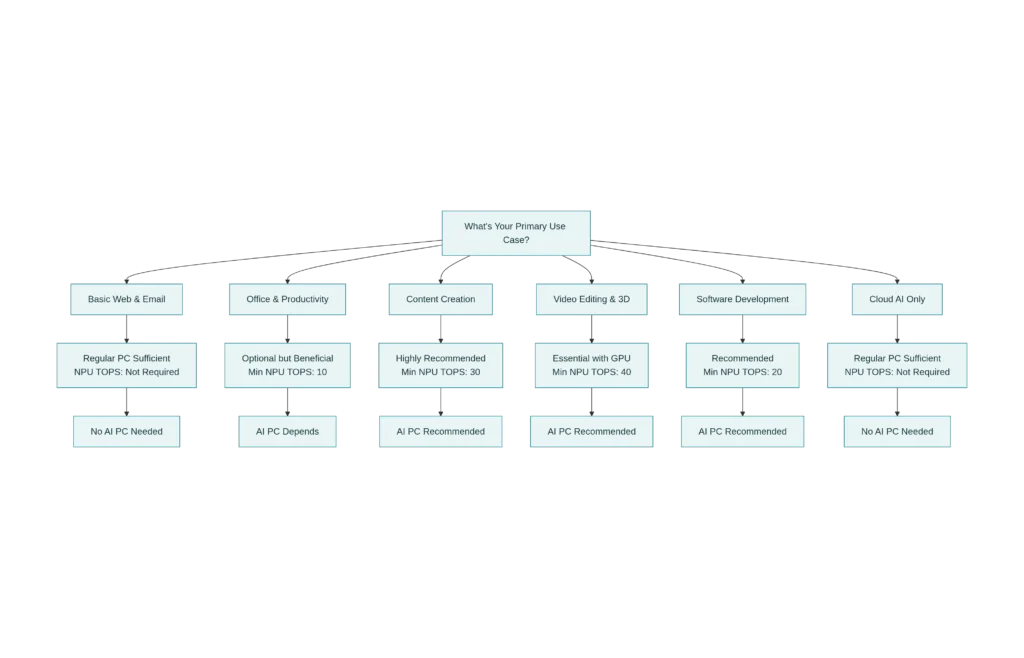
The truth is context-dependent. Not everyone needs an AI PC in 2025, despite what marketing departments claim. Here’s the practical breakdown:
You DON’T Need an AI PC If:
You only use cloud-based AI services. If you exclusively use ChatGPT, Claude, Gemini, Copilot in the browser, or similar cloud-based AI tools, an NPU provides zero direct benefit. Cloud AI services perform heavy computation on distant servers, not your laptop. The internet round-trip latency dominates overall response time, making local NPU acceleration irrelevant.
Your workload is lightweight. Basic web browsing, email, office documents (Microsoft Word, Excel, Google Docs), and light creative work run perfectly fine on conventional laptops. A 10–20-year-old CPU suffices for these tasks.
You’re on an extreme budget. The ₹6,000–8,000 premium for AI PC hardware is substantial in a country where median laptop budgets hover around ₹50,000–₹80,000. If budget is tight, that money goes further toward raw CPU power, RAM, or SSD storage than toward an NPU you might not use.
You need discrete GPU performance. If gaming, 3D rendering, or professional GPU-accelerated workloads dominate your workflow, invest in a dedicated NVIDIA or AMD GPU over NPU specs. A laptop with RTX 4060 + mediocre NPU will underperform compared to RTX 4070 + no NPU.
You SHOULD Get an AI PC If:
You use Microsoft Windows and want Copilot+ features. The exclusive Copilot+ features—Recall, Click-to-Do, advanced Studio Effects—genuinely improve productivity for knowledge workers who take notes, browse extensively, and manage documents. These features are Copilot+ exclusives and represent real value.
You value privacy and offline capability. Running AI features locally means sensitive data never leaves your device. If you work with confidential information, AI PCs enable on-device processing that cloud-based solutions cannot match. Medical professionals, lawyers, government employees, and finance workers often face compliance requirements making local processing essential.
You’re a content creator or developer. Real-time AI-assisted photo editing, video transcription, subtitle generation, and AI-powered coding tools (Copilot, Tabnine, Cursor) leverage NPU acceleration meaningfully. These tools directly amplify your productivity and creative output.
You’re a serious multitasker. If you habitually run multiple applications, browser tabs, video calls, and creative tools simultaneously, the NPU’s ability to handle AI tasks without burdening the CPU/GPU meaningfully improves responsiveness and system stability compared to conventional laptops.
You plan to keep the laptop for 5+ years. NPU support in software is expanding rapidly throughout 2025. Buying an NPU-equipped laptop now means your device will support emerging AI features for years without obsolescence. Non-NPU laptops may lose access to future Copilot+ features and OS-level AI acceleration.
You prioritize battery life on a budget. If you need 12+ hours of battery life without premium pricing, a mid-range AI PC offers better efficiency than equivalent non-AI laptops.
Practical AI PC Buying Guide for India (2025)
Budget Options (Under ₹70,000)
Entry-level AI PCs start at ₹61,990–₹70,000 with processors like Snapdragon X Plus, Intel Core Ultra 5, or AMD Ryzen 5 with entry-level NPUs (10–20 TOPS). These deliver basic AI features and solid general computing but lack the power for intensive creative work.
Recommended: ASUS Vivobook 16 Snapdragon X Plus (~₹61,990), Lenovo IdeaPad Slim 5 with Snapdragon X Plus (~₹69,990–₹75,000), or HP OmniBook Ultra (~₹70,000). These offer all-day battery life, lightweight design, and reliable AI performance for students, remote workers, and light creators.
Mid-Range Sweet Spot (₹75,000–₹1,10,000)
This is where value peaks. Mid-range AI PCs deliver 30–40 TOPS NPU performance with capable CPUs, integrated graphics, 16GB RAM, and 512GB–1TB SSDs—everything most professionals need.
Recommended: ASUS Zenbook 14 with Intel Core Ultra 5 (~₹95,000–₹1,08,000), Lenovo Yoga Slim with Intel Core Ultra (~₹85,000–₹1,00,000), or ASUS Vivobook 16 Snapdragon X Plus (~₹85,000–₹95,000). These handle productivity, light content creation, and coding with excellent battery life.
Premium Performance (₹1,10,000+)
For power users, creators, and professionals, premium AI PCs with 40+ TOPS NPUs, high-end CPUs (Ryzen 9 or Intel Core Ultra 7/9), dedicated GPUs, 32GB RAM, and fast NVMe SSDs are available at ₹1,20,000–₹1,80,000.
Recommended: ASUS ROG Zephyrus G14 or G16 with Ryzen AI 9 HX (~₹1,50,000+), HP EliteBook Ultra 14 (~₹1,30,000+), or Lenovo ThinkBook 16 (~₹1,25,000+) for content creators and developers needing maximum flexibility.
Key Specs to Prioritize
Regardless of price, ensure:
- Minimum 16GB RAM (non-negotiable for smooth AI features; 32GB if doing video editing or software development)
- 512GB SSD minimum (1TB preferred; you’ll need space for AI models and media files)
- A capable NPU (10+ TOPS for basic features; 30+ TOPS for serious content work; 40+ TOPS for Copilot+ exclusives)
- At least 8–10 hours of real-world battery (measure from reviews, not manufacturer claims)
- A reasonably bright display (if using for creative work, 300+ nits is better)
What NOT to Overspend On
Don’t pay premium prices for specs you won’t use:
- 64GB+ RAM: Only needed for professional AI model development; 32GB covers 99% of users.
- Workstation-class GPUs: Consumer RTX cards suffice for almost all work. Professional Quadro/RTX cards add cost without commensurate benefit for most users.
- Top-tier CPU models: Ryzen 7 or Core i7 equivalents handle nearly everything. Ryzen 9 or Core i9 offer diminishing returns unless you’re a developer or data scientist.
- Premium build materials: Aluminum chassis looks nice but adds weight and cost. Plastic builds from ASUS and Lenovo are durable and lighter.
The Real-World Performance Question: Do NPUs Deliver?
Measurable Improvements Users Will Feel
Benchmark vs. Reality Gap: Benchmark sites publish impressive TOPS numbers, but real-world performance varies significantly based on how well applications are optimized to use NPUs. Intel Core Ultra 200V NPUs recently achieved the fastest first-token latency (1.09 seconds) in MLPerf benchmarks, demonstrating genuine performance advantages when software is properly optimized.
Video calls improve noticeably. On a Copilot+ PC with proper NPU acceleration, background blur remains crystal sharp, eye contact correction works seamlessly, and voice isolation actively removes background noise—all simultaneously without stuttering or frame rate drops. On conventional laptops without NPU support, these same features (if available) consume GPU resources and can impact gaming or video playback.
Content creation feels faster. AI-assisted photo editing, one-click background removal, smart cropping, and generative fill operate in real-time on NPU-equipped laptops. On conventional systems, these operations stall waiting for GPU compute, creating visible lag that undermines workflow.
Responsiveness during multitasking improves. When the NPU handles AI tasks independently, the CPU and GPU remain available for your primary application. Video conferences don’t interrupt coding sessions. Background processing doesn’t slow creative work.
Battery life genuinely extends. KAIST research confirms NPUs consume up to 44% less power than GPUs for equivalent AI tasks. Real-world laptop battery testing shows 1–3 hours additional runtime on NPU-equipped devices compared to conventional laptops under typical mixed workloads.
The Honest Limitations
Not everything labeled “AI acceleration” shows dramatic improvements. Some older applications don’t yet leverage NPU support—they default to CPU/GPU paths. Windows Copilot integration is still rolling out; not all promised features are fully live as of December 2025. And NPU performance gains only manifest when applications actively target the NPU. If developers don’t optimize, the theoretical TOPS advantage means nothing.
Additionally, mobile NPUs face floating-point operation challenges. Most mobile NPUs excel at integer-based matrix multiplication but struggle with floating-point (FP16, FP32) operations that some AI models demand. Quantization (converting floating-point weights to lower-precision integers) can incur 8×–10× performance overhead, negating NPU advantages entirely. This remains an active research area, and improvements are expected throughout 2025–2026.
The Verdict: Who Should Buy an AI PC in 2025?
Enthusiasts and early adopters: If you want the latest technology and can justify the cost, AI PCs deliver genuine advantages that will become increasingly important as software matures throughout 2025 and beyond.
Content creators, designers, developers: Real productivity gains justify the expense. NPU acceleration for creative tools, code generation, and media processing compound over your working life.
Privacy-conscious professionals: Healthcare, legal, government, and financial professionals handling sensitive data benefit meaningfully from local AI processing that never leaves their device.
Remote workers and travelers: Snapdragon X Elite’s exceptional battery life makes a compelling case for mobile professionals—the ability to work 20+ hours without charging eliminates the stress of finding power outlets.
Students and young professionals: Age 18–25 demographic are early adopters of AI tools (ChatGPT, Copilot in code editors, generative design tools). An AI PC future-proofs your investment if you’ll use the device for 4–5 years.
Budget-conscious buyers: If you’re replacing a 7–10-year-old laptop anyway, the ₹6,000–8,000 premium for AI capabilities on a mid-range device is reasonable when amortized over 5+ years.
Everyone else: A conventional laptop with a strong CPU, good GPU, and ample RAM will serve perfectly fine. Wait for a new purchase cycle, see how Copilot+ adoption progresses, and decide with more mature software ecosystem in 2026.
Read More:Best Open Source LLMs of 2025 (Better than GPT-4?)
Source: K2Think.in — India’s AI Reasoning Insight Platform.