
Running advanced AI on your laptop without internet, paid subscriptions, or cloud dependencies is no longer science fiction—it’s a practical reality in 2025. Ollama makes it possible to deploy powerful language models locally, giving you complete privacy, unlimited usage, and zero recurring costs. This comprehensive guide walks you through everything you need to know about setting up offline ChatGPT-style AI on your machine, from hardware requirements to production deployment.
Why Run AI Offline? The Real Benefits Beyond Privacy
The decision to run ChatGPT or similar models offline goes far beyond avoiding monthly subscription fees. Privacy remains the primary concern for professionals in healthcare, finance, and legal sectors—sending sensitive client data to cloud servers creates compliance headaches and potential breach risks. When you process data locally, nothing leaves your device, eliminating concerns about corporate espionage, data mining, or unexpected policy changes from third-party providers.
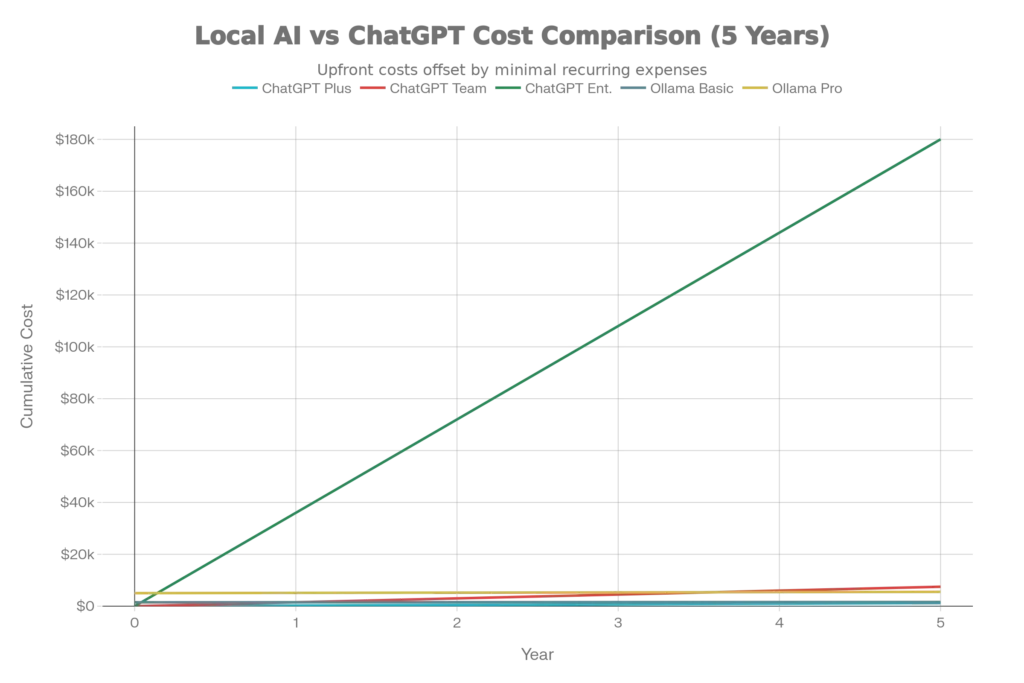
The financial impact of offline deployment is staggering at scale. ChatGPT Plus costs $20/month ($240/year), ChatGPT Team runs $1,500/year for five users, and Enterprise solutions exceed $180,000 over five years. Conversely, a one-time Ollama setup with a modern laptop costs $1,500-5,000, with electricity being the only ongoing expense ($24-100 annually). For organizations processing millions of tokens monthly, local deployment reduces costs by 80-90% after the initial investment.
Beyond economics and privacy, offline deployment provides resilience and speed. Cloud-based ChatGPT requires network connectivity and processes requests with 200-800ms latency due to API round trips. Local inference delivers sub-10ms response times while functioning completely offline, making it ideal for remote deployments, vehicles, and systems requiring uninterrupted operation.
Hardware Requirements: What Your Laptop Needs
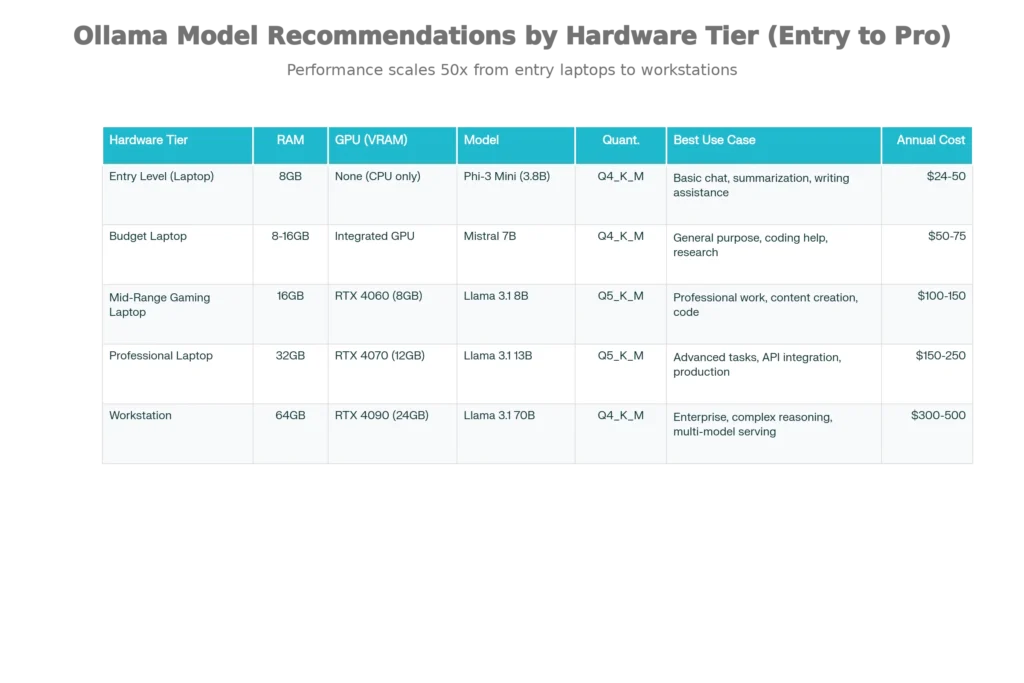
The beautiful aspect of Ollama is scalability across hardware tiers. Unlike cloud solutions requiring stable internet and account setup, local deployment simply depends on your device’s capabilities. Here’s the breakdown:
Entry-Level Setups (8GB RAM): Laptops from the past 5-7 years typically include 8GB RAM. This tier comfortably runs compact models like Phi-3 Mini (3.8B parameters), which delivers respectable performance for summarization, writing assistance, and basic reasoning tasks. Expect 2-4 tokens per second on CPU-only machines—slower than cloud AI, but sufficient for thoughtful work rather than interactive chat.
Mid-Range Gaming Laptops (16GB RAM with GPU): Modern gaming laptops with GTX 1650 or RTX 4060 (6-8GB VRAM) unlock 7-8B parameter models like Mistral or Llama 3.1 8B, delivering 15-25 tokens per second. This tier represents the sweet spot for most professionals—sufficient capability for coding assistance, content generation, and complex reasoning without extreme hardware costs.
Professional Workstations (32GB+ RAM with RTX 4070+): This configuration supports 13B-70B parameter models, achieving 30-100+ tokens per second depending on quantization. Organizations and research teams operating at this level get performance approaching or exceeding GPT-3.5 Turbo while maintaining complete data sovereignty.
Critical Hardware Specifications:
- RAM matters more than GPU for most users: Running 7B models requires minimum 8GB system RAM; 13B models need 16GB; 33B models demand 32GB
- CPU performance: Modern CPUs with AVX-512 instruction sets achieve 20-50 tokens per second with small models
- Storage space: Models range from 3GB (Phi-3 Mini) to 40GB+ (70B quantized versions)
- Cooling: Continuous inference generates sustained heat; proper ventilation prevents throttling
Installation: Three Simple Steps to Offline AI
Step 1: Download and Install Ollama
Visit ollama.com and download the installer for your operating system (Windows, macOS, or Linux). Installation takes under five minutes—Ollama runs as a background service requiring no complex configuration. On Windows and macOS, the application appears in your system tray; on Linux, run the installation command:
bashcurl -fsSL https://ollama.com/install.sh | sh
Once installed, Ollama automatically starts on port 11434, making it accessible via http://localhost:11434.
Step 2: Select and Download Your Model
Model selection depends entirely on your hardware and use case. Begin by downloading a model using the ollama pull command:
bashollama pull mistral          # For 7B general-purpose model (4.1GB)
ollama pull llama3.1:8b      # Meta's 8B model (4.7GB)
ollama pull phi:mini         # Microsoft's ultra-compact 3.8B
The Ollama library offers dozens of models; popular choices for 2025 include Llama 3.1 (Meta), Mistral (accessible and efficient), Phi-4 (Microsoft’s reasoning powerhouse), DeepSeek-R1 (advanced reasoning), and Gemma 3 (Google’s multimodal option). First-time users should start with Mistral 7B or Phi-3—both excellent entry points balancing capability and resource efficiency.
Step 3: Run Your Model
Execute a single command to start chatting:
bashollama run mistral
Type your prompts directly in the terminal. While functional, the command-line interface feels dated. That’s where graphical frontends enter the picture.
The Smart Frontend: Adding a User-Friendly Interface with Open WebUI
Running Ollama purely through the terminal works, but Open WebUI transforms the experience into something resembling professional ChatGPT. This open-source graphical interface connects to your local Ollama instance, providing conversation history, prompt templates, file uploads, and model switching—all without external APIs.
Docker-based Setup (Recommended for Non-Technical Users):
If your machine has Docker installed, run a single command to launch both Ollama and Open WebUI:
bashdocker run -d \
  -p 3000:3000 \
  -e OLLAMA_API_BASE_URL=http://host.docker.internal:11434 \
  --name open-webui \
  --restart always \
  ghcr.io/open-webui/open-webui:main
Then open http://localhost:3000 in your browser—a ChatGPT-like interface greets you immediately. Upload PDFs for document analysis, adjust system prompts to customize model behavior, and save conversations locally.
Manual Node.js Setup (No Docker):
For users preferring direct installation, clone Open WebUI from GitHub and run:
bashnpm install
npm start
Both approaches yield identical functionality—choose based on whether Docker is already installed on your system.
Model Selection Strategy: Quantization and Performance Trade-offs
Quantization is the secret weapon making laptop AI feasible. While full-precision models consume enormous storage and RAM, quantized versions compress weights to 4-8 bits, reducing size 50-75% while preserving 95%+ of original capability.
Understanding Quantization Formats:
Modern quantization uses “K-quants,” an improvement over legacy formats. Q4_K_M represents the recommended sweet spot for most users—4-bit quantization with intelligent clustering that balances quality and speed. Q5_K_M provides higher quality with slightly more storage overhead, ideal when you have sufficient VRAM. For CPU-only systems, Q4_K_S or Q3_K variants squeeze models into minimal memory.
Avoid aggressive quantization like Q2_K; the quality degradation becomes noticeable in reasoning tasks. Similarly, Q8_0 and full-precision (F16/F32) formats are impractical for laptops unless specifically targeting coding models requiring maximum precision.
The Ollama library automatically selects appropriate quantizations—when you run ollama pull mistral, Ollama downloads the Q4_K_M variant by default, optimizing for quality-to-size tradeoff.
Performance Reality: What Speed to Expect
Tokens per second (t/s) measures how fast your model generates responses. ChatGPT typically generates 50-100 tokens/second on cloud servers. Local setups on consumer hardware naturally run slower, but the gap has narrowed dramatically.
A Phi-3 Mini on modern CPU achieves 2-4 t/s—generating a 500-word response takes 2-3 minutes. For most writing and coding tasks, this feels acceptable since you’re thinking while the model works. Mistral 7B on an RTX 4060 reaches 15-25 t/s, generating responses in real-time. Llama 3.1 8B with GPU hits 30-45 t/s, matching or exceeding cloud API speeds.
GPU acceleration delivers the most dramatic improvements. The same Llama 3.1 8B model runs at 5-8 t/s on CPU but 40+ t/s on a modern GPU—a 5-10x speedup. For serious deployment, even modest gaming GPUs justify their cost through sheer speed gains.
Practical Use Cases and Industry Applications
Healthcare and Medical Data: HIPAA-compliant document analysis requires keeping patient records local. Radiologists and pathologists use offline models for preliminary image analysis without sending sensitive imaging data to cloud servers.
Financial Services: Trading firms process market data with sub-millisecond latency requirements that cloud APIs cannot satisfy. Fraud detection systems analyze transactions locally, keeping competitive algorithms proprietary.
Legal and Corporate: Law firms analyze confidential contracts and intellectual property without third-party exposure. Corporate R&D teams process trade secrets through local models without leakage risks.
Education and Research: Academic institutions deploy local models for teaching, allowing students unlimited experimentation without API quotas or costs. A recent study analyzing 180 Indian developers found local deployment enables 2× more experimental iterations and 33% cost reduction compared to commercial solutions, with users reporting deeper understanding of AI architectures.
Edge and IoT Deployment: Small models (1-3B parameters) run on edge devices—smartphones, industrial equipment, drones—providing intelligence without cloud connectivity. Manufacturing facilities use offline models for predictive maintenance without exposing facility data.
Integration with Development Frameworks
LangChain Integration: Connect Ollama to LangChain for building AI applications:
pythonfrom langchain.llms import OpenAI
import os

os.environ["OPENAI_API_BASE"] = "http://localhost:11434"
os.environ["OPENAI_API_KEY"] = "dummy-key"

llm = OpenAI(model_name="mistral")
result = llm("Explain quantum computing in simple terms")
print(result)
This approach works because Ollama includes an OpenAI-compatible API endpoint, making it a drop-in replacement for any tool designed for OpenAI’s services.
Python SDK: For direct Python integration without HTTP calls:
pythonimport ollama

response = ollama.generate(
    model="mistral",
    prompt="What is photosynthesis?"
)
print(response)
JavaScript/Node.js: Web developers can integrate models into full-stack applications:
javascriptconst { Ollama } = require("ollama");
const ollama = new Ollama({ host: "http://localhost:11434" });

async function chat() {
  const response = await ollama.generate({
    model: "mistral",
    prompt: "Explain machine learning",
  });
  console.log(response.response);
}

chat();
All frameworks connect through a standardized REST API on port 11434, supporting streaming responses, batch processing, and concurrent requests.
Troubleshooting Common Issues
GPU Not Detected: Ollama uses GPU drivers for acceleration. If your GPU isn’t recognized, first ensure you’re running the latest drivers (NVIDIA or AMD). On Linux, verify Docker GPU runtime is configured:
bashdocker run --gpus all ubuntu nvidia-smi
If this fails, Ollama won’t see your GPU.
Out of Memory: If Ollama crashes or freezes, you’re likely exceeding available RAM. Solutions include: (1) using a smaller model or quantization, (2) reducing context window in configuration, or (3) enabling layer offloading to split computation between GPU and CPU.
Slow Performance: Performance depends on bottleneck identification. CPU-only inference on large models is inherently slow—there’s no fixing this without GPU upgrade. If GPU-enabled but still slow, check if model layers are being offloaded to CPU due to insufficient VRAM. Reduce context length or use smaller quantization.
Model Version Issues: Ollama caches models locally. To update to latest versions:
bashollama pull mistral
ollama pull llama3.1:8b
Older versions can cause compatibility issues with Open WebUI.
Advanced Deployment: Production and Enterprise Scenarios
Hybrid Cloud Offloading: Sophisticated organizations deploy local models for routine queries while automatically deferring complex reasoning to GPT-4 via cloud APIs, optimizing cost and performance. Requests are routed intelligently based on query complexity, saving cloud expenditure while maintaining capability ceiling.
Multi-GPU Tensor Parallelism: For 70B+ models, frameworks like vLLM distribute computation across multiple GPUs, enabling enterprise-grade inference on consumer hardware clusters.
Fine-Tuning on Private Data: Unlike cloud solutions preventing customization, local Ollama models can be fine-tuned on proprietary datasets, creating organization-specific AI assistants.
API Management with LiteLLM: In complex environments running both local and cloud models, LiteLLM provides intelligent routing, automatically selecting optimal providers based on cost, latency, and availability.
Cost Reality Check: 5-Year Financial Comparison
A comprehensive 5-year cost analysis reveals dramatic savings:
- ChatGPT Plus: $1,200 total (5 years)
- Ollama Basic Setup: $120-300 (electricity only after initial $1,500 investment)
- ChatGPT Team (5 users): $7,500 total
- Ollama Professional Setup: $300-500 (electricity only after initial $5,000 investment)
- ChatGPT Enterprise (50 users): $180,000+
- Ollama Enterprise Cluster: $3,000-6,000 operating costs annually
For enterprises, 5-year savings reach $177,000+ by eliminating per-token API charges. Break-even occurs within 12-18 months for organizations with significant AI workloads. Even individual users save $1,080+ over five years through eliminated subscription fees.
Latest Models and Research (2025)
The local LLM landscape evolved dramatically in 2025, with several standout developments:
DeepSeek-R1 Series: This Chinese lab’s reasoning models now approach GPT-4o performance in math and coding benchmarks, with smaller 7B and 8B variants running comfortably on gaming laptops. The 7B distilled version delivers 90%+ of performance for inference workloads under 10% of the computational cost.
Llama 4 and Beyond: Meta’s continued optimization of the Llama family delivers incremental but meaningful improvements, with version 3.1 establishing itself as the stable workhorse for production deployments.
Gemma 3 Multimodal: Google’s latest includes vision capabilities, enabling image understanding and document analysis without separate models. However, the 12B and 4B variants experience known performance issues in Ollama (resolved in the 27B version).
Research Validation: Academic papers validate offline deployment’s viability. A peer-reviewed study published in 2025 found that locally deployed LLMs provide sufficient accuracy for report processing while dramatically reducing operational costs and dependencies. Additionally, research on democratizing AI development shows local deployment enables 2× more experimentation while reducing costs by 33% compared to cloud solutions.
Final Thoughts: The Privacy-First AI Revolution
Running ChatGPT-style AI locally represents a fundamental shift in how individuals and organizations approach artificial intelligence. You’re no longer dependent on cloud providers, monthly subscriptions, or internet connectivity. Your data remains yours, your costs become predictable, and your model behavior remains under your control.
The technical barriers have fallen away. Installation takes five minutes, model downloads happen automatically, and Open WebUI provides a modern interface indistinguishable from commercial chatbots. Whether you’re a developer prototyping AI applications, a professional protecting client confidentiality, or an organization optimizing cost structure, Ollama makes offline AI deployment practical and accessible.
The future isn’t about centralized cloud AI—it’s about bringing intelligence to the edge, close to your data, under your control, and completely private. That future is available today.
Read More:Lip Sync AI Secrets: Instantly Make Any Character Talk in Any Language
Source: K2Think.in — India’s AI Reasoning Insight Platform.