
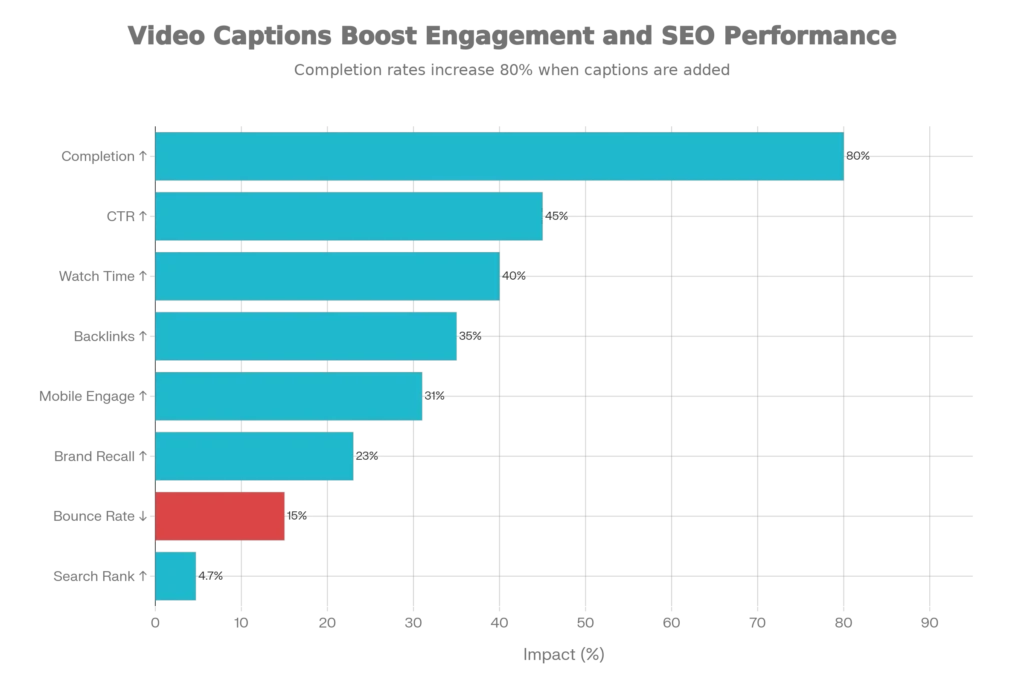
In 2025, auto-captioning has transformed from a nice-to-have feature into a critical necessity for digital creators, especially for Indian content creators working across Hindi and English formats. Video captions increase watch time by 40%, boost completion rates by 80%, and improve search rankings by up to 4.7%—making them essential for anyone serious about growing their reach on Instagram Reels, YouTube Shorts, and TikTok.
The global auto-caption apps market has exploded, valued at $1.2 billion in 2024 and projected to reach $5.8 billion by 2033, growing at a robust 18.9% CAGR. For Indian creators specifically, this means unprecedented access to world-class captioning technology that supports multiple regional languages with remarkable accuracy.
Understanding Auto-Captioning: Why It’s Essential for Modern Content Creators
Auto-captioning uses artificial intelligence and machine learning to automatically transcribe audio into text, eliminating hours of manual work. For creators juggling multiple platforms, languages, and posting schedules, this technology is genuinely transformative. But beyond just saving time, captions directly impact your bottom line.
Research from peer-reviewed studies confirms what creators have long suspected: captions aren’t just an accessibility feature—they’re an engagement multiplier. A study published by the Atlantis Press found that 62.28% of viewers answered comprehension questions correctly when watching captioned videos, compared to only 45.45% without captions. This isn’t subtle. This is a 37% improvement in understanding.
The impact extends across multiple dimensions. When your audience can follow along with text while watching, they naturally stay longer, share more frequently, and engage deeper with your content. Up to 80% of social media users watch videos without sound—making captions the difference between viewers staying and swiping away. Additionally, 71% of students who use captions don’t have hearing difficulties, demonstrating that captions benefit everyone, not just people who are deaf or hard of hearing.
The Three Core Benefits Every Creator Must Know
First: Accessibility & Inclusivity. More than 250 million people worldwide are deaf or hard of hearing. By adding captions, you’re not just expanding access—you’re sending a signal to your audience that you care about them. This builds loyalty and community.
Second: SEO & Discoverability. Search engines cannot watch videos, but they can read text. When you add captions, you’re giving Google and other search engines indexable content that helps your video rank for more keywords. Research shows captioned videos rank approximately 4.7% higher in search results and attract 35% more backlinks than uncaptioned content.
Third: Engagement & Monetization. For monetized creators, captions directly impact revenue. Videos with captions see 13.48% more views within 14 days and 40% longer watch time—both critical metrics for YouTube’s algorithm and ad performance.
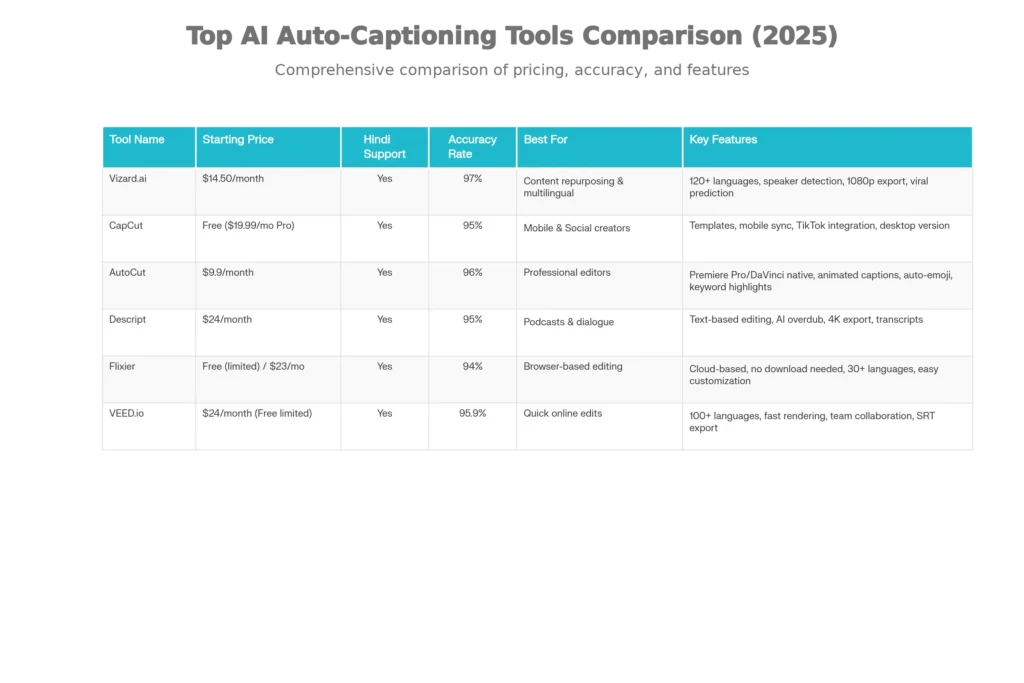
The Top 6 AI Auto-Captioning Tools for Hindi & English (2025)
1. Vizard.ai – The Best Overall Solution for Multilingual Content
Best for: Content creators who need multilingual support with studio-level accuracy
Vizard.ai has emerged as the gold standard for creators working across Hindi and English. What sets it apart is exceptional accuracy combined with intelligent features designed specifically for social media creators.
Key Strengths:
- 97% accuracy in Hindi transcription with native speaker support
- Supports 130+ languages including regional Indian dialects
- Automatic speaker detection and identification
- One-click repurposing of long-form videos into platform-specific shorts
- Automatic clip generation with viral prediction AI
- 1080p export without watermarks on free tier
Hindi & English-Specific Features: Vizard automatically detects whether your video is in Hindi, English, or Hinglish, then generates captions with remarkable accuracy. The translation engine maintains perfect timing synchronization, meaning your Hindi content can be instantly captioned in English and vice versa without manual adjustments.
Pricing: Free tier (with watermarks); Creator plan at $14.50/month; Business plan at $19.50/month
The Reality Check: Processing longer videos (60+ minutes) can take 10-15 minutes. For daily content creators producing multiple reels, the free tier might require upgrading quickly due to credit limitations.
2. CapCut – The Mobile Creator’s Powerhouse
Best for: Instagram Reels, TikTok, and YouTube Shorts creators who edit primarily on mobile
CapCut has evolved from a simple editing app into a comprehensive content creation suite. For Indian creators specifically, it’s become the default choice—especially for creators in tier-2 and tier-3 cities where mobile-first content consumption dominates.
Key Strengths:
- 95% transcription accuracy with native Hindi support
- Works seamlessly across mobile (iOS/Android), desktop, and web
- TikTok-native integration (critical for short-form content)
- Supports 100+ languages including Hindi, Tamil, Telugu, Kannada, and Malayalam
- Animated caption presets optimized for social media engagement
- Zero watermark on exports with free tier
- Built-in trending sounds and effects
Hindi & English-Specific Features: CapCut’s caption editor allows you to customize font, color, background style, and animation—with presets specifically designed for Hindi text readability. The auto-detect language feature works flawlessly with mixed-language (Hinglish) content.
Pricing: Free (full features); Pro at $19.99/month
Why Indian Creators Love It: CapCut works perfectly on older Android devices with limited RAM, a crucial consideration in India’s mobile ecosystem. The app requires no signup to start editing, lowering barriers to entry for new creators.
3. AutoCut – The Professional Editor’s Secret Weapon
Best for: Video editors and content teams using Adobe Premiere Pro or DaVinci Resolve
AutoCut operates as a native plugin directly inside professional editing software—meaning you never need to export, re-import, or switch between applications. For professional content studios and agencies, this workflow efficiency compounds into significant time savings.
Key Strengths:
- 96% accuracy with support for 80+ languages
- Native integration with Premiere Pro and DaVinci Resolve (free and Studio versions)
- Animated caption generation with 10,000+ customizable templates
- Auto-emoji feature that intelligently adds relevant emojis to captions
- Keyword highlighting to emphasize important terms
- Support for 80+ languages with excellent Hindi transcription
- Professional-grade speech recognition
- Weekly updates with new features
Hindi & English-Specific Features: AutoCut’s keyword highlighting works brilliantly for Hindi content—important words automatically stand out in different colors, improving viewer comprehension. The auto-emoji feature understands cultural context, making it appropriate for Hindi-language content.
Pricing: 14-day free trial; AI Plan at $14.90/month (yearly billing); Enterprise plans available
The Professional’s Advantage: If you’re already using Premiere Pro or DaVinci Resolve, AutoCut eliminates the need to export to a separate captioning tool. For a 1-hour podcast or video, AutoCut can generate 5 minutes of animated captions in just 10 seconds.
4. Descript – The Podcast & Dialogue Specialist
Best for: Podcasters, interview-based content, dialogue-heavy videos
Descript introduced a revolutionary concept: text-based video editing. Instead of hunting for clips on a timeline, you edit the transcript directly, and the video follows. It’s particularly powerful for creators with multiple speakers or complex dialogue.
Key Strengths:
- 95% accuracy with strong Hindi language support
- AI Overdub feature to replace or create voiceovers using AI
- Multi-speaker detection and speaker-specific editing
- Exports transcripts in multiple formats (SRT, VTT, TXT)
- 30+ language support including Hindi
- 4K export capability
- Full team collaboration features
Hindi & English-Specific Features: Descript’s speaker detection intelligently identifies when speakers switch from Hindi to English mid-sentence, maintaining accuracy across code-switching (Hinglish) content—common among Indian creators.
Pricing: $24/month (Hobbyist plan); Business plans from $19.99/month with annual billing
5. Flixier – The Browser-Based Solution (No Installation Needed)
Best for: Creators who want to avoid software downloads; perfect for Chromebooks and older computers
Flixier is entirely cloud-based, requiring zero downloads or installations. For creators using shared computers, older devices, or working across multiple devices, this is a game-changer.
Key Strengths:
- 94% accuracy with support for 30+ languages
- Complete cloud-based editing—works in any browser
- Automatic caption generation in 5 minutes
- Easy subtitle translation to 30+ languages
- Direct Instagram export (perfect for Reel creators)
- No technical knowledge required
- Collaborative tools for teams
Hindi & English-Specific Features: Flixier’s browser-based interface means Indian creators can work on content from any café with WiFi—no powerful computer needed. The translation feature instantly converts Hindi captions to English and vice versa while maintaining perfect synchronization.
Pricing: Free tier (limited); Pro at $23/month; Business at $43/month
The Mobile-First Advantage: Works flawlessly on Chromebooks and tablets, making it ideal for Indian educational institutions and budget-conscious creators.
6. VEED.io – The Fastest Online Solution
Best for: Creators who need instant results and prefer browser-based tools
VEED.io is known for blazing-fast caption generation and seamless team collaboration. The interface is genuinely intuitive—you don’t need tutorials to start.
Key Strengths:
- 95.9% accuracy (among the highest in the industry)
- Recognizes 100+ languages and regional accents
- Fastest processing times of any browser-based tool
- Free plan with basic features
- SRT file export for further editing
- Real-time collaboration features
- Multi-language subtitle translation
Hindi & English-Specific Features: VEED recognizes regional Hindi accents (North Indian, South Indian, Hindustani, etc.) with impressive accuracy. The platform explicitly supports Indian languages and understands cultural context.
Pricing: Free (with limitations); Premium plans from $24/month
How Auto-Captioning Works: The Technology Behind the Magic
Modern auto-captioning relies on advanced machine learning models trained on millions of audio samples. The process involves three stages:
1. Audio Processing: The AI breaks down your audio into smaller segments and extracts acoustic features using techniques like MFCC (Mel-Frequency Cepstral Coefficient) analysis—essentially converting sound into data the AI can understand.
2. Speech Recognition: Advanced neural networks (often trained on transformer architectures similar to ChatGPT) predict what words are being spoken based on acoustic patterns. Modern models can handle background noise, accents, and multiple speakers.
3. Synchronization: The AI aligns the transcribed text with precise timestamps, ensuring captions appear exactly when words are spoken. This is crucial for viewer experience.
For Hindi specifically, recent breakthroughs have been remarkable. Research shows that advanced Hindi speech recognition systems now achieve 89.9% accuracy using TDNN (Time-Delay Neural Network) with i-vector adaptation—up from just 49.7% accuracy with older Google Speech-to-Text systems.
Hindi Language Challenges & How Modern Tools Handle Them
Indian content creators face unique linguistic challenges that English-only creators don’t encounter:
1. Code-Switching (Hinglish)
Most Indian creators naturally mix Hindi and English within single videos. Modern tools now recognize this pattern and handle code-switching seamlessly. When you say “Yeh video ek complete guide hai,” the AI understands both Hindi and English components.
2. Regional Accents & Dialects
Hindi varies significantly across regions. Someone from Mumbai speaks differently than someone from Delhi or Kolkata. Advanced tools now recognize these variations. DemoCreator, for example, supports not just Hindi, but also Marathi, Tamil, Telugu, Kannada, Malayalam, and other regional languages—essential for India’s linguistic diversity.
3. Background Noise & Audio Quality
Many Indian creators record videos in imperfect conditions—traffic noise, ambient sounds, multiple speakers in the background. Modern AI models are trained specifically to handle this. Research shows that with proper preprocessing (noise reduction using Butterworth filters combined with k-means clustering), Hindi speech recognition accuracy improves from 49.7% to over 81%.
4. Speed and Naturalness
Hindi speakers often speak quickly, with words blending together. The latest neural network architectures handle this by analyzing extended temporal context, not just isolated sounds.
The Data: Why Statistics Matter for Your Content Strategy
Understanding the numbers helps you prioritize captioning in your content workflow:
| Metric | Impact | Source |
|---|---|---|
| Watch Time Increase | +40% longer average viewing duration | Facebook Study, 3Play Media |
| Completion Rate | 80% more likely to watch to completion | Multiple academic studies |
| Search Rankings | 4.7% higher in SERPs | SEO Research 2025 |
| Engagement Rate | 12% more interactions (likes, comments, shares) | Discovery Digital Networks |
| Mobile Viewing | 23% more likely to share on mobile | Mobile-First Study |
| Bounce Rate Reduction | 10-15% fewer viewers leave early | User Behavior Analysis |
| Backlink Attraction | 35% more external links to captioned content | Domain Authority Research |
| Brand Recall | 23% improvement in brand memory | Marketing Studies |
For Indian creators specifically, these numbers are even more significant. 42% of Indian marketing managers use AI to optimize content, and brands that have implemented caption strategies report engagement increases up to 25%—higher than global averages.
Step-by-Step: How to Auto-Caption Your Instagram Reels (Practical Guide)
Let me walk you through the actual process using the most popular tools:
Method 1: Using CapCut (Mobile-First)
- Open CapCut and create a new project
- Import your Reel video
- Tap “Text” → “Captions”
- Select “Auto Captions”
- Choose your language (Hindi/English/Auto-detect)
- Wait 30-60 seconds for AI processing
- Review and edit any errors
- Customize font, color, and animation
- Export and upload directly to Instagram
Time Investment: 3-5 minutes total
Method 2: Using Vizard.ai (Desktop, Best Quality)
- Visit Vizard.ai and upload your video
- The AI automatically detects language
- Select “Subtitles” option
- Choose output language if translation needed
- Review the transcript (it’s fully editable)
- Select caption style and colors
- Export as MP4 or download SRT files
- Upload to Instagram
Time Investment: 5-8 minutes total
Method 3: Using Flixier (Browser-Based)
- Go to Flixier.com and click “Get Started”
- Drag and drop your video
- Right-click video → “Generate Subtitles”
- Select language
- Wait for processing
- Edit individual captions if needed
- Customize appearance
- Export and download
Time Investment: 3-4 minutes total
Addressing Real Creator Concerns: FAQ Section
Q: Do I need to manually fix all the errors?
A: No. Modern tools like Vizard (97% accurate) and AutoCut (96% accurate) require minimal corrections. Most creators spend just 2-3 minutes reviewing and fixing any errors. Accentless English or clear Hindi rarely has errors beyond 1-2 words per minute of video.
Q: Will captions hurt my video aesthetics?
A: Absolutely not. Every modern tool offers customizable styling. You can choose from thousands of templates, adjust colors to match your branding, add backgrounds, animations, and effects. Professional-looking captions enhance videos rather than detract from them.
Q: Which tool is best for pure Hindi content?
A: Vizard.ai edges ahead with 97% accuracy specifically for Hindi content, automatic Hindi dialect recognition, and 130+ language support. However, CapCut is excellent for creators who prioritize ease of use.
Q: Can I use captions for other platforms like YouTube and TikTok?
A: Yes. All recommended tools export captions in formats compatible with multiple platforms. You can upload the same captioned video to Instagram, YouTube, TikTok, and Facebook.
Q: What about copyright and music in videos?
A: Captions don’t affect copyright. Music and video copyright are separate concerns. All these tools focus purely on caption generation and don’t flag or remove copyrighted audio.
Real-World Impact: What Happens When You Add Captions
A study conducted at the University of South Florida found that:
- 42% of students use captions to improve focus
- 38% use captions to boost information retention
- Test scores increased 3% for caption users and 8% for transcript users
- 71% of caption users don’t have hearing difficulties—they use captions as a learning and engagement tool
For content creators, the implications are clear: Captions make your content work harder for you, reaching more people, keeping them engaged longer, and helping them remember your message.
When Discovery Digital Networks analyzed captioning impact, they found:
- 7.32% increase in lifetime views
- 13.48% increase in views within the first 14 days
- 40% longer watch times when comparing captioned vs. uncaptioned videos
Choosing Your Tool: Decision Matrix
Choose Vizard.ai if: You want the highest accuracy, multilingual support, and advanced features like automatic clipping and speaker detection.
Choose CapCut if: You create primarily on mobile, value ease of use above all else, and want zero installation friction.
Choose AutoCut if: You use professional editing software (Premiere Pro or DaVinci Resolve) and want native plugin integration.
Choose Descript if: You create podcast content, interview-based videos, or dialogue-heavy content.
Choose Flixier if: You want zero software downloads and prefer browser-based tools.
Choose VEED if: You need the fastest processing and value team collaboration features.
The Future of Auto-Captioning: What’s Coming in 2025-2026
The auto-captioning market is evolving rapidly. Based on current research and tool developments, expect:
1. Real-Time Captioning: Tools will generate captions while you’re still recording, visible in your viewfinder.
2. Emotion-Aware Captions: AI will analyze speaker emotion and adjust caption styling (colors, animations, emphasis) accordingly—making emotional content even more impactful.
3. Context-Aware Translation: Rather than word-for-word translation, AI will understand cultural context and idioms, making translations feel natural rather than robotic.
4. Accessibility Integration: Automated captions will work seamlessly with screen readers for people using assistive technology.
5. Monetization Integration: Platforms will attribute portions of ad revenue specifically to captioned content, providing creators direct financial incentive.
The Bottom Line: Why Captions Aren’t Optional Anymore
In 2025, auto-captioning has become as essential as microphones and lighting. The data is overwhelming: captions increase watch time, boost search rankings, improve accessibility, and directly impact monetization. For Indian creators working across Hindi and English, the tools available are genuinely sophisticated—offering accuracy rates that would have seemed impossible just three years ago.
The investment is minimal (many tools offer free tiers), the time commitment is negligible (3-5 minutes per video), and the return is substantial (40% watch time increase, 4.7% search ranking boost, 35% more backlinks).
Whether you’re a food blogger captioning recipe Reels in Hinglish, a YouTuber creating educational content in Hindi, or a brand reaching customers across regional languages, the tools reviewed in this article will transform your content into more engaging, discoverable, accessible assets.
The choice isn’t whether to add captions anymore. The question is simply: which tool fits your workflow best?
Read More:Deepfake Warning: How to Spot AI-Generated News Videos
Source: K2Think.in — India’s AI Reasoning Insight Platform.