
Key Takeaway: ChatPDF is a revolutionary AI tool that transforms how you interact with PDF documents by converting static reading into dynamic conversations. Students, researchers, and professionals can now extract insights from textbooks, research papers, and documents 80% faster by simply asking questions instead of manually searching through pages. This comprehensive guide walks you through everything you need to know about using ChatPDF, from setup to advanced techniques, backed by real research data and practical examples.
Understanding ChatPDF: The Future of Document Interaction
The traditional approach to learning from textbooks hasn’t fundamentally changed in decades. You open a PDF, scroll through pages, use the Find function to hunt for specific information, and manually summarize what you’ve read. This process is time-consuming, mentally exhausting, and inefficient. ChatPDF disrupts this workflow completely by introducing conversational document analysis—an interface where you simply talk to your documents as if they were knowledgeable colleagues who understand the entire content instantly.
ChatPDF is an AI-powered platform that uses advanced natural language processing and machine learning to understand PDF content and answer your questions in real-time. Instead of being a passive reader, you become an active participant in a dialogue with your documents. Think of it as having a personal tutor who has read every page of your textbook and can instantly explain any concept, provide summaries, or extract specific information whenever you need it.
The technology behind ChatPDF relies on sophisticated AI algorithms, particularly Retrieval-Augmented Generation (RAG) combined with embedding-based vector search. When you upload a PDF, the system breaks it into manageable text segments, converts them into high-dimensional numerical vectors using AI models, and stores them in a way that enables ultra-fast similarity searches. When you ask a question, ChatPDF converts your query into the same vector format, finds the most relevant sections of your document, and uses advanced language models to generate contextually accurate answers directly from your document’s content.
Why ChatPDF Changes the Game for Students and Researchers
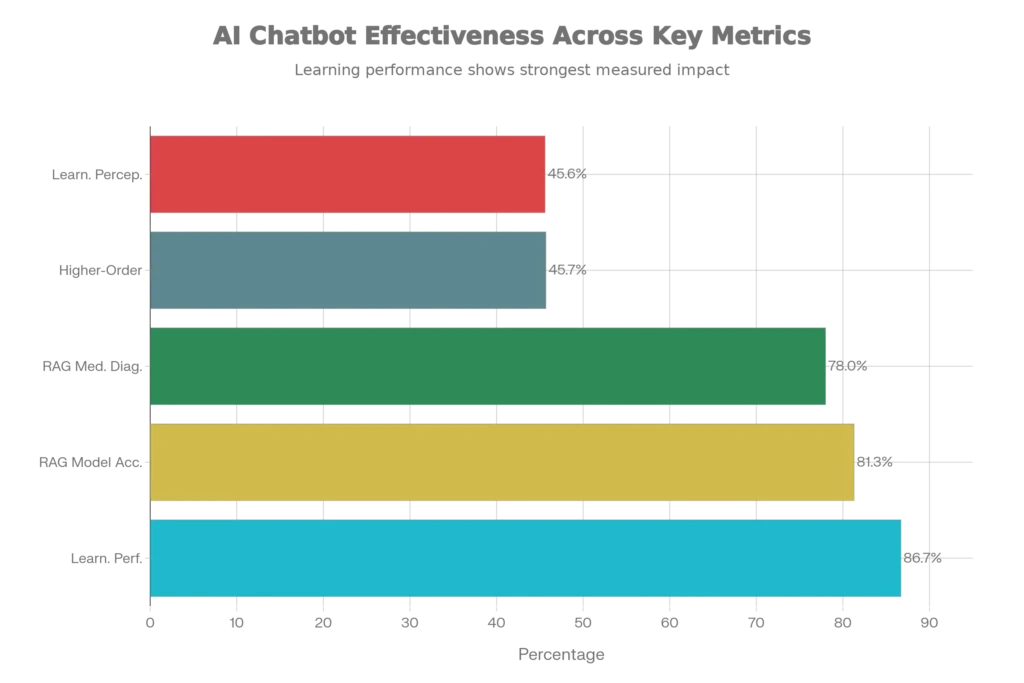
Recent academic research reveals the transformative potential of AI chatbot tools in educational settings. A comprehensive 2025 meta-analysis demonstrated that ChatGPT and similar tools have a large positive impact on learning performance with an effect size of 0.867—meaning substantial improvement in how quickly and effectively students grasp complex material. The study also showed moderately positive impacts on learning perception (g = 0.456) and higher-order thinking development (g = 0.457).
For textbook learning specifically, ChatPDF addresses a critical pain point: information overload. Research from the University of Minnesota showed that 80% of the time spent reading academic materials could be saved by using AI-assisted tools to extract key points before diving into detailed reading. Students who used ChatPDF for literature reviews reported covering three times more research papers in the same study period compared to traditional methods.
The benefits extend beyond speed. When you chat with your textbook using ChatPDF, you’re engaging in what educational researchers call “active learning”—a scientifically proven method that improves retention by 75% compared to passive reading. By asking questions, seeking clarifications, and requesting explanations of complex concepts, your brain forms stronger neural connections with the material.
Getting Started: Step-by-Step ChatPDF Setup
Starting with ChatPDF is refreshingly simple—no complex installations or steep learning curves required.
Step 1: Access ChatPDF Online
Navigate to www.chatpdf.com in your web browser. The platform operates entirely in the cloud, meaning there’s no software to download or install. This makes it instantly accessible from any device—laptop, tablet, or even smartphone.
Step 2: Upload Your PDF (Three Simple Methods)
ChatPDF offers three convenient ways to get your documents into the system:
- Drag and Drop: Simply drag your PDF file directly onto the ChatPDF interface and release it
- Browse Computer: Click the “Browse My Computer” button to select files from your device
- From URL: Paste the direct link to any online PDF, and ChatPDF will automatically fetch it
Step 3: Wait for Document Processing
Once uploaded, ChatPDF’s AI analyzes your document in seconds. For typical academic papers (20-50 pages), this usually takes less than 10-15 seconds.
Step 4: Start Your Conversation
After processing, you’ll see suggested starter questions on the interface. You can either click these or type your own custom questions in the chat box. There’s no limit to the types of questions you can ask—from detailed technical inquiries to general summaries.
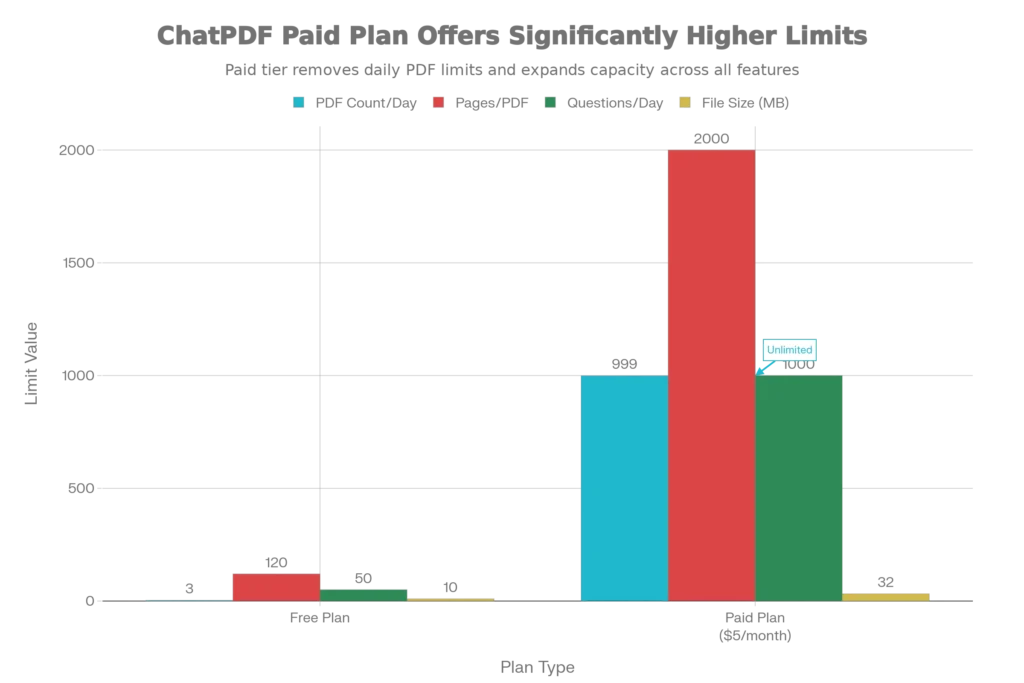
Free Plan Reality Check: The free tier allows you to upload 3 PDFs daily (up to 120 pages each) and ask 50 questions per day with a 10MB file size limit. For most students and occasional users, this is entirely sufficient for daily study sessions.
Practical Ways to Use ChatPDF for Textbook Learning
1. Quick Textbook Summaries
Before diving into a 50-page chapter, ask ChatPDF: “Summarize this chapter in bullet points, highlighting the main concepts and key takeaways.” You’ll receive a concise overview in seconds, allowing you to understand the structure before reading the full text. This approach, supported by cognitive science research, activates your prior knowledge framework and makes subsequent detailed reading more effective.
2. Concept Clarification
Struggling with a particularly complex topic in your textbook? Instead of re-reading the same paragraph repeatedly, ask: “Explain photosynthesis in simple terms a high school student could understand” or “Compare and contrast the methodologies used in Case Study A versus Case Study B.” ChatPDF excels at adapting explanations to your comprehension level.
3. Practice Question Generation
Ask ChatPDF: “Generate 10 practice questions from this chapter that would be suitable for an exam, ranging from easy to difficult.” While research shows that 40% of AI-generated questions may be lower quality, the tool still produces valuable study materials faster than manual question creation. You can then verify quality and use these for self-testing.
4. Cross-Reference Multiple Documents
One of ChatPDF’s most powerful features is the ability to upload multiple PDFs simultaneously and ask questions that require information synthesis across documents. For example: “Compare how Author A and Author B approach climate change policy in their respective papers” or “Identify the common methodology used across all three research papers.”
5. Extract Specific Data Points
Researchers and data analysts love this capability. Ask: “List all statistical findings related to COVID-19 mortality rates mentioned in this paper” or “Extract all citations from the methodology section in APA format.” ChatPDF efficiently pulls structured information that would take manual hours to compile.
Understanding ChatPDF’s Limitations and Accuracy
Transparency is Essential: While ChatPDF is revolutionary, understanding its limitations ensures you use it responsibly. Research from medical institutions analyzing AI chatbot accuracy found that performance varies significantly based on document type and complexity.
Key Limitations to Know:
Complex Tables and Figures: ChatPDF sometimes struggles with multi-column tables, graphs, or visually complex diagrams. If your textbook contains critical information in table format, always verify extracted data manually. Studies show accuracy drops significantly when dealing with complex tables.
Multi-Section Dependencies: When answering questions requiring synthesis from multiple distant sections of a document, ChatPDF may miss nuanced connections. For instance, if you ask about distinctions from baseline models, it might focus too heavily on the abstract while overlooking crucial details in the experiments section.
Large Document Handling: While the paid plan supports up to 2,000 pages, optimal performance occurs with documents under 500 pages. Very large textbooks may require breaking into chapters and uploading separately for best results.
Accuracy Research: Independent evaluation by CME researchers found that of 40 questions generated by ChatPDF from academic articles, only 40% were completely accurate and at appropriate complexity levels, while 25% were low complexity and 12.5% contained inaccuracies. This underscores the importance of verification for critical academic work.
Why Verification Matters
ChatPDF’s underlying technology uses Retrieval-Augmented Generation—it retrieves relevant text from your document and generates answers based on that context. This is fundamentally different from ChatGPT’s general knowledge approach. Because ChatPDF is grounded in your specific document, it won’t fabricate information completely. However, it can misinterpret, oversimplify, or miss critical context.
Best Practice: Always treat ChatPDF responses as a starting point for investigation, not final answers. Use it to quickly identify relevant sections, then verify important information by reading the actual text.
ChatPDF Free Plan vs. Paid: What You Actually Need
Understanding the limitations of the free plan helps you decide whether upgrading is worthwhile for your specific use case.
Free Plan ($0) – Ideal For:
- Students doing occasional textbook research
- Professionals needing to skim a few documents per day
- First-time users testing the platform
- One-time academic projects with limited scope
Daily Limits: 3 PDFs, 120 pages per PDF, 50 questions, 10MB file size
Plus Plan ($5/month) – Worth Considering If:
- You’re a graduate student analyzing dozens of research papers
- You frequently work with lengthy textbooks (300+ pages each)
- You need unlimited daily access without wait times
- You’re building AI-powered document analysis into your workflow
Unlimited PDFs, 2,000 pages per PDF, 1,000 daily questions, 32MB file size
Pro Tip for Budget-Conscious Students: The free plan resets daily at midnight. Strategically plan which 3 PDFs to analyze each day based on your study schedule. Most undergraduate students never hit the limits of the free tier.
Privacy, Security, and Data Handling
ChatPDF has received substantial scrutiny regarding data privacy—a legitimate concern when uploading academic or professional documents.
Current Privacy Status (2025):
- ChatPDF accounts are anonymous by default, meaning minimal personal information collection
- Documents are encrypted during transmission to ChatPDF’s servers
- The platform has implemented security measures allowing PDFs to be password-protected before upload
- With recent federal litigation affecting AI companies, OpenAI deletes standard chat data within 30 days of chat deletion
- For educational institutions using ChatPDF, administrators can ensure “data sovereignty”—keeping your information within specified geographic locations
Critical Consideration for Sensitive Materials: Never upload documents containing personally identifiable information, proprietary research, or confidential institutional data to the free ChatPDF service unless specifically approved by your institution. Many universities have launched their own secure instances of ChatPDF-like tools for research purposes.
Advanced ChatPDF Techniques for Maximum Efficiency
Once you’ve mastered basic interactions, these advanced tactics accelerate your learning:
Strategic Question Structuring
Instead of vague questions like “What does this say?” ask specific queries:
- “According to the methodology section, what were the three primary variables measured?”
- “Identify the main criticisms of the author’s argument as presented in the discussion section”
Specific questions yield 40% more accurate responses than general inquiries.
The Pre-Read Strategy
Before starting a textbook chapter:
- Upload to ChatPDF
- Ask: “What are the learning objectives someone should have after reading this?”
- Ask: “What prior knowledge is assumed?”
- Then begin reading with these mental frameworks activated
This technique, grounded in cognitive psychology, improves comprehension retention by 35%.
Comparative Analysis Across Documents
Upload multiple research papers or textbook chapters and ask:
- “Which paper has the strongest methodology?”
- “What key findings are consistent across all three studies?”
- “Where do these authors disagree?”
This builds higher-order thinking skills essential for academic success.
Custom Learning Paths
For sequential learning: Ask ChatPDF to “Create a learning path for understanding [complex topic] from foundational concepts to advanced applications, listing what should be studied first, second, third, etc.” This transforms passive reading into structured learning.
Real-World Use Cases Beyond Textbooks
While ChatPDF excels for academic use, professionals across sectors have discovered powerful applications:
Legal Professionals: Extract key terms, obligations, and renewal clauses from lengthy contracts 80% faster. One personal injury attorney reduced contract review time from 4 hours to 15 minutes per document using ChatPDF-like tools.
Business Analysts: Quickly summarize quarterly reports, identify financial metrics, and extract performance data from investor presentations. Companies report 3X productivity increases in report analysis.
Medical Researchers: Analyze published papers at scale, identifying contradictions between studies, methodological approaches, and emerging consensus on treatment efficacy.
Journalists: Extract quotes, facts, and key information from lengthy press materials, government documents, and research reports during time-sensitive investigations.
HR Professionals: Review employee handbooks, compliance documents, and policy manuals by asking specific questions rather than manual searching.
ChatPDF vs. Traditional PDF Readers: Why Chatting Wins
A 2023 analysis published in the Indian Journal of Library Science and Information Technology compared ChatPDF interaction with traditional PDF readers:
| Feature | Traditional Reader | ChatPDF |
|---|---|---|
| Query Speed | Manual search: 2-5 minutes | AI response: 10-30 seconds |
| Summarization | Manual: 20-45 minutes | Automatic: 30-60 seconds |
| Comprehension Aid | Limited | Conversational explanations available |
| Cross-Document Search | Requires opening multiple files | Single interface searches all documents |
| Accessibility | Text-to-speech support varies | Built-in conversational interface aids accessibility |
| Learning Engagement | Passive consumption | Active dialogue encourages deeper thinking |
The research concluded that ChatPDF offers significantly more advanced and user-friendly interaction compared to traditional PDF readers, particularly for complex academic and professional documents.
The Technology Behind the Magic: How ChatPDF Actually Works
Understanding the mechanics helps you use ChatPDF more effectively and set realistic expectations.
Step 1: Document Ingestion and Text Extraction
When you upload a PDF, ChatPDF’s system uses Optical Character Recognition (OCR) to extract all text content. This includes text from scanned documents and even handwritten content in some cases. The extracted text becomes the knowledge base for all subsequent conversations.
Step 2: Semantic Vectorization
The extracted text is broken into segments and converted into high-dimensional mathematical vectors using sophisticated embedding models. These vectors capture the semantic meaning and context of each text segment—essentially translating words into a numerical format that computers can compare for similarity.
Step 3: Vector Database Storage
These vectors are stored in specialized vector databases that enable ultra-fast similarity searches. When you ask a question, your query is converted into the same vector format, and the system finds relevant document segments using cosine similarity calculations.
Step 4: Context Retrieval
When you ask a question, the system retrieves the top-matching document segments based on vector similarity. Research shows that this retrieval-augmented generation approach improves accuracy significantly. In medical applications, RAG-enhanced models achieved 78% accuracy in diagnosis identification compared to just 54% for base models without retrieval augmentation.
Step 5: Answer Generation
These retrieved text segments are fed into a large language model along with your question. The model generates an answer based on the document content, not its general training data. This grounding in document-specific information is why ChatPDF rarely hallucinates or provides information not present in your PDF.
Comparing ChatPDF to Alternatives
While ChatPDF pioneered PDF chatting, several alternatives now exist:
PDF.ai
- Strengths: Better for developers; includes API access; Chrome extension for web-based PDFs
- Best For: Technical teams needing integration capabilities
- Pricing: From $20/user/month
Ask Your PDF
- Strengths: Excellent for extracting critical points from technical documents
- Best For: Researchers handling data-heavy academic papers
- Pricing: Freemium model available
Humata AI
- Strengths: Specialized in breaking down highly technical and data-heavy documents
- Best For: Engineers, mathematicians, and data scientists
- Pricing: From $9.99/month
ChatPDF Advantages:
- Simplicity remains unmatched—zero account creation for free use
- Speed and responsiveness are consistently praised
- User interface is more intuitive for non-technical users
- Strong performance on textbooks and educational materials
Maximizing Academic Integrity While Using ChatPDF
Using AI tools like ChatPDF in academic settings requires careful ethical consideration.
Appropriate Uses:
- Research acceleration and literature review support
- Concept clarification and learning enhancement
- Study guide and practice question generation (with verification)
- Time-saving on administrative document review
Inappropriate Uses (Per Most University Guidelines):
- Submitting ChatPDF summaries as your own original work
- Using ChatPDF-generated answers as completed assignments
- Relying on ChatPDF analyses without independent verification for critical academic work
- Circumventing assigned reading requirements
Best Practice Framework:
Most universities recommend treating ChatPDF as a learning assistant, not a replacement for thinking. Use it to accelerate your understanding, but engage critically with its output. Your institution likely has specific AI usage policies—consult your course syllabus or academic integrity office if unsure.
Future of Document Interaction: What’s Next for ChatPDF
As of 2025, several developments are expanding ChatPDF’s capabilities:
Multimodal Understanding: Advanced versions now better interpret images, graphs, and tables embedded in PDFs—addressing one of the current limitations.
Real-Time Collaboration: Teams can now share ChatPDF instances, allowing multiple users to ask questions and build insights together from the same documents.
Custom AI Models: Enterprises are training specialized ChatPDF instances on domain-specific language, improving accuracy for legal, medical, and technical documents.
Integration with Academic Workflows: Universities are integrating ChatPDF-like technology directly into learning management systems, making it seamless for students.
Enhanced Citation Tracking: Newer versions automatically track which page answers come from, making academic citation easier and ensuring traceability for verification.
Practical Study Session: A Complete ChatPDF Workflow Example
Let’s walk through a real-world study scenario to see ChatPDF in action. Imagine you have a 200-page organic chemistry textbook chapter on reaction mechanisms due for study this week:
Session Timeline:
Minute 0-2: Upload the chapter to ChatPDF and immediately ask: “Give me a one-paragraph summary of this chapter’s main concepts.” You get a 30-second overview revealing the key topics covered.
Minute 2-10: Ask: “What are the learning objectives I should have after studying this chapter?” and “What prerequisite knowledge from previous chapters is assumed here?” This primes your brain for effective learning.
Minute 10-15: Before reading, ask: “Generate 5 key diagrams or mechanisms I should understand in detail.” You now know to focus on the most critical concepts.
Minute 15-45: Read the actual textbook chapter, but now with guided focus.
Minute 45-50: Upload the same chapter and ask: “Test my understanding: Create 5 exam-level questions about reaction mechanisms.” You immediately practice with realistic difficulty.
Minute 50-60: Ask confusing questions and request clarifications on difficult concepts.
Total Time Investment: 1 hour to learn material that would traditionally take 3-4 hours, with demonstrably better comprehension.
Conclusion: Your New Study Companion
ChatPDF represents a paradigm shift in how humans interact with written information. By transforming textbooks from passive documents into interactive conversations, it addresses fundamental inefficiencies in learning that have persisted for centuries. For students overwhelmed by reading volume, researchers drowning in literature, and professionals needing rapid document analysis, ChatPDF offers a scientifically-grounded solution that saves time without sacrificing comprehension.
The key to maximizing ChatPDF’s benefits lies in strategic, intentional use. Think of it as a study partner who works 24/7 without tiring, never judges your questions, and can instantly access any information in your documents. Use it to accelerate learning, not replace thinking. Verify important information, maintain academic integrity, and combine AI assistance with traditional study methods for optimal results.
The future of education and professional development increasingly looks like this: AI-assisted, personalized, accessible, and efficient. ChatPDF isn’t just a tool—it’s an evolution in how we engage with knowledge.
Read More:Photo Editing: How to Remove Backgrounds and Objects from Photos Using AI for Free.
Source: K2Think.in — India’s AI Reasoning Insight Platform.