
In an era where knowledge workers spend over 23 hours weekly in Zoom meetings, AI meeting assistants are transforming workplace productivity by capturing every word, generating accurate meeting notes, extracting action items, and freeing teams from the burden of manual documentation. This comprehensive guide explores three leading AI solutions that are reshaping how organizations document, analyze, and act on critical business conversations.
The Rise of AI Tools for Managing Zoom Meetings
Paragraph:
As remote work becomes the norm, companies are increasingly relying on AI tools to improve the structure and efficiency of their Zoom meetings. These tools automatically record conversations, detect important moments, and generate context-rich summaries. With AI support, Zoom meetings become more organized, actionable, and easier to revisit, especially when dealing with complex topics or cross-functional teams.
Why Zoom Meetings Need Automated Support in a Remote-First World
Paragraph:
Remote-first environments create a high volume of Zoom meetings, making it difficult for teams to manually track every key point and follow-up task. Automated support ensures that no critical detail gets overlooked by providing instant transcripts, highlights, and action lists. This reduces mental fatigue, increases productivity, and ensures teams stay aligned even when working across different time zones.
Best Practices for Using AI During Zoom Meetings
Paragraph:
To maximize results, teams should clearly communicate when AI tools are active, speak at a steady pace, and assign roles for reviewing the generated summaries. Encouraging participants to clarify key decisions during the meeting helps AI capture them with better precision. When used effectively, AI enhances the value of Zoom meetings while minimizing confusion and redundancy.
The Productivity Crisis: Why AI Meeting Assistants Matter
The modern workplace faces a paradox. According to recent workplace productivity research, 92% of employees agree that meetings are often unproductive, yet organizations continue hosting more meetings than ever before. In fact, managers and directors now spend an average of 13 hours per week in meetings—representing over 20% of their workweek. This shift from 25% meeting time in 2020 demonstrates an alarming trend that directly impacts organizational efficiency and employee burnout.
The time spent in meetings is compounded by an additional administrative burden: manual note-taking and post-meeting documentation. Professionals traditionally spend hours transcribing conversations, identifying action items, and summarizing key decisions. This dual burden—attending meetings while simultaneously documenting them—creates cognitive overload that prevents meaningful participation and decision-making.
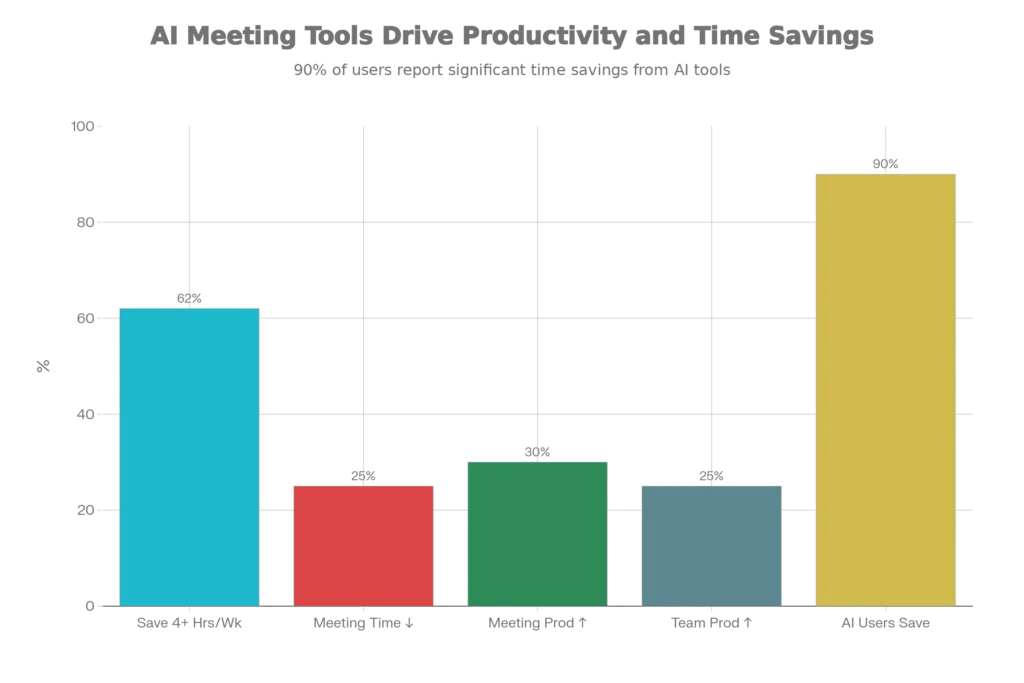
Enter AI-powered meeting assistants. These intelligent bots automatically record conversations, transcribe them with near-human accuracy, and generate actionable summaries. The results are staggering. Sixty-two percent of professionals using automated transcription save over four hours weekly, which translates to more than a month of reclaimed work annually per person. This time recovery enables professionals to redirect efforts toward high-value activities including client engagement, strategic planning, and deep work rather than administrative tasks.
Understanding AI Meeting Transcription Technology
Before examining specific tools, it’s essential to understand how AI meeting bots actually work. Modern meeting transcription relies on three interconnected technologies working in real-time: speech recognition, natural language processing (NLP), and machine learning.
Speech recognition serves as the foundation. Advanced algorithms analyze audio streams to match sounds with words, distinguishing between multiple speakers even in noisy environments. These systems can filter background noise, adapt to different accents, and handle varying speaking speeds. Today’s leading platforms achieve 95-98% accuracy in clear audio conditions, though performance varies in complex environments with overlapping speakers or heavy accents.
Natural language processing transforms raw transcription into coherent, readable text. Rather than simply converting speech-to-text, NLP understands grammar, sentence structure, and word relationships. This enables the system to add proper punctuation, handle capitalization, and create paragraph breaks. Critically, NLP can detect context, identify speakers, and understand idioms—transforming raw audio into professional documentation.
Machine learning continuously improves accuracy over time. By training on massive datasets of spoken language, algorithms learn to recognize industry-specific jargon, adapt to unique speaker patterns, and improve performance based on user feedback. This continuous learning mechanism means that AI meeting assistants become more accurate the more they’re used.
The combination of these technologies enables critical features including real-time transcription with speaker identification, automated action item extraction, conversation sentiment analysis, and multilingual translation. Research from academic institutions demonstrates that AI-powered systems can generate meeting summaries with sufficient accuracy for professional use, though human review remains valuable for specialized domains.
Chart: Productivity Impact of AI Meeting Tools
The Three Leading AI Meeting Assistants
1. Otter.ai: Best for Individuals and Small Teams
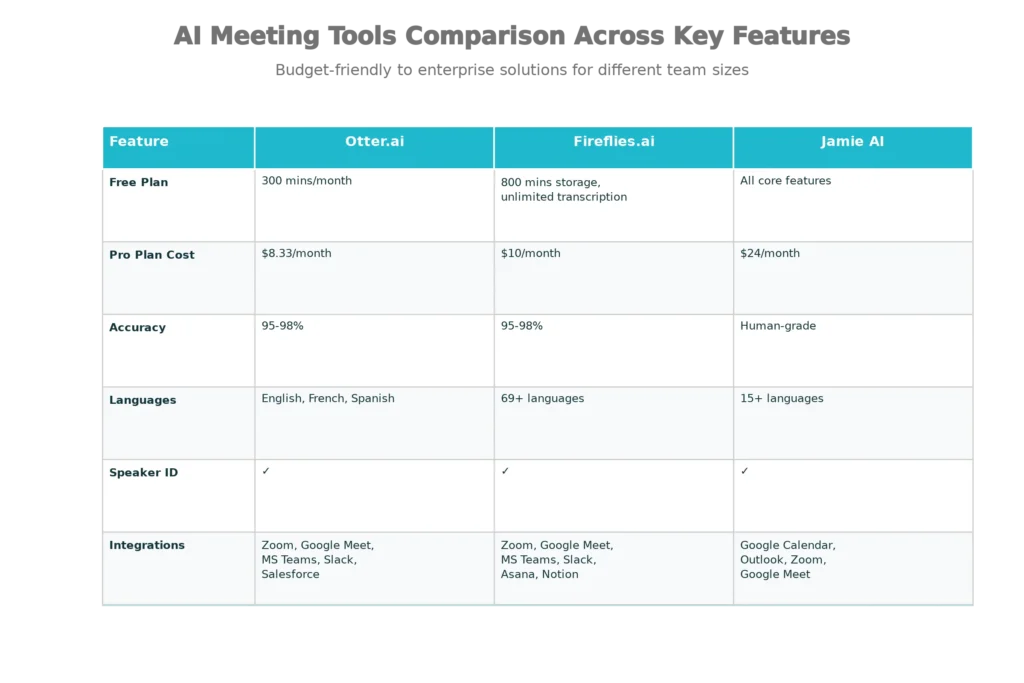
Otter.ai has emerged as one of the most trusted and widely-used AI meeting transcription tools for professionals seeking affordable, straightforward functionality. The platform records every word of conversations without requiring manual note-taking, making it particularly valuable for solo content creators, consultants, and small teams managing multiple client interactions.
Core Features and Functionality
Otter delivers real-time transcription that begins the moment a meeting starts. The platform automatically differentiates between speakers and tags each person’s name once trained, providing clear conversation context in multi-participant meetings. The system then uses AI to identify main points, highlight keywords, and create organized meeting summaries without requiring users to read through lengthy transcripts.
The platform integrates with your existing calendar tools, Zoom, Google Meet, Microsoft Teams, and numerous other applications, creating a seamless workflow. Once meetings conclude, Otter connects with CRMs like Salesforce and HubSpot, automatically logging notes, transcriptions, and call summaries while minimizing manual work.
Pricing Structure
Otter’s pricing begins with a free Basic plan offering 300 monthly transcription minutes with basic collaboration features. The Pro plan starts at $8.33/month per seat and includes 6,000 monthly transcription minutes, advanced search capabilities, and custom vocabulary. The Business plan at $20/month per seat adds team-level billing, user management, and enhanced security. Enterprise plans with custom pricing provide additional support, training, and integration capabilities.
Strengths and Ideal Use Cases
Otter excels for individuals and small teams prioritizing affordability without sacrificing core functionality. The platform’s strength lies in its straightforward feature set and competitive pricing. Solo professionals, freelancers, and small agencies benefit significantly from Otter’s real-time transcription and CRM integration capabilities.
The platform’s primary limitation involves its per-user pricing model, which can become expensive for larger teams. Additionally, lower-tier plans include limited monthly minutes, potentially requiring upgrade paths as usage increases.
2. Fireflies.ai: Best for Teams and Multilingual Organizations
Fireflies.ai represents a more comprehensive solution designed to maximize how teams capture, organize, and work with meeting conversations. Rather than simply transcribing meetings, Fireflies treats meeting data as a strategic organizational asset.
Core Features and Functionality
Fireflies automatically records and transcribes meetings without requiring manual setup for each conversation. The platform enables teams to search meeting transcripts using keywords, topics, or speaker names, with the ability to jump to exact timestamps within seconds—particularly valuable when retrieving specific discussion points from lengthy recordings.
The platform’s searchable meeting archive transforms meeting data into organizational knowledge. Teams can pull meeting recordings, sync notes with CRMs like Salesforce and HubSpot, and leverage automation rules to reduce manual follow-up work. The system supports 69+ languages, making it particularly valuable for internationally distributed teams.
Beyond transcription, Fireflies provides conversation analytics including monologue/dialogue ratios and talk-time metrics. These insights reveal communication patterns and engagement levels, enabling managers to identify who participated actively and who remained silent. Teams can collaborate on call notes, assign action items, and track completion directly within the platform.
Pricing Structure
Fireflies offers the most generous free plan among competitors, providing 800 minutes of storage per seat with unlimited transcription in 69+ languages and access to AskFred (their AI assistant). The Pro plan at $10/month per seat unlocks unlimited AI summaries, 8,000 minutes of storage, access to AI Apps, and a Tasks feature. The Business plan ($19/month per seat) adds unlimited storage and video capture capabilities. Enterprise plans starting at $39/month per seat include custom data retention, rules engines, and dedicated account management.
Strengths and Ideal Use Cases
Fireflies is particularly well-suited for medium and large teams valuing multilingual support and deep analytics. The platform’s unlimited transcription on the free plan represents exceptional value for organizations exploring AI meeting solutions without financial commitment. Teams managing complex projects requiring detailed conversation analysis and action item tracking benefit significantly from Fireflies’ comprehensive feature set.
The primary trade-off involves price-point differences at higher tiers. While Fireflies’ Pro plan ($10/month) undercuts Otter.ai’s ($8.33/month), the Business plan ($19/month) becomes more expensive than Otter’s equivalent tier.
3. Jamie AI: Best for Enterprise Teams and Organizations Prioritizing Privacy
Jamie represents a premium meeting assistant specifically designed for organizations requiring enterprise-level security, sophisticated functionality, and teams unwilling to compromise on data privacy. Unlike competitors that deploy bots joining meetings, Jamie operates without visible meeting participation.
Core Features and Functionality
Jamie joins meetings without requiring a virtual bot to visibly appear, preserving meeting atmosphere and reducing participant distraction. The platform provides real-time transcription with human-grade accuracy across 15+ languages, enabling distributed teams to collaborate effectively regardless of language barriers.
The system generates intelligent meeting notes automatically, capturing discussion context and extracting action items with precision. Jamie integrates with Google Calendar and Outlook, enabling the system to automatically join scheduled meetings without manual setup. Templates allow teams to standardize note formats across the organization, ensuring consistency and improving information retrieval.
Jamie’s standout feature involves its AI chatbot assistant sidebar, enabling participants to ask questions about meeting content in real-time. Rather than waiting until meetings conclude to review transcripts, team members can query the AI assistant immediately, making it particularly valuable for complex discussions requiring rapid information retrieval.
Pricing Structure
Jamie’s generous free plan includes all core advanced features including human-grade transcription, speaker identification, and AI chatbot access, allowing teams to thoroughly evaluate the product before committing to paid subscriptions. The Standard plan begins at €24/seat/month, unlocking additional meetings per month and more AI messages. The Pro plan (€47/seat/month) adds priority support and additional capacity. The Executive plan (€99/seat/month) provides unlimited usage with dedicated account management and customized onboarding.
Strengths and Ideal Use Cases
Jamie is ideally suited for enterprise organizations, regulated industries requiring audit trails, and teams prioritizing security alongside functionality. The comprehensive free plan enables organizations to pilot the platform across departments before full deployment. The absence of meeting bots makes Jamie particularly attractive for organizations concerned about participant privacy and meeting atmosphere preservation.
The primary consideration involves pricing. Jamie’s free plan is generous but premium plans begin higher than competitors, making the tool more suitable for organizations valuing security and privacy over cost optimization.
How AI Meeting Transcription Delivers Measurable Business Impact
The productivity improvements delivered by AI meeting assistants translate into concrete organizational benefits. Companies implementing AI meeting transcription experience a 25% reduction in meeting time by eliminating repetitive information sharing and enabling asynchronous participation through transcript review. For executives and knowledge workers spending 23+ hours weekly in meetings, recovering just 5+ hours per week creates substantial capacity for strategic work.
Meeting productivity increases by 30% when participants focus on engagement rather than note-taking. When teams know conversations are accurately transcribed and searchable, they ask better questions, contribute more substantively, and make higher-quality decisions. Searchable transcripts eliminate confusion about previous decisions, enabling rapid reference to past discussions.
Overall team productivity rises by 25% through cumulative effects including reduced administrative burden, improved information accessibility, and enhanced collaboration. Organizations report that 90% of AI users experience significant time savings, with 85% reporting that AI enables them to focus on their most important work.
These improvements compound for larger organizations. A research firm with five team members each saving four hours weekly reclaims 1,040 hours annually—equivalent to adding a half-time employee focused exclusively on analysis rather than transcription. These hours represent competitive advantage, enabling teams to pursue high-value activities including strategic planning, client relationship building, and innovation.
Security and Privacy Considerations
As organizations implement AI meeting assistants, security and privacy concerns must be addressed thoughtfully. A critical consideration involves how AI tools handle meeting data, particularly the interaction between AI systems and large language models (LLMs). Meeting transcripts must be transmitted to LLMs to generate summaries and insights, creating potential data exposure risks if not properly managed.
Leading AI meeting tools implement multiple security mechanisms. Tactiq, for example, maintains SOC-2 Type II attestation ensuring meeting data protection according to highest industry standards. The platform does not store audio from meetings—only real-time transcripts saved as text, minimizing data exposure surface.
Advanced tools enable users to pause and resume recordings during personal or confidential segments, preventing sensitive information from being captured. Post-meeting redaction capabilities allow users to remove specific information from recordings, transcripts, and summaries with permanent, visible deletions having both privacy and legal implications.
Permission automations establish rules governing who can access specific recordings. Organizations can create channels within recording libraries—for example, organization-wide channels for Town Halls alongside restricted channels for executive QBRs—ensuring appropriate access controls. Integration with existing security frameworks ensures compliance with data protection regulations including GDPR and HIPAA for healthcare organizations.
Implementation Best Practices
Successfully implementing AI meeting assistants requires thoughtful consideration beyond tool selection. Start with pilot programs enabling teams to evaluate tools before organization-wide deployment. Most leading platforms offer generous free trials or free plans supporting this evaluation approach.
Establish clear governance policies addressing recording consent, data retention periods, and access permissions. Different meeting types may require different retention approaches—board meetings might demand longer retention periods while routine team meetings may have shorter requirements.
Train participants on tool capabilities and limitations. Ensure team members understand that AI summaries serve as supplements to critical discussions rather than replacements for participation. Establishing norms around review and verification creates organizational confidence in AI-generated summaries.
Integrate tools with existing workflows rather than creating parallel systems. Connecting AI meeting platforms with CRMs, project management tools, and communication platforms creates seamless information flow, maximizing adoption and value extraction.
Monitor and measure impact using metrics including meeting time reduction, action item completion rates, and user satisfaction. These measures demonstrate ROI and identify optimization opportunities.
The Future of Meeting Intelligence
The AI meeting transcription market is experiencing explosive growth. The market is projected to grow from $3.86 billion in 2025 to $29.45 billion by 2034, representing a 25.62% compound annual growth rate. This expansion reflects remote work’s permanence and organizational recognition that nearly 60% of remote workers struggle with retaining information from virtual meetings.
Future evolution will likely emphasize advanced analytics including sentiment analysis, decision tracking, and predictive insights. Organizations will increasingly leverage meeting intelligence to identify communication patterns, track organizational decisions over time, and generate insights supporting strategic planning.
Multilingual capabilities will deepen, enabling truly global teams to collaborate seamlessly across language barriers. Real-time translation will evolve beyond simple transcription to nuanced cultural context translation, enabling better cross-cultural communication.
Integration with knowledge management systems will transform meeting data from ephemeral conversations into permanent organizational knowledge bases. Teams will query meeting histories across years, extracting organizational learning and decision precedents.
Conclusion
The shift from manual note-taking to AI-powered meeting assistance represents a fundamental transformation in how organizations work. Rather than balancing note-taking with participation, professionals can now engage fully in conversations while AI captures every detail. The three platforms examined—Otter.ai for affordability and simplicity, Fireflies.ai for team collaboration and multilingual support, and Jamie AI for enterprise security—provide distinct value propositions addressing different organizational needs.
The decision framework is straightforward: Choose Otter.ai for cost-conscious individuals and small teams, select Fireflies.ai for growing organizations prioritizing collaboration and international reach, and invest in Jamie AI for enterprises requiring maximum security and sophisticated functionality.
The productivity gains are undeniable. Reclaiming four-plus hours weekly for each team member compounds into substantial organizational capacity. When multiplied across entire organizations, AI meeting assistants deliver not just time savings but strategic advantage—enabling teams to focus on decision-making, innovation, and relationship-building rather than administrative documentation.
The question is no longer whether to adopt AI meeting transcription, but which platform aligns best with your organization’s priorities, scale, and security requirements. The tools are available, proven, and ready to transform how your organization captures institutional knowledge.
Read More:Resume Builders: I Let AI Rewrite My Resume: Here Are the Results (Best Free Resume Tools).
Source: K2Think.in — India’s AI Reasoning Insight Platform.