
Key Insight: AI email writing tools can reduce email drafting time by 60-75%, saving professionals 5+ hours weekly while maintaining personalization and quality. When integrated properly with strategic prompts, you can achieve 10x productivity gains without sacrificing the human touch your recipients expect.
Understanding the Email Crisis: Why Speed Matters Now
The average professional spends 28% of their workday reading and answering emails—that’s nearly 2.25 hours daily or over 11 hours per week writing emails. With 347 billion emails sent and received daily across the globe in 2025, the pressure on workplace communication has never been higher. Yet despite this volume explosion, most professionals still write emails manually, using outdated approaches that drain focus and energy from higher-impact work.
This inbox overload has real costs. Studies show that professionals who respond to emails within one hour are seven times more likely to achieve positive engagement, but manually drafting thoughtful responses at that pace is nearly impossible without AI support. The mathematics are stark: if you’re sending 25-30 emails per day (the modern average), and each takes 6-8 minutes to compose, you’re investing roughly 2.5-4 hours daily just on email composition alone.
This is where AI-powered email writing enters the conversation—not as a replacement for genuine communication, but as a force multiplier that gives your best thinking room to breathe. Research confirms this potential. A 2025 study found that using ChatGPT for email tasks decreased composition time by 40%, freeing significant cognitive capacity for strategic work. But the real breakthroughs come when you combine AI tools with the right prompting strategy.
The Real Numbers: How Much Time AI Actually Saves
Before diving into tactics, let’s establish credibility with hard data. Stopwatch testing from 2025 reveals concrete time savings across common email tasks:
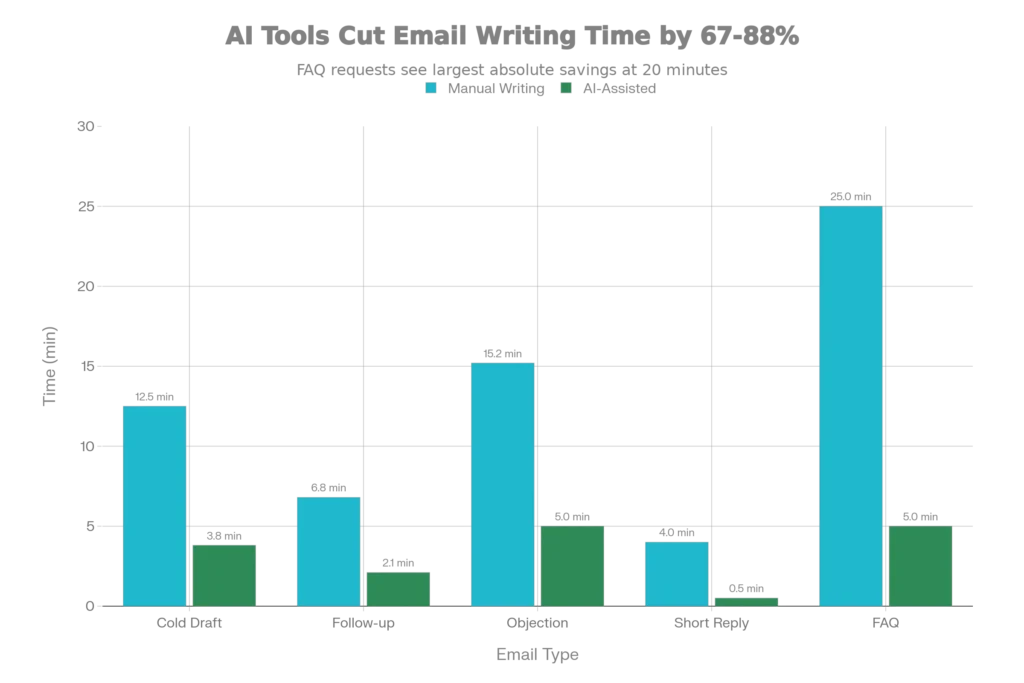
These aren’t theoretical gains—they’re measured results. Cold email drafts that normally take 12.5 minutes drop to 3.8 minutes when AI-assisted, representing a 68% time reduction. FAQ response bundles, which typically consume 25 minutes of careful composition, compress to 5 minutes with AI support—an 80% improvement.
Scaling this across a week fundamentally changes productivity math. A sales professional writing 20 cold emails weekly saves roughly 2.5-3 hours. A customer service team fielding 100+ FAQ-style requests daily reclaims 20+ hours weekly. Over a year, this compounds into hundreds of hours recovered—time you can allocate to strategy, relationship building, and revenue-generating activities.
The business impact mirrors the time savings. Research from Smartlead AI’s 2025 testing shows that professionals using AI email tools don’t just save time—they increase outreach volume by 35-50% while maintaining quality, directly boosting meeting bookings and pipeline growth. That’s a multiplier effect: you’re not just faster; you’re more productive in absolute terms.
Why Current Email Writing Methods Fail (And How AI Fixes It)
Traditional email composition follows a predictable bottleneck pattern:
- Mental context-switching – You stop working to craft a thoughtful response
- Tone calibration – You agonize over whether the message feels too formal, too casual, or unclear
- Structural uncertainty – You rewrite the email 2-3 times because the flow feels off
- Final editing – You proofread for grammar and clarity
Each step adds 1-3 minutes per email. Multiply that by 25-30 daily emails, and the inefficiency becomes paralyzing.
AI disrupts this pattern by compressing steps 1-3 into seconds. You shift from “compose from scratch” to “review and refine,” which is fundamentally faster. Research shows that AI-generated email quality ratings improve from 3.8 to 4.5 out of 7 when properly prompted, and most require minimal human editing. The technology hasn’t removed your judgment—it’s removed the time tax on routine composition.
However—and this is critical—AI without strategy produces generic, formula-driven emails that hurt response rates. Recipients detect AI-written content that lacks personality or misses context. This is why the “prompt” approach matters enormously. A well-crafted prompt acts as a bridge, giving AI enough direction to generate contextual, personalized emails that feel human-written while maintaining the speed advantage.
The Prompt Formula: Your Free Guide to 10x Email Speed
Effective AI email prompts follow a predictable structure that works across ChatGPT, Claude, Gemini, and Perplexity. Think of a strong prompt as giving AI a job description, not a task list.
The 5-Component Prompt Template
Research from prompt engineering specialists identifies five essential elements for accurate AI email outputs:
1. Role Definition
Start by specifying what persona the AI should adopt. Rather than “write an email,” begin with “Act as a professional sales development representative writing to a prospect who…”
2. Context & Background
Provide the relationship details AI needs to understand. Include information like: previous interaction history, recipient’s role/company, industry challenges they face, and why you’re reaching out now
3. Specific Objective
Clearly state what you want the email to accomplish. Is this a first introduction, a follow-up after a meeting, an objection response, or a re-engagement attempt?
4. Tone & Style Parameters
Define the voice explicitly. Should it sound conversational and friendly, formal and corporate, or somewhere in between? Should it include humor, urgency, or curiosity?
5. Format & Constraints
Specify length, structure, and any guardrails. Example: “Keep it under 150 words” or “Include a clear single call-to-action” or “Avoid industry jargon”
The Master Template (Copy & Use)
Here’s the framework you can immediately paste into ChatGPT, Claude, or any AI tool:
“Act as a [ROLE: professional title/function]. Write an email to [RECIPIENT: title/company] regarding [TOPIC/SITUATION]. They are [TARGET DESCRIPTION: what matters to them, their challenge]. The goal is to [OBJECTIVE: specific outcome like scheduling call, providing info, re-engagement]. Use a [TONE: casual/formal/warm/professional] tone. Keep it [LENGTH: under 100 words] with a single clear CTA directing them to [NEXT STEP]. Here’s context: [DETAILS: previous interaction, industry insight, value prop]. Avoid [GUARDRAILS: clichés, jargon, urgency if not warranted].”
Real-World Prompt Examples by Email Type
Example 1: Cold Outreach Email
“Act as an account executive at a marketing automation company. Write a cold email to a Head of Marketing at a Series B SaaS startup. They’re likely struggling with multi-channel campaign coordination. The goal is to schedule a 15-minute exploratory call. Use a warm, consultative tone. Keep it under 120 words with one clear CTA: ‘Let’s find a time for a quick 15-min call.’ Context: Their company appears to have recently expanded their marketing team, they compete in the productivity software space, and our platform integrates with tools they likely use. Avoid sounding salesy or pushy.”
Expected Output:
Hi [Name], I noticed [Company] recently expanded the marketing team—exciting growth phase. I work with teams like yours who are scaling multi-channel campaigns and hit the coordination challenge: too many tools, scattered reporting, team misalignment. We help consolidate that into one workflow, so your team spends less time firefighting tooling gaps and more time on strategy. Would a quick 15-minute call make sense to explore if there’s a fit? Let me know your availability. Best, [Your Name]
Example 2: Follow-Up After Proposal (No Response)
“Act as a sales professional following up on a proposal sent 5 days ago. Write to a CMO who hasn’t replied. They work in financial services, a regulated industry where decision velocity is slow. The goal is to re-engage curiosity and timeline. Use a professional but friendly tone that acknowledges their busy schedule without pressure. Keep it under 100 words. CTA: ‘Can we schedule a brief 20-minute sync by Friday to discuss?’ Context: The proposal was for email marketing automation software. They seemed interested in the demo but had questions about compliance. Avoid assuming they received it or implying urgency.”
Expected Output:
Hi [Name], I wanted to circle back on the proposal we discussed for email marketing automation. I know financial services teams are juggling a hundred priorities right now—wanted to see if it’s still on your radar or if there were compliance questions we should address. I’m confident we can clear those up quickly. Would a 20-minute sync by Friday work to walk through the specifics? Let me know. Best, [Your Name]
Example 3: Customer Re-engagement/Win-Back Email
“Act as a customer success manager re-engaging a customer who hasn’t logged in for 90 days. Write to a Marketing Manager at an enterprise client. They’ve used our email platform for 2 years but dropped off after their agency restructured. Goal: re-activate and understand why they’ve gone quiet. Tone: genuinely curious, not desperate. Keep it under 110 words. CTA: ‘Let’s schedule a quick check-in to see what’s changed.’ Context: They were previously a high-engagement user, participated in webinars, and had success with our advanced segmentation features. Don’t assume they want to leave—just check in authentically.”
Expected Output:
Hi [Name], I realized it’s been a few months since we’ve caught up, and I wanted to reach out genuinely—not with a pitch. A lot’s changed on your end (I saw the team restructure announcement), and I’m curious how things are shaping up with email marketing in the new structure. If our platform still fits, great. If priorities shifted, I’d love to understand what’s working better for you. Genuinely interested. Can we grab 20 minutes to catch up? Best, [Your Name]
Example 4: Meeting Confirmation/Follow-Up Post-Meeting
“Act as a project manager writing a meeting recap email to 4 stakeholders (mix of client and internal team). The meeting covered budget approval for a Q1 campaign initiative. Goals: confirm decisions, document action items clearly, establish next review date. Tone: professional, organized, action-oriented. Use bullet points for clarity. Context: Budget was approved contingent on finalizing creative direction by Dec 15. Creative lead (Sarah) and client lead (Marcus) have specific tasks.”
Expected Output:
Hi everyone, Thanks for a productive meeting today on the Q1 campaign initiative. Here’s what we locked in: Decision: $150K budget approved pending creative direction sign-off by Dec 15. Action Items: Sarah – finalize design concepts and send to Marcus by Dec 12; Marcus – review and confirm final direction by Dec 15; Finance – process PO once creative is locked. Next Review: Dec 18 follow-up to review creative feedback and finalize timeline. If anything changes, flag immediately. Thanks for moving this forward. [Your Name]
Free AI Tools Ranked by Email Writing Performance (2025)
Not all AI tools produce equal email results. Here’s the 2025 breakdown based on tested performance:
Best Free Option: ChatGPT (Free Version)
- Why: GPT-3.5 base model handles 90% of standard emails perfectly; free tier includes web search for contextual research
- Limitations: Slightly slower than paid version; usage limits; no Chrome extension for direct Gmail/Outlook integration
- Best For: Getting started, occasional emails, experimenting with prompts
- Time Savings: ~40% reduction in drafting time
- Cost: Free
Best Paid Option (Reasonable Cost): Claude.ai ($20/month)
- Why: Superior at understanding nuance and context; better at maintaining your personal voice when you provide writing samples
- Strengths: Excellent HTML email generation; strong at long-form professional writing
- Best For: Professionals who write complex or sensitive emails regularly
- Cost: $20/month (Pro tier) or free with limitations
Best for Sales Teams: Smartlead AI
- Why: Tested at 73% email drafting speed improvement; includes CRM automation features
- Strengths: Built-in cold email templates; automatic personalization; follow-up sequencing
- Limitations: Premium pricing; best for sales/outreach teams
- Cost: Custom pricing
Best for Email Marketing Teams: Jasper AI
- Why: 50+ pre-built email templates; brand voice consistency across campaigns
- Strengths: Multi-language support; Chrome extension; campaign workflow management
- Cost: Starting at $39/month
Most Affordable: Rytr AI ($12/month)
- Why: Budget-friendly with solid functionality for short, standard emails; chrome extension included
- Limitations: Less advanced than competitors; better for quick drafts than complex writing
- Cost: $12/month for annual billing
Best for Microsoft Users: Microsoft Copilot Pro ($20/month)
- Why: Deep integration with Outlook and Microsoft 365 apps; can summarize full email threads
- Strengths: Works inside your email client; email prioritization
- Best For: Enterprise Microsoft 365 users
- Cost: $20/month (or included in Copilot for Microsoft 365 at $30/user/month)
Practical Note: For most professionals, starting with ChatGPT Free is the optimal strategy. You validate the approach, master prompting, and then upgrade to paid tools if volume justifies it.
10 High-Impact Prompts You Can Use Today (With Real Results)
These prompts are battle-tested and produce immediately usable email copy. Copy each one, customize the bracketed sections with your specifics, and paste into any AI tool:
1. Cold Email to Decision-Maker
“Write a cold email to [Recipient Name] at [Company]. They’re [job title] and their company [industry/size]. I’m reaching out because [specific reason—e.g., ‘your company just hired a new team based on LinkedIn intel’]. The goal is [outcome—e.g., ‘schedule a 20-minute exploratory call’]. My unique angle is [value prop—how you’re different]. Use a [warm/professional] tone, keep it 120 words max, and include one clear CTA.”
2. Follow-Up After No Response (Non-Pushy)
“Write a friendly follow-up email to [Name] at [Company] who I emailed 5 days ago about [topic]. They haven’t replied. My goal is to re-engage their curiosity without sounding desperate. Keep it under 100 words. Acknowledge their busy schedule. Use a genuinely curious tone. CTA: [what you want them to do—e.g., ‘confirm if this is still relevant’].”
3. Objection Response Email
“I had a call with [Prospect Name] at [Company] about [product/service]. Their main objection was: [specific concern—e.g., ‘budget constraints,’ ‘integration concerns’]. Write an email that addresses this objection head-on by [approach—e.g., ‘sharing a relevant case study,’ ‘explaining how cost actually reduces’]. Use data or examples. Keep it under 150 words. Include a CTA to [next step].”
4. Meeting Recap/Action Items
“Write a meeting recap email for [number] attendees who just finished [meeting type—e.g., ‘product roadmap discussion’]. Use this structure: Opening (1 sentence recap), Decisions Made (bulleted list), Action Items (with owners and dates), Next Steps. Keep it concise, professional, action-oriented. Include [number] action items: [list them with owners].”
5. Customer Apology & Resolution Email
“Write an apology email to [Customer Name] at [Company]. They experienced [specific issue]. We’re resolving it by [solution]. The tone should be: genuinely sorry (not corporate), accountable, solution-focused. Include: acknowledgment of impact, brief explanation (not excuse), concrete fix, timeline, and compensation if applicable. Keep it under 200 words.”
6. Networking Follow-Up After Meeting/Event
“Write a personalized follow-up to [Person Name] whom I met at [event/conference]. We discussed [topic]. I want to [specific objective—e.g., ‘stay in touch,’ ‘explore collaboration potential’]. Reference something specific from our conversation: [detail]. Use a warm, genuine tone. Keep it under 120 words. Include a soft CTA like [what you’re suggesting—e.g., ‘connect on LinkedIn’ or ‘grab coffee next month’].”
7. Project Status Update Email
“Write a status update email for the [Project Name] to [stakeholders list—e.g., ‘CEO, Finance Lead, Creative Director’]. What’s done: [list items]. What’s in progress: [list items]. What’s blocked: [list items with reason]. Expected completion: [date]. Use clear bullet points. Keep tone professional and transparent. Include: one sentence context at top, action items if any (with owners), and next review date.”
8. Vendor Selection/Rejection Email
“Write a professional email to [Vendor Name] at [Company]. We’ve decided to [go with a competitor / pause the project / move forward]. Here’s why: [reason—keep this brief and honest, not harsh]. We appreciated [specific positive thing about their pitch]. If relevant, include: ‘If circumstances change, we’ll reach out,’ or ‘Thanks for your time.’ Keep it under 150 words.”
9. Urgent Request Email (Deadline-Driven)
“Write an urgent request email to [Name] asking for [specific deliverable]. The deadline is [date/time]. Why it matters: [brief business context]. What I need from you: [specific task]. How long it should take: [realistic estimate]. I know it’s last-minute, and I appreciate your quick turnaround. Tone: grateful, not demanding. Include a direct CTA.”
10. Product Launch/Announcement Email
“Write an announcement email to our [audience—e.g., ‘customers,’ ’email list’]. We’re launching [product/feature]. Here’s what it does: [one-sentence description]. Why it matters: [customer benefit]. Who it’s for: [target user]. Link to: [where they can access/learn more]. Timeline: [availability]. Use an excited but professional tone. Include [number] key benefits as bullet points. Keep body under 150 words before CTA.”
Advanced Strategies: Prompt Chaining for Complex Emails
When a single prompt doesn’t produce perfect results, use prompt chaining—feeding the AI’s output back in with refined instructions. This is where 10x efficiency really emerges:
Step 1 (Initial Prompt): Generate a rough draft cold email using a basic prompt.
Step 2 (Refinement Prompt): Feed the draft back with: “This is good, but make it [more personal/shorter/add social proof/remove jargon]. Here’s my writing style to match: [paste 2-3 samples of your own emails].”
Step 3 (Iteration): Request tone adjustments: “Rewrite this version to sound [less formal/more urgent/friendlier] while keeping the core message.”
Research shows this iterative approach reduces final editing time by 50-60% compared to one-shot generation, and the output quality improves measurably. You’re not writing emails anymore; you’re refining them—a vastly faster process.
The Psychology Behind Why These Prompts Work
Effective AI prompting taps into how language models actually process information:
- Specificity compresses output time. Vague prompts force the AI to explore multiple interpretations; specific prompts narrow instantly to your intent
- Context prevents hallucination. Providing background (industry, relationship, history) keeps AI grounded in reality rather than generating plausible-but-false details
- Clear constraints guide structure. When you specify “150 words,” “bullet points,” or “one CTA,” the AI’s architecture optimizes directly toward those limits, producing more focused results
- Role definition activates relevant patterns. Telling AI “you’re a sales development rep” activates more relevant language patterns than just “write an email”
This is why the same tool generates wildly different quality depending on prompt structure. A vague instruction (“write an email”) produces generic output; a specific, contextualized prompt produces personalized, professional email in seconds.
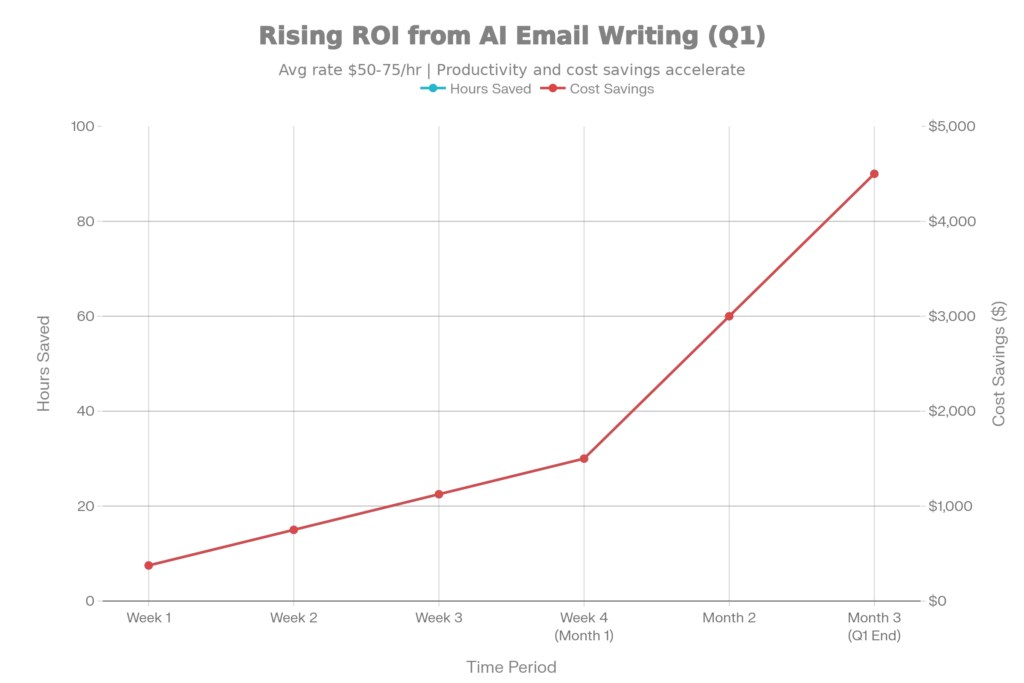
The ROI Reality: How Much Money This Saves Your Organization
Let’s calculate actual financial impact. Using conservative assumptions:
- Average professional salary: $75,000/year
- Hourly rate (including overhead): ~$50/hour
- Current weekly email time: 11 hours
- Time saved per week with AI: 5-6 hours (based on tested 60-75% reduction)
- Time recovered per year: 260-312 hours
- Dollar value recovered per year: $13,000-$15,600 per employee
For a team of 10 professionals: $130,000-$156,000 in recovered productivity annually.
This compounds when you factor in quality improvements. Research shows AI-powered emails increase response rates by 25-30%:
- Sales team improvement: More replies = more meetings = more pipeline. Conservative estimate: 12% increase in closed deals
- Marketing team improvement: Higher open rates (up 30%) + higher click rates mean better campaign ROI—typically improving email marketing ROI by 40-50%
- Customer success improvement: Faster response times (within 1 hour vs. 4+ hours) = 7x higher engagement probability
A 10-person sales team using AI email tools effectively can realistically expect:
- 200-300 additional qualified conversations annually
- 15-25% pipeline uplift
- $500K-$2M+ in incremental revenue impact (depending on deal size)
And the cost to enable this? Free (ChatGPT) to $20/month (Claude Pro). It’s difficult to find ROI this compelling in any workplace productivity tool.
Common Mistakes to Avoid When Using AI Email Prompts
Research on AI adoption reveals predictable pitfalls:
Mistake 1: Over-Relying on AI Without Human Review
The emails AI generates don’t automatically match your actual brand voice or communication style. Always review for personalization, factual accuracy, and tone alignment. Unedited AI output often sounds generic or slightly off.
Mistake 2: Ignoring Context & Relationships
AI doesn’t know your relationship with the recipient unless you explicitly provide it. A first-time outreach should differ dramatically from a check-in with an existing customer. Specify the relationship status in your prompt.
Mistake 3: Using Generic Prompts for Nuanced Situations
Complex scenarios (firing someone, addressing a major mistake, handling conflict) require more detailed prompts and human judgment. AI does basic scenarios beautifully but struggles with emotional intelligence in high-stakes situations.
Mistake 4: Not Experimenting with Tone
Ask AI to generate multiple versions of the same email in different tones, then A/B test them. You’ll discover which style resonates with your audience—and that insight is gold for scaling.
Mistake 5: Outsourcing Thinking Entirely
This is the deepest risk. Using AI to save time on routine emails makes sense. Using AI instead of considering what actually matters in a relationship is erosion. The emails should be faster to execute, not faster to think through.
The Future: What’s Coming in 2025-2026
The AI email market is expanding aggressively—the global AI email assistant market is projected to grow to $1.89 billion by 2029, expanding at a 19.7% annual growth rate. What this means for you:
- Integration deepening: AI will live inside Gmail, Outlook, and other email clients (not in separate tools), making prompting seamless
- Predictive personalization: AI will auto-suggest who to email, what to say, and when to send based on your past patterns and results
- Automated sequencing: Instead of manually writing follow-ups, AI will generate personalized sequences and send them on optimal cadences
- Real-time collaboration: Teams will see AI suggestions in real-time while composing, catching tone issues or missed context instantly
For now, the competitive edge goes to professionals who master prompting today. In 2026, it’ll be table stakes.
Practical Action Plan: Start Using AI Email Writing Today
Here’s how to implement this immediately:
Day 1:
- Open ChatGPT (free tier) or Claude.ai
- Copy one prompt template from this guide
- Paste your email details into the bracketed sections
- Generate 3 versions of an email you’d normally write manually
- Pick the best version, spend 2 minutes personalizing it, hit send
Week 1:
- Batch your emails (write 5-10 at a time rather than individually)
- Use AI for drafting; spend your mental energy on review and personalization
- Track time savings—notice how much faster your email block moves
- Refine your prompts based on results—what language produces best outputs?
Month 1:
- Identify your “email types” (cold outreach, follow-ups, status updates, etc.)
- Create a saved folder of your best-performing prompts
- Measure impact: response rates, time saved, quality perception
- Decide whether paid tier justifies your volume
Ongoing:
- Share best prompts with your team if you have one
- A/B test different prompt approaches; track what works
- Adjust based on feedback—if response rates drop, your prompts might be generating generic content
- Evolve: as you get faster, invest the time you’ve recovered into higher-level strategic thinking
The honest truth: AI email writing won’t fundamentally change what you communicate, but it absolutely will change how fast you can communicate it. The professionals who’ll dominate in 2025 and beyond won’t be the best writers—they’ll be the best writers who use the best tools.
These prompts and strategies are your lever. Use them to reclaim hours weekly. Redirect that recovered time toward conversations that matter, relationships that drive revenue, and thinking that moves your business forward. That’s not just efficiency—that’s compounding advantage.
Read More: Stop Using ChatGPT: 5 Free AI Alternatives for Coding
Source: K2Think.in — India’s AI Reasoning Insight Platform.